In iOS 16, Apple has added some major updates to the Messages app, introducing some features that rival third-party messaging platforms have had for years. One of these changes is the ability to edit iMessages in iOS 16. Keep reading to learn how it works.
Almost everyone with a smartphone can relate to the situation where you send a text message only to immediately realize that the meaning of the message is unintended because of an innocent typo. The problem with Apple's iMessage service is that in previous versions of iOS, once the message was sent, there was nothing you could do about it.
That's not the case in iOS 16. For the first time, Apple lets you edit a message up to a maximum of 15 minutes after it was sent.
But before you use the edit function outlined below, there are some caveats to the feature that you should be aware of. First, it only works with iMessages, not SMS messages, so both people need to have an iPhone for it to work effectively.
Second, using the message editing feature requires participants to be using Apple's latest software updates, including iOS 16, iPadOS 16, macOS Ventura, and watchOS 9. People on an earlier version of iOS or those on Android will see text that says "Edited to [text]" when receiving an edited iMessage.
Third, and perhaps most importantly for some, when you edit a message, the edit history is sent to the recipient along with the edit, so the original content is visible. Recipients of an edited message can tap on the small blue "Edited" label to see the edit history, and hide it again by tapping on Hide Edits.
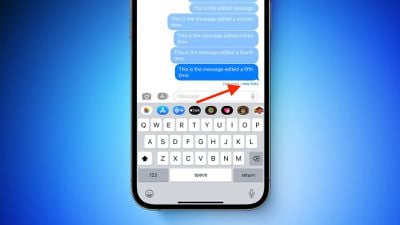
With all of that in mind, here's how you edit a sent iMessage on an iPhone or iPad running iOS 16 or iPadOS 16.
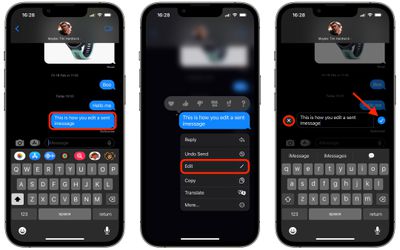
- In the Messages app, open the chat thread containing the sent message that you want to edit.
- Long press the sent message that you want to fix. (If you don't see the option, the message was sent over 15 minutes ago and you cannot edit it.)
- Tap Edit from the pop-over menu.
- Make your desired changes, then tap the blue tick on the right to confirm. If you decide you don't want to edit the message, tap the grey X on the left.
That's all there is to it. Did you know that you can also unsend iMessages in iOS 16? Check out our dedicated how-to to learn how.