If you've installed iOS 16 or iPadOS 16 through Apple's developer program, you may decide you want to downgrade because of usability or stability issues. Keep reading to learn how it's done.
Apple's beta versions of its major software updates can be notoriously buggy, especially the early releases. You may find apps not working properly, poor battery life, device crashes, and features that don't do what they're supposed to. Fortunately, you can restore your iPhone or iPad to the previous version of iOS.
If you made an archived backup before you installed the beta, you can remove the iOS 16 beta and restore the backup. If you didn't make a backup, you can still downgrade, but you won't be able to restore your device to its original state before you upgraded.
Also, if you've installed watchOS 9 on your Apple Watch, it's important to note that you won't be able to use it with your iPhone once you've gone back to iOS 15. And downgrading an Apple Watch to a previous version of watchOS can't be done manually either – if you want to remove watchOS 9, you'll have to send your watch in to Apple.
How to Downgrade from iOS 16 or iPadOS 16
- Launch Finder on your Mac.
- Connect your iPhone or iPad to your Mac using a Lightning cable.
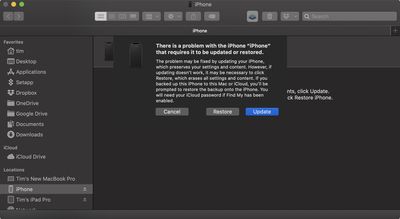
- Put your device into recovery mode. The method of doing this depends on your device, so check the list below these steps to find your model. Apple also provides more information on Recovery mode in this support article.

- A dialog will pop up asking if you want to restore your device. Click Restore to wipe your device and install the latest public release of iOS or iPadOS.
- Wait while the restore process completes.
How to Enter Recovery Mode on Your iOS Device
- iPad models with Face ID: Press and quickly release the Volume Up button. Press and quickly release the Volume Down button. Press and hold the Top button until your device begins to restart. Continue holding the Top button until your device goes into recovery mode.
- iPhone 8 or later: Press and quickly release the Volume Up button. Press and quickly release the Volume Down button. Then, press and hold the Side button until you see the recovery mode screen.
One you've followed the above steps, you can restore a backup of your device from iOS 15 or iPadOS 15 using your Mac or iCloud.