In macOS, transparency – or more properly, translucency – is a visual effect many apps use to create a sense of depth by hinting at content residing in the background.
how to disable transparency in macos 00
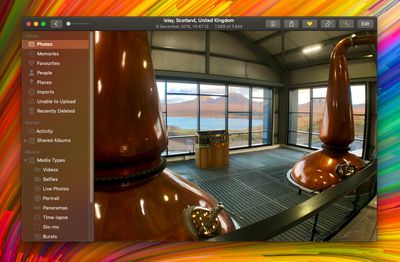
An example of transparency is when content behind a window shows through in interface elements like menus and sidebars. It's evident in the screenshot above, for example, in which the colors of the desktop wallpaper bleed through the sidebar in the Photos app.

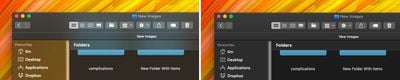
A similar effect is sometimes used within app interface elements that are windowed, allowing window content to show through other elements like toolbars. An instance of this can be seen below, where the folders are visible through Finder's toolbar as if through frosted glass.
how to disable transparency in macos 000

Transparency enabled (left); transparency disabled

The effect can look cool, but it can also be distracting if you're trying to focus on content, especially if you're editing photos. Fortunately, macOS lets you turn off transparency, but the way to do it isn't immediately obvious. The following steps show you how.

How to Disable Transparency in macOS Mojave

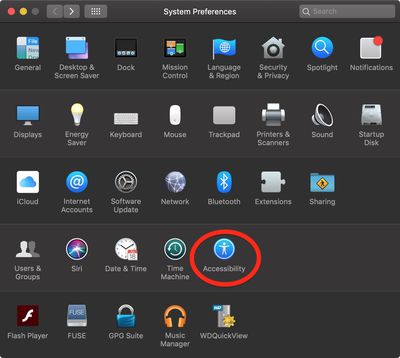
  1. Launch System Preferences from your Mac's Dock, from the Applications folder, or from the Apple menu bar ( -> System Preferences...).
    how to disable transparency in macos 01

  2. Select the Accessibility preference pane.
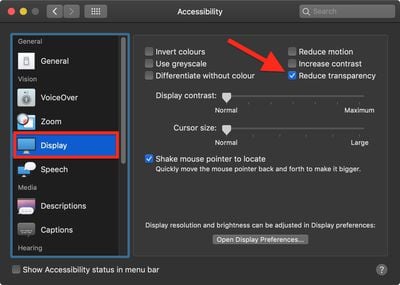
  3. In the sidebar, under Vision, click Display.
    how to disable transparency in macos 02

  4. Check the box next to Reduce transparency.
Related Forum: macOS Mojave

Top Rated Comments

martyjmclean Avatar
93 months ago
Setting your Accent Colour to Greyscale also turns off wallpaper window tinting. Another tip to increase legibility.
[doublepost=1544791052][/doublepost]
Does this save resources at all? I used to do this on my iphones back in the day thinking I saved CPU cycles and ram.
None of this makes any difference on modern computers.
Score: 5 Votes (Like | Disagree)
martyjmclean Avatar
93 months ago
There's no accent color called "Greyscale". It's called "Graphite".
You still knew which colour I was talking about.
I hope you realize that's an issue with whatever third-party browser and/or theme you're using.
I hope you realise they were being sarcastic.

Stop being obtusely fastidious.
Score: 2 Votes (Like | Disagree)
BigMcGuire Avatar
93 months ago
I still do this on my iPhone XR (started with the iPhone 5 and iOS 7). It’s less about resources at this stage, and more that I’ve come to prefer low transparency and reduced motion.
Same here! I thought I was the only one that did this. I am so happy to have found Reduced Motion for my MacBook thanks to this article, all these years I had no clue it existed (same for transparency for Mac OS). I've used both since my 6+ iPhone and prefer it.
Score: 2 Votes (Like | Disagree)
edrozenberg Avatar
93 months ago
Setting your Accent Colour to Greyscale also turns off wallpaper window tinting. Another tip to increase legibility.
[doublepost=1544791052][/doublepost]
Recent betas remove the window tinting when using any accent color with reduce transparency enabled (I'm on 10.14.3 Beta (18D21c)). This is great. Tinting still remains in the dock, notification center, and alerts - no big deal, window tinting was the one that was really annoying.
Score: 2 Votes (Like | Disagree)
2499723 Avatar
93 months ago
Does this save resources at all? I used to do this on my iphones back in the day thinking I saved CPU cycles and ram.
I still do this on my iPhone XR (started with the iPhone 5 and iOS 7). It’s less about resources at this stage, and more that I’ve come to prefer low transparency and reduced motion.
Score: 2 Votes (Like | Disagree)
jbarley Avatar
93 months ago
Really wish I could get rid of this dropdown menu transparency, it's almost a deal breaker for me.


Attachment Image
Score: 1 Votes (Like | Disagree)

Popular Stories

Aston Martin CarPlay Ultra Screen

Apple's CarPlay Ultra to Expand to These Vehicle Brands Later This Year

Sunday February 1, 2026 10:08 am PST by
Last year, Apple launched CarPlay Ultra, the long-awaited next-generation version of its CarPlay software system for vehicles. Nearly nine months later, CarPlay Ultra is still limited to Aston Martin's latest luxury vehicles, but that should change fairly soon. In May 2025, Apple said many other vehicle brands planned to offer CarPlay Ultra, including Hyundai, Kia, and Genesis. In his Powe...
iOS 26

iOS 26.3 and iOS 26.4 Will Add These New Features to Your iPhone

Tuesday February 3, 2026 7:47 am PST by
We are still waiting for the iOS 26.3 Release Candidate to come out, so the first iOS 26.4 beta is likely still at least a week or two away. Following beta testing, iOS 26.4 will likely be released to the general public in March or April. Below, we have recapped known or rumored iOS 26.3 and iOS 26.4 features so far. iOS 26.3 iPhone to Android Transfer Tool iOS 26.3 makes it easier...
Apple Logo Black

Apple's Next Launch is 'Imminent'

Sunday February 1, 2026 12:31 pm PST by
The calendar has turned to February, and a new report indicates that Apple's next product launch is "imminent," in the form of new MacBook Pro models. "All signs point to an imminent launch of next-generation MacBook Pros that retain the current form factor but deliver faster chips," Bloomberg's Mark Gurman said on Sunday. "I'm told the new models — code-named J714 and J716 — are slated...
Apple MacBook Pro M4 hero

New MacBook Pros Reportedly Launching Alongside macOS 26.3

Sunday February 1, 2026 5:42 am PST by
Apple is planning to launch new MacBook Pro models with M5 Pro and M5 Max chips alongside macOS 26.3, according to Bloomberg's Mark Gurman. "Apple's faster MacBook Pros are planned for the macOS 26.3 release cycle," wrote Gurman, in his Power On newsletter today. "I'm told the new models — code-named J714 and J716 — are slated for the macOS 26.3 software cycle, which runs from...
iOS 26 Home Feature

Apple Gives Final Warning to Home App Users

Tuesday February 3, 2026 8:55 am PST by
In 2022, Apple introduced a new Apple Home architecture that is "more reliable and efficient," and the deadline to upgrade and avoid issues is fast approaching. In an email this week, Apple gave customers a final reminder to upgrade their Home app by February 10, 2026. Apple says users who do not upgrade may experience issues with accessories and automations, or lose access to their smart...