

macOS: How to Disable Apple Mail URL Link Previews - MacRumorsOpen MenuShow RoundupsShow Forums menuVisit ForumsOpen Sidebar
Skip to Content

macOS: How to Disable Apple Mail URL Link Previews

by

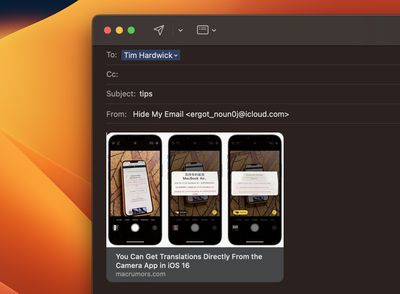
In macOS Ventura, Apple's Mail app automatically adds a rich link preview in your email when you paste in a web address. Keep reading to learn how to disable them.
rich links mail
When you paste a web link into a Mail message in macOS Monterey, only the web address is shown in the message content, providing the recipient with no information about what's being linked to beyond what's included in the URL.

By contrast, macOS Ventura inserts rich link previews in emails. Link previews convert the web address into a visual snapshot of the linked content, so recipients can see what's on the other side of the link before choosing to click it.

If you prefer not to include a link preview in your email when sharing a link, here are a couple of simple ways to avoid them.

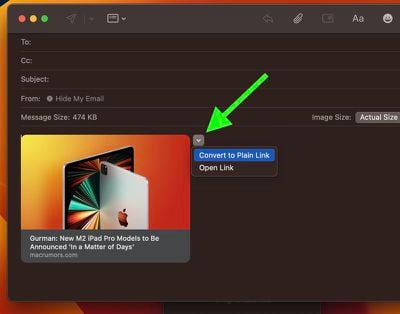
One way of removing the link preview is to paste the URL directly into the body of the email and then click the small chevron at the top-right corner of the preview. This will display a dropdown menu that includes an option to Convert to Plain Link. Click that, and the preview will disappear leaving just the URL address.
mail
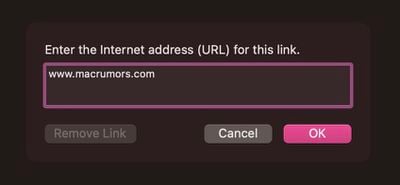
Alternatively, instead of pasting the link into the body of your email, click Edit in the Mail app's menu bar and select Add Link.... This opens a dialog with an input field where you can enter your link.
mail
After clicking OK, the link will appear in your email without the preview. You can also access this option using the keyboard shortcut Command-K.


Popular Stories

Apple Event Logo

Apple Just Released a New Accessory

Monday May 4, 2026 8:13 am PDT by
Apple today released a new Pride Edition Sport Loop for the Apple Watch. The band features a rainbow design with 11 colors of woven nylon yarns. The new Pride Edition Sport Loop is available to order now on Apple.com and in the Apple Store app in 40mm, 42mm, and 46mm sizes, and it will be available at Apple Store locations starting later this week. In the U.S., the band costs $49. There...
iOS 27 on iPhone 17 1

iOS 27 Will Add These New Features to Your iPhone

Saturday May 2, 2026 8:43 am PDT by
Apple is expected to unveil iOS 27 during its WWDC 2026 keynote on June 8, and there are already many rumored features and changes for iPhones. The first developer beta of iOS 27 will likely be available immediately following the keynote, and a public beta typically follows in July. Following beta testing, the software update should be released to all users with a compatible iPhone in...
Apple Announces 2026 Pride Band Watch Face and iPhone Wallpaper Article 2

iOS 26.5 Coming Soon With These New Features

Monday May 4, 2026 8:40 am PDT by
iOS 26.5 is expected to be released next week, following more than a month of beta testing. The update is relatively minor, but there are a couple of new features and changes across the operating system that we have recapped below. iOS 26.5 lays the groundwork for end-to-end encryption for RCS in the Messages app and ads in the Apple Maps app, and it will include a new Pride wallpaper and a...
Related Apple News: Technology | Reviews | Culture | Lifestyle | Mac















