macOS: How to Automatically Dim Videos Containing Flashes of Light - MacRumorsOpen MenuShow RoundupsShow Forums menuVisit ForumsOpen Sidebar
Skip to Content

macOS: How to Automatically Dim Videos Containing Flashes of Light

by

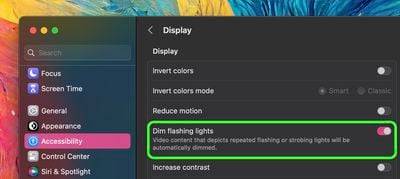
In macOS Ventura 13.3, Apple has added an accessibility option that dims video when flashes of light or strobe effects are detected. Here's how to enable the feature on your device.
apple logo backlit mac
When watching video on your Mac, there may be times when the content includes rapid flashes of light or stroboscopic effects. In such cases, a key concern is user safety.

Some people with photo-sensitive epilepsy can be affected by strobing light, which may induce seizure. The effect can also produce undesirable sensations amongst the general population, such as disturbed vision.

With this in mind, Apple has added a new option in its accessibility feature set that can automatically reduce the brightness of video if it includes triggering light effects.

The following steps show you how to enable the feature. Note that you must have macOS 13.3 installed on your device to see the option. You can check that your Mac is up-to-date by going to System Settings -> General -> Software Update.

  1. Click the Apple symbol () in your Mac's menu bar and select System Settings... in the dropdown menu.
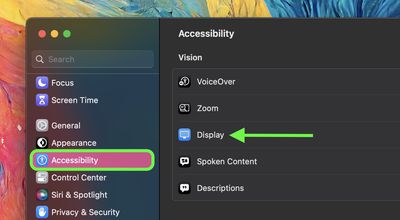
  2. Select Accessibility in the settings sidebar.
    settings

  3. Under "Vision," click Display.
  4. Toggle on the switch next to Dim Flashing Lights.
    settings

That's all there is to it. Next time you play video and macOS detects the lighting effects, the screen will be automatically dimmed to reduce the possibility of a negative reaction.


Popular Stories

imac video apple feature

Apple Released Yet Another New Product Today

Friday March 20, 2026 2:39 pm PDT by
Apple has unveiled a whopping nine new products so far this March, including an iPhone 17e, iPad Air models with the M4 chip, MacBook Air models with the M5 chip, MacBook Pro models with M5 Pro and M5 Max chips, the all-new MacBook Neo, an updated Studio Display, a higher-end Studio Display XDR, AirPods Max 2, and now the Nike Powerbeats Pro 2. iPhone 17e features the same overall design as...
ios 26 4 pastel

iOS 26.4: Top 10 New Features Coming to Your iPhone

Friday March 20, 2026 2:44 pm PDT by
iOS 26.4 isn't the major update with new Siri features that we hoped for, but there are some useful quality of life improvements, and a little bit of fun with an AI playlist generator and new emoji characters. Playlist Playground - Apple Music has a Playlist Playground option that lets you generate playlists from text-based descriptions. You can include moods, feelings, activities, or...
HomePod mini and Apple TV Sage

New Apple TV and HomePod Mini Remain 'Ready' to Launch

Sunday March 22, 2026 6:33 am PDT by
Apple has unveiled nine new products this month, but the wait continues for the next-generation Apple TV 4K and HomePod mini models. In his Power On newsletter today, Bloomberg's Mark Gurman said new versions of the Apple TV and HomePod mini have been "ready" since last year, but he reiterated that Apple has held off on releasing them until the more personalized version of Siri and other...
Related Apple News: South Africa | Ipad | Local News | Politics | Mac