 Apple's iOS mobile operating system includes built-in features that offer suggestions on how you can save space on your iOS device. These space-saving suggestions can help you free up space on your iPhone and iPad when storage space is running low, so it's worth checking in on them from time to time.
One of these built-in features encourages you to review large attachments taking up storage in apps like Photos, Mail, and Messages. It's surprising just how much storage you can save deleting photos, videos, and media that's been shared with you or attached to Messages. Follow the steps below to learn how you can do this efficiently on your iPhone and iPad.
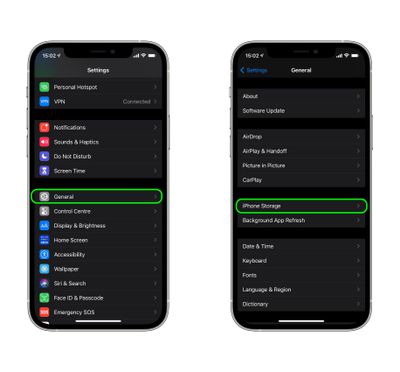
- Launch the Settings app on your iOS device.
- Scroll down and tap General.
- Tap iPhone Storage.

- Tap Enable next to "Review Large Attachments" if it's not already active, otherwise tap the chevron to reveal the list of apps taking up space.
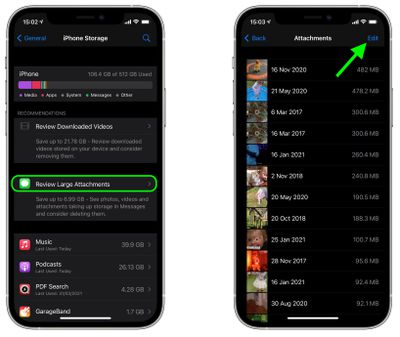
After following these steps, you'll see a list of the largest files located in Photos, Mail, Messages, and other apps. Tap a file to view it up close. Swiping left on an item in the file list will bring up an option to delete it. You can also bulk-delete files by tapping on the Edit button in the upper right corner of the screen.