

 In iOS 13, Apple overhauled the interface of its Reminders app and added some new functions that make it a lot more competitive with rival third-party to-do apps.
As with the previous version of Reminders, you can make as many lists as you need in the Reminders app. You can have separate lists for family, friends, work, or for other custom categories.
The redesigned interface also incorporates all of your reminders across all of your lists into four views – Today, Scheduled, All, and Flagged – with your separate lists listed below.
To create a new list, tap Add List at the bottom-right corner of the screen.
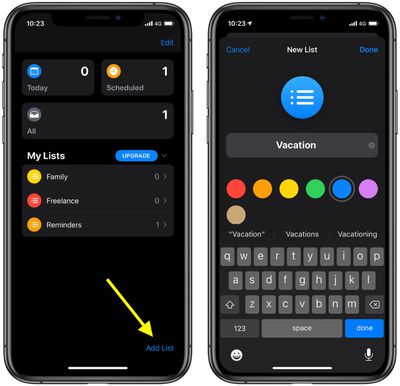
You'll be invited to give your new list a name and select a color for it, to help distinguish it from any other lists you keep. Tap Done in the top-right corner, and your list is created.
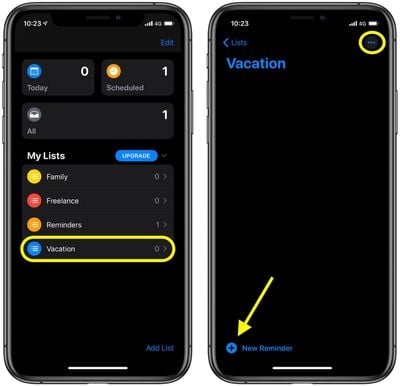
Your new list automatically appears in the Reminders home screen under My Lists. Tap its name to start working with it. With the new list open, you can tap the plus icon in the bottom-left corner of the screen to add your first reminder. Note the ellipsis button in the top-right corner as well.
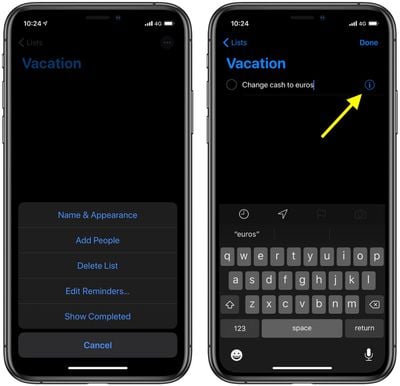
The ellipsis button provides quick access to options for changing the name and appearance of your list, adding people to make it a shared reminders list, deleting the list, editing your reminders, and showing completed reminders.
Tap a reminder that you've created to edit it. A small info ("i") button will also appear next to it. You can tap this to add notes to your reminder, opt to be reminded on a particular day and/or at a particular location, and give it a priority level. From here, you can also quickly move the reminder to another list.





















