Create a Groceries List in Your iPhone's Reminders App - MacRumorsOpen MenuShow RoundupsShow Forums menuVisit ForumsOpen Sidebar
Skip to Content

Create a Groceries List in Your iPhone's Reminders App

by

In iOS 17, Apple has added a handy little list function to the Reminders app to help you when you're out to pick up some groceries. Keep reading to learn how to use it and make short work of your trip to the store.
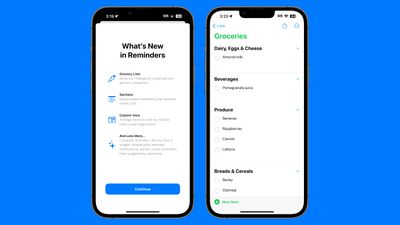
ios 17 reminders app
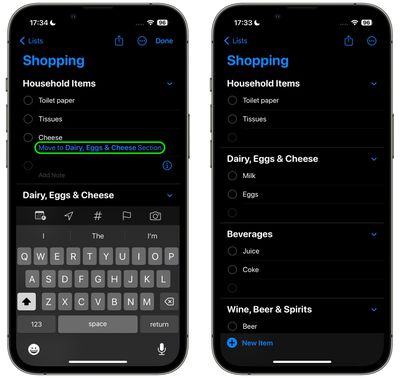
When you create a list with the new "Groceries" list type (named "Shopping" outside the U.S), you can input various foods and sundries and have them organized automatically by category. The organization makes it easier to find what you need when you're at the grocery store, or out shopping.

The available category types in Reminders include Produce, Breads & Cereals, Frozen Foods, Snacks & Candy, Meat, Dairy, Eggs & Cheese, Bakery, Baking Items, Household Items, Personal Care & Health, and Wine, Beer & Spirits.

Here's how to create a Shopping or Groceries reminder list in iOS 17.

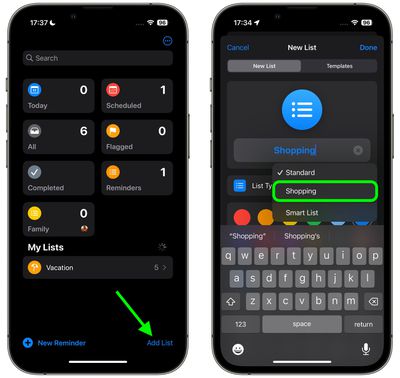
  1. In the Reminders app, tap Add List.
  2. Give your list a name, an optional color and icon, and tap the "List Type" and choose Groceries (or Shopping), then tap Done.
    reminders

  3. Start populating your Groceries list with items. As you add different category types, the Reminders app will prompt you to move certain items to specific categories. Tap the option in blue to move the item.
  4. When you've finished your list, it should be organized into separate categories, making it easier to find the related items in the same areas of the store.
    reminders

If the ‌‌iPhone‌‌ doesn't recognize where an item should go, it remains uncategorized. Note that it will recognize specific brands and types of food like "Sour Patch Kids," so it is a fairly robust solution for grocery shopping.

You can also create your own categories in the grocery list. Simply tap the three dots in a circle icon and select New Section in the dropdown. You can then tap on the new section to give it an identifying name.


Popular Stories

imac video apple feature

Apple Released Yet Another New Product Today

Friday March 20, 2026 2:39 pm PDT by
Apple has unveiled a whopping nine new products so far this March, including an iPhone 17e, iPad Air models with the M4 chip, MacBook Air models with the M5 chip, MacBook Pro models with M5 Pro and M5 Max chips, the all-new MacBook Neo, an updated Studio Display, a higher-end Studio Display XDR, AirPods Max 2, and now the Nike Powerbeats Pro 2. iPhone 17e features the same overall design as...
ios 26 4 pastel

iOS 26.4: Top 10 New Features Coming to Your iPhone

Friday March 20, 2026 2:44 pm PDT by
iOS 26.4 isn't the major update with new Siri features that we hoped for, but there are some useful quality of life improvements, and a little bit of fun with an AI playlist generator and new emoji characters. Playlist Playground - Apple Music has a Playlist Playground option that lets you generate playlists from text-based descriptions. You can include moods, feelings, activities, or...
iPhone 18 Pro Deep Red Feature

iPhone 18 Pro Launching Later This Year With These 12 New Features

Wednesday March 18, 2026 7:39 am PDT by
While the iPhone 18 Pro and iPhone 18 Pro Max are not expected to launch for another six months or so, there are already plenty of rumors about the devices. It was initially reported that the iPhone 18 Pro models would have fully under-screen Face ID, with only a front camera visible in the top-left corner of the screen. However, the latest rumors indicate that only one Face ID component...
Related Apple News: Sport | Travel | Motoring | Iphone | Technology