How to Create Alarms on Your HomePod - MacRumorsOpen MenuShow RoundupsShow Forums menuVisit ForumsOpen Sidebar
Skip to Content

How to Create Alarms on Your HomePod

by

HomePod, much like an iPhone or iPad, can be used as an alarm clock replacement to wake you up in the morning or remind you of important tasks.

Using ‌HomePod‌ as an alarm clock is simple, but it is controlled separately than alarms on your iPhone and there are a few tricks to be aware of.
homepodalarm

Setting Using Siri

The easiest way to set an alarm on the ‌HomePod‌ is to ask Siri. ‌Siri‌ can set a one-time alarm for you, or ‌Siri‌ can set recurring alarms that go off every day. Some sample commands:

  • Hey ‌Siri‌, set an alarm for 10:00 a.m
  • Hey ‌Siri‌, set an alarm for 9:00 a.m. every weekday
  • Hey ‌Siri‌, set an alarm for 10:00 a.m. every Tuesday and Thursday
  • Hey ‌Siri‌, set an alarm for 2:00 p.m. labeled Flight Check-In
  • Hey ‌Siri‌, set an alarm for 9:00 a.m. every weekend

TIP: Labeling your alarms makes it easier for you to remember them and to reference them again when giving commands to ‌Siri‌.

Managing Alarms Using Siri

You can manage your alarms with ‌Siri‌, too. For example, if you want to delete an alarm, you can say something like "Hey ‌Siri‌, delete the 2:00 p.m. alarm," or "Hey ‌Siri‌, delete all of my alarms."

Changing an alarm is also possible, with a command like "Hey ‌Siri‌, change the 2:00 p.m. alarm to 3:00 p.m, and if you want to know what alarms you have set up, say "Hey ‌Siri‌, what alarms do I have on?"

‌Siri‌ will run through all alarms that are set up on the ‌HomePod‌ with that command.

Managing and Setting Alarms in the Home App

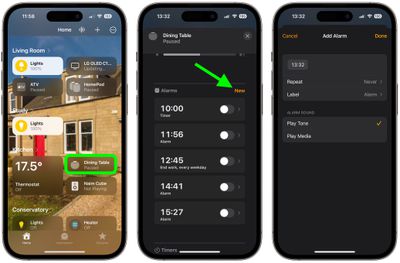
Alarms that you set up on the ‌HomePod‌ through ‌Siri‌ can be viewed and managed in the Home app.

  1. Open up the Home app.
  2. Tap on a ‌HomePod‌ card on the main screen.
  3. Scroll down to the "Alarms" section and tap New.
  4. Tap the time to adjust when you want the alarm to go off.
  5. Use the Repeat and Label options to select whether this is a recurring alarm and to give your alarm a name, respectively.
  6. Under "Alarm Sound," choose to Play Tone or Play Media. If you choose the latter, additional options will appear for you to select the media to play, as well as the volume.
  7. When you're finished, tap Done.

home

You can set multiple alarms on a single ‌HomePod‌ all of which will be listed under the Alarms section on the ‌HomePod‌'s card in the Home app.

Disabling an Alarm

When an alarm goes off on the ‌HomePod‌, an alarm sound activates and the top of the ‌HomePod‌ flashes with a white light. To turn it off, you simply need to tap the top of the ‌HomePod‌.

If you don't have a free hand, you can also ask ‌Siri‌ to turn off the alarm: "Hey ‌Siri‌, turn off the alarm." To snooze an alarm, you can say "Hey ‌Siri‌, snooze" and it will snooze for a short period of time before the alarm goes off again.
Related Roundups: HomePod, HomePod mini

Top Rated Comments

JoEw Avatar
106 months ago
Damn shameful you can't have the alarm set to a playlist, song or radio station on AM. This seems like a day 1 kind of feature for a device like this.
Score: 8 Votes (Like | Disagree)
106 months ago
It is possible to snooze an alarm. The catch is that your have to speak the command: “Hey Siri, snooze”
Score: 4 Votes (Like | Disagree)
106 months ago
How about setting a "sleep" alarm for an audio device? The fact that you can't have your podcasts shut off after a certain amount of time kills about 33% of the usefulness of the home pod for me. It's a shame that so many day-1 features are missing.

I have a feeling that Apple knows all of this, and it was either ship HomePod with V1.0 Hardware V0.75 software, or ship Q1 2019 with 1.0 Hardware and 1.0 software.
Score: 2 Votes (Like | Disagree)
106 months ago
This is really TERRIBLE.... the alarm feature should:
1) be able to play Apple Music playlist or radio station or genre
2) be able to fade on over X minutes
3) allow you to set the volume of the alarm
Score: 2 Votes (Like | Disagree)
106 months ago
You've got that exactly right. I've read a lot of critical remarks in the tech press written by people who don't realize that a lot of their gripes may sooner or later be fixed by software and firmware upgrades. My hunch is that the HomePod is going to turn out to be capable of a LOT more things than Apple has told us about so far. Here's an example: the HP must have Bluetooth circuitry aboard to facilitate the initial setup. Just because it is then of no further use does not necessarily mean that 's always going to be the case. That would mean the HP could be used for a lot of additional purposes (for inst. to use with your Apple Watch, to replace your t. v.'s soundbar, to integrate with your sound system).
Score: 1 Votes (Like | Disagree)
chfilm Avatar
106 months ago
Damn shameful you can't have the alarm set to a playlist, song or radio station on AM. This seems like a day 1 kind of feature for a device like this.
Absolutely- especially since Sonos offers such a nice way of doing this, absolutely love their alarm with an Apple Music playlist and a smooooth fade in! It’s really a nice way of waking up! And Apple has such good curated playlists at Apple ,sic, that work perfectly in conjunction with Sonos. Would have totally expected the HomePod to do the same thing. Disappointing. Hope we’ll see a massive software update for this thing later this year!
Score: 1 Votes (Like | Disagree)

Popular Stories

iPhone 18 Pro Deep Red Feature

iPhone 18 Pro Launching Later This Year With These 12 New Features

Wednesday March 18, 2026 7:39 am PDT by
While the iPhone 18 Pro and iPhone 18 Pro Max are not expected to launch for another six months or so, there are already plenty of rumors about the devices. It was initially reported that the iPhone 18 Pro models would have fully under-screen Face ID, with only a front camera visible in the top-left corner of the screen. However, the latest rumors indicate that only one Face ID component...
Apple Logo Sketch Feature

Apple Has Now Unveiled Eight New Products This Month

Tuesday March 17, 2026 9:25 am PDT by
Apple has unveiled a whopping eight new products so far this March, including an iPhone 17e, iPad Air models with the M4 chip, MacBook Air models with the M5 chip, MacBook Pro models with M5 Pro and M5 Max chips, an updated Studio Display, a higher-end Studio Display XDR, and now the AirPods Max 2 this week. iPhone 17e features the same overall design as the iPhone 16e, but it gains Apple's...
ios 26 4 yellow

Here Are Apple's Release Notes for iOS 26.4

Wednesday March 18, 2026 11:56 am PDT by
Apple provided developers and public beta testers with the release candidate versions of iOS 26.4 and iPadOS 26.4, which means we're going to see a public launch as soon as next week. The RC versions of the software include Apple's official release notes, giving us final details on what's included in the update. Apple Music - Playlist Playground (beta) generates a playlist from your...
Related Apple News: News | Travel | Buyers Guide | Business | Iphone