How to Copy and Delete Screenshots on iPhone and iPad - MacRumorsOpen MenuShow RoundupsShow Forums menuVisit ForumsOpen Sidebar
Skip to Content

How to Copy and Delete Screenshots on iPhone and iPad

by

In iOS 16, Apple has added a new "Copy and Delete" option to the screenshot interface on iPhone. This article explains what it's for and how to use it.

General iOS 16 Feature Yellow
Whenever you take a screenshot on your iPhone and tap on the preview thumbnail that appears in the corner of the screen, iOS brings up an image editing interface that lets you easily highlight, draw on, and crop the image before saving it or sharing it.

With iOS 16, Apple added another useful function to this interface when you're finished editing: Copy and Delete.

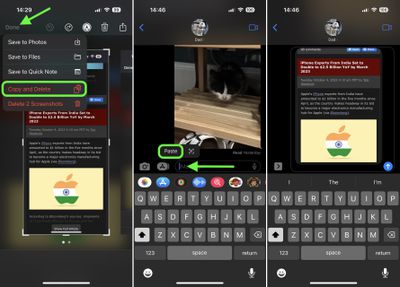
Basically, what this option allows you to do is copy the screenshot to the clipboard and then trash it in one quick action. That way you can paste it wherever you want, to go in a Message or email, for example, without having to save it in your Photos library first. Here's how it works.

  1. Take a screenshot in the usual way for your particular device.
  2. Tap the thumbnail image, then make any desired edits using the markup tools.
  3. Tap Done in the left-hand corner.
  4. Tap Copy and Delete.
  5. Switch to another app with an input field, then hold your finger on the input space where you want to paste the image.
  6. Tap Paste in the popover menu.

messages

Note that the Done dropdown menu in the screenshots interface also lets you Save to Photos, Save to Files, and Save to Quick Note.


Popular Stories

imac video apple feature

Apple Released Yet Another New Product Today

Friday March 20, 2026 2:39 pm PDT by
Apple has unveiled a whopping nine new products so far this March, including an iPhone 17e, iPad Air models with the M4 chip, MacBook Air models with the M5 chip, MacBook Pro models with M5 Pro and M5 Max chips, the all-new MacBook Neo, an updated Studio Display, a higher-end Studio Display XDR, AirPods Max 2, and now the Nike Powerbeats Pro 2. iPhone 17e features the same overall design as...
HomePod mini and Apple TV Sage

New Apple TV and HomePod Mini Remain 'Ready' to Launch

Sunday March 22, 2026 6:33 am PDT by
Apple has unveiled nine new products this month, but the wait continues for the next-generation Apple TV 4K and HomePod mini models. In his Power On newsletter today, Bloomberg's Mark Gurman said new versions of the Apple TV and HomePod mini have been "ready" since last year, but he reiterated that Apple has held off on releasing them until the more personalized version of Siri and other...
ios 26 4 pastel

iOS 26.4: Top 10 New Features Coming to Your iPhone

Friday March 20, 2026 2:44 pm PDT by
iOS 26.4 isn't the major update with new Siri features that we hoped for, but there are some useful quality of life improvements, and a little bit of fun with an AI playlist generator and new emoji characters. Playlist Playground - Apple Music has a Playlist Playground option that lets you generate playlists from text-based descriptions. You can include moods, feelings, activities, or...
Related Apple News: Iphone | Opinion | Ipad | Sport | Health