

How to Control Your iPhone With Your Apple Watch - MacRumorsOpen MenuShow RoundupsShow Forums menuVisit ForumsOpen Sidebar
Skip to Content

How to Control Your iPhone With Your Apple Watch

by

In watchOS 9, Apple includes a feature that allows you to control your iPhone with your Apple Watch. Keep reading to learn how it works.
watchOS 9 header
With the release of iOS 16 and watchOS 9, Apple introduced new accessibility features including the ability to control your Apple Watch with your iPhone, and vice versa.

Both features are designed to make the Apple Watch and iPhone experience more accessible for people with physical and motor disabilities, but they can also be useful if, for example, your iPhone's screen is cracked or unresponsive, or the device is simply out of reach.

The following steps show you how to control your iPhone with your Apple Watch. Bear in mind that the watch needs to be paired to the iPhone you want to control, and the watch and phone need to be running watchOS 9 and iOS 16, respectively.

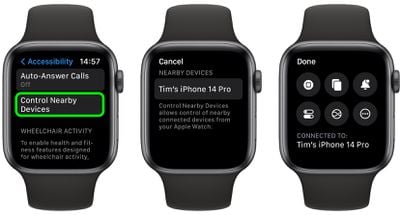
  1. On your Apple Watch, open the Settings app.
  2. Scroll down and tap Accessibility.
  3. Select Control Nearby Devices.
  4. Select your iPhone (or iPad) from the list.
watch

Once connected, you'll see a series of control buttons enabling you to perform a variety of actions on your ‌iPhone‌, including Go to Home Screen, Open App Switcher, Open Notification Center, Open Control Center, and Activate Siri. Tapping the More button will also give you media playback controls.

Note that if VoiceOver is enabled on your Apple Watch and you control a nearby device, VoiceOver will also be enabled on that device, and the VoiceOver gestures that you use on your Apple Watch are performed on the device.


Popular Stories

iPhone 18 Pro Deep Red Feature

iPhone 18 Pro Launching Later This Year With These 12 New Features

Wednesday March 18, 2026 7:39 am PDT by
While the iPhone 18 Pro and iPhone 18 Pro Max are not expected to launch for another six months or so, there are already plenty of rumors about the devices. It was initially reported that the iPhone 18 Pro models would have fully under-screen Face ID, with only a front camera visible in the top-left corner of the screen. However, the latest rumors indicate that only one Face ID component...
ios 26 4 yellow

Here Are Apple's Release Notes for iOS 26.4

Wednesday March 18, 2026 11:56 am PDT by
Apple provided developers and public beta testers with the release candidate versions of iOS 26.4 and iPadOS 26.4, which means we're going to see a public launch as soon as next week. The RC versions of the software include Apple's official release notes, giving us final details on what's included in the update. Apple Music - Playlist Playground (beta) generates a playlist from your...
Apple Logo Sketch Feature

Apple Has Now Unveiled Eight New Products This Month

Tuesday March 17, 2026 9:25 am PDT by
Apple has unveiled a whopping eight new products so far this March, including an iPhone 17e, iPad Air models with the M4 chip, MacBook Air models with the M5 chip, MacBook Pro models with M5 Pro and M5 Max chips, the all-new MacBook Neo, an updated Studio Display, a higher-end Studio Display XDR, and now the AirPods Max 2 this week. iPhone 17e features the same overall design as the iPhone...
Related Apple News: South Africa | Mac | Iphone | Politics | Business














