Earlier this year, Apple retested the batteries of its iPhone 15 models and updated its battery life claims for the entire series, suggesting that they offer better longevity than previously thought. Curious about the battery health of your iPhone 15? Here's how to check it.
iPhone 15 USB C Port Event Still
Apple in February 2024 updated the technical specifications for the batteries in the iPhone 15, iPhone 15 Plus, iPhone 15 Pro, and iPhone 15 Pro Max. According to its latest tests, Apple says that the devices' batteries are designed to retain 80% of their original capacity at 1,000 complete charge cycles under ideal conditions.

It's a significant improvement over the 500 charge cycles that the company advertises for all older iPhone models over the same cycle count.

iPhone 15 models also include a Battery Charging Optimization feature, so if you regularly charge your ‌iPhone‌ up at night while you're asleep, the device can limit its charging to 80%, and then wait for an hour or so before you wake up to charge the remaining 20%. This keeps the ‌iPhone‌ at an optimal capacity for battery health by reducing the amount of time that it's sat on your charger at 100% charged, which can reduce its life over time.

If you have an iPhone 15 with iOS 17.4 or later installed, you can get more specific information on the battery health of your device in the following way:

  1. Open the Settings app.
  2. Scroll down and tap Battery.
  3. Check the readout next to "Battery Health." For more details including your device's battery cycle count, manufacture date, and first use date, simply tap the readout. (In earlier versions of iOS 17, this information was hidden in the General ➝ About section of the Settings app).
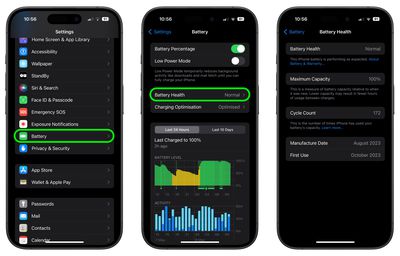
settings

Apple says that the battery lifespan of any iPhone model ultimately depends on how the device is regularly used and charged. While the "Maximum Capacity" readout will give you a good indication of your iPhone's battery health, it's worth tapping on the blue text that says "About Battery & Warranty," which will give you more information on the likely battery lifespan of your device based on how it's used.

Battery life depends on a number of variables, but if you think you have an issue, it's worth remembering that the standard one-year AppleCare+ warranty on an iPhone includes service for defective batteries. Depending on where you are, local consumer laws might even give you cover beyond the standard 12 months, so don't be shy to ask at an Apple Store if you think there's a problem.


Top Rated Comments

sw1tcher Avatar
23 months ago

Here's How to Check Your iPhone's Battery Health
Step 1: Buy an iPhone 15

:rolleyes:

That's where you lost me.
Score: 14 Votes (Like | Disagree)
falkon-engine Avatar
23 months ago
I've been using the charge to 80% feature and it would appear that my battery has been liking it. Occasionally the phone charges to 100% probably like 1x or 2x a month. Battery life still at 100% after approx 192 cycles.
Score: 3 Votes (Like | Disagree)
Xavier Avatar
23 months ago
70% on my iPhone 12 Pro. Holding out until the new phones this fall!
Score: 3 Votes (Like | Disagree)
iToph Avatar
23 months ago
Launch day 15 pro Max 225 cycles still at 100% with daily charge 100%

Attachment Image
Score: 2 Votes (Like | Disagree)
Egnat69 Avatar
23 months ago

I've been using the charge to 80% feature and it would appear that my battery has been liking it. Occasionally the phone charges to 100% probably like 1x or 2x a month. Battery life still at 100% after approx 192 cycles.
It does make a ton of difference. I‘ve wanted that feature forever. Been manually limiting my Pro 13 to about 80% every time I charge it (except for the occasional falling asleep while charging accident) and it sits at 94% battery health after over 2 1/2 years of daily usage.
Score: 2 Votes (Like | Disagree)
Zyhon Avatar
23 months ago
100% on 14Pro Max. (since September 2022)
Score: 1 Votes (Like | Disagree)

Popular Stories

Aston Martin CarPlay Ultra Screen

Apple's CarPlay Ultra to Expand to These Vehicle Brands Later This Year

Sunday February 1, 2026 10:08 am PST by
Last year, Apple launched CarPlay Ultra, the long-awaited next-generation version of its CarPlay software system for vehicles. Nearly nine months later, CarPlay Ultra is still limited to Aston Martin's latest luxury vehicles, but that should change fairly soon. In May 2025, Apple said many other vehicle brands planned to offer CarPlay Ultra, including Hyundai, Kia, and Genesis. In his Powe...
Apple Logo Black

Apple's Next Launch is 'Imminent'

Sunday February 1, 2026 12:31 pm PST by
The calendar has turned to February, and a new report indicates that Apple's next product launch is "imminent," in the form of new MacBook Pro models. "All signs point to an imminent launch of next-generation MacBook Pros that retain the current form factor but deliver faster chips," Bloomberg's Mark Gurman said on Sunday. "I'm told the new models — code-named J714 and J716 — are slated...
iOS 26

iOS 26.3 and iOS 26.4 Will Add These New Features to Your iPhone

Tuesday February 3, 2026 7:47 am PST by
We are still waiting for the iOS 26.3 Release Candidate to come out, so the first iOS 26.4 beta is likely still at least a week or two away. Following beta testing, iOS 26.4 will likely be released to the general public in March or April. Below, we have recapped known or rumored iOS 26.3 and iOS 26.4 features so far. iOS 26.3 iPhone to Android Transfer Tool iOS 26.3 makes it easier...
Apple MacBook Pro M4 hero

New MacBook Pros Reportedly Launching Alongside macOS 26.3

Sunday February 1, 2026 5:42 am PST by
Apple is planning to launch new MacBook Pro models with M5 Pro and M5 Max chips alongside macOS 26.3, according to Bloomberg's Mark Gurman. "Apple's faster MacBook Pros are planned for the macOS 26.3 release cycle," wrote Gurman, in his Power On newsletter today. "I'm told the new models — code-named J714 and J716 — are slated for the macOS 26.3 software cycle, which runs from...
iOS 26 Home Feature

Apple Gives Final Warning to Home App Users

Tuesday February 3, 2026 8:55 am PST by
In 2022, Apple introduced a new Apple Home architecture that is "more reliable and efficient," and the deadline to upgrade and avoid issues is fast approaching. In an email this week, Apple gave customers a final reminder to upgrade their Home app by February 10, 2026. Apple says users who do not upgrade may experience issues with accessories and automations, or lose access to their smart...