

Apple doesn't currently allow iPhone users to change the Side button's Siri functionality to another assistant, but owners of iPhone 15 Pro and newer models can assign ChatGPT to the Action button instead. Keep reading to learn how.
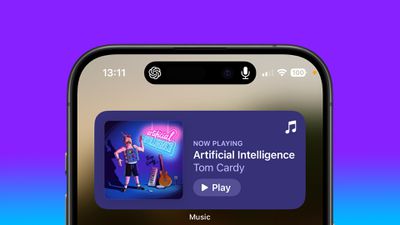
chatgpt iphone dynamic island
OpenAI's free ChatGPT app for iPhone lets you interact with the chatbot using text or voice. What's more, if you assign voice mode directly to the Action button, you can use it to jump straight into a spoken conversation, giving you quick, handsfree access to a far more capable assistant.

  1. Install the ChatGPT app, then sign into your account or create a new one.
  2. Next, open the Settings app.
  3. Tap Action Button.
  4. Swipe to Controls, then tap the two chevrons beside the currently assigned control.
  5. Using the control search field, type "ChatGPT."
  6. Select the control Open ChatGPT Voice.
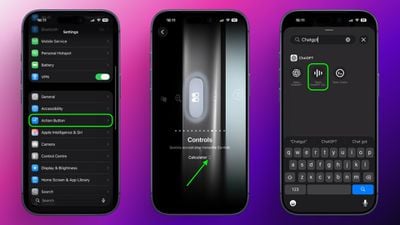
chatgpt voice action button

A long press of the Action button will now open ChatGPT's voice mode. The first time you activate it, the app may request microphone access. Tap Allow to proceed. After that, you can begin speaking immediately.

A recent update means voice conversations now take place inside the same chat window as text-based prompts, instead of switching to a separate voice-only interface. Responses appear in real time, combining spoken output with on-screen text and any visuals the model generates. This keeps your conversation's context intact and makes switching between typing and speaking smoother.

Continue the Conversation Anywhere

You can also leave the ChatGPT app during a voice session without ending it. When you swipe away, the conversation continues and appears in the Dynamic Island as long as the assistant is listening and preparing a response. To stop, tap the Dynamic Island to return to the app, then tap End.

Note that while this setup gives you a fast, physical shortcut to a richer, more context-aware assistant, ChatGPT can't perform Siri-like system actions like accessing your calendar or setting an alarm.


Tag: ChatGPT

Top Rated Comments

I7guy Avatar
2 weeks ago
After trying out different actions, including opening up the trunk…I like the ability to put the phone on mute. That is the default action and that is where it is now.
Score: 26 Votes (Like | Disagree)
Techwatcher Avatar
2 weeks ago
Hell no. Shazam is by far the best option. ChatGPT needs to go away.
Score: 17 Votes (Like | Disagree)
tonie walker Avatar
2 weeks ago
mine is just Mute all the way
Score: 12 Votes (Like | Disagree)
coolfactor Avatar
2 weeks ago

It won’t. Siri though, might. Well not in name perhaps, but it’s very likely it will just be a skin for Google Gemini.
Siri isn't going away.

The report on the street is that Apple is going to license a separate installation of Gemini that will reside on Apple's PPC (Private Cloud Compute) servers to power Siri. Google would have zero access to this installation, so no data scraping will occur.

Apple has been wise to not rush into the LLM-powered AI Assistant era until the technology has matured and the compute costs come down. That's now happening.

What Apple should've done is gone full bore into the SLM (Small Language Model) architecture instead of "one model to rule them all". Have specialized models for different tasks, with Siri being a "conductor", but this technology also didn't exist in a usable form until recently.

While the frontier labs are releasing new models are break-neck speeds, we're only just now — this week, in fact — starting to see models that would be able to meet the needs of Siri.

Great time to be alive.
Score: 12 Votes (Like | Disagree)
TFrank2 Avatar
2 weeks ago

mine is just Mute all the way
I’d love to have a dedicated physical silent mode slider come back so we could have both. I know it’s simple to just mute in control center but maintaining the tactile feel/option is a plus IMO.
Score: 10 Votes (Like | Disagree)
krusnof Avatar
2 weeks ago
I made a quick menu based on a shortcut I saw someone else had done

Attachment Image
Score: 7 Votes (Like | Disagree)

Popular Stories

iOS 26

iOS 26.2 Coming Soon With These 8 New Features on Your iPhone

Thursday December 11, 2025 8:49 am PST by
Apple seeded the second iOS 26.2 Release Candidate to developers earlier this week, meaning the update will be released to the general public very soon. Apple confirmed iOS 26.2 would be released in December, but it did not provide a specific date. We expect the update to be released by early next week. iOS 26.2 includes a handful of new features and changes on the iPhone, such as a new...
Google maps feaure

Google Maps Quietly Added This Long-Overdue Feature for Drivers

Wednesday December 10, 2025 2:52 am PST by
Google Maps on iOS quietly gained a new feature recently that automatically recognizes where you've parked your vehicle and saves the location for you. Announced on LinkedIn by Rio Akasaka, Google Maps' senior product manager, the new feature auto-detects your parked location even if you don't use the parking pin function, saves it for up to 48 hours, and then automatically removes it once...
AirPods Pro Firmware Feature

Apple Releases New Firmware for AirPods Pro 2 and AirPods Pro 3

Thursday December 11, 2025 11:28 am PST by
Apple today released new firmware designed for the AirPods Pro 3 and the prior-generation AirPods Pro 2. The AirPods Pro 3 firmware is 8B30, up from 8B25, while the AirPods Pro 2 firmware is 8B28, up from 8B21. There's no word on what's include in the updated firmware, but the AirPods Pro 2 and AirPods Pro 3 are getting expanded support for Live Translation in the European Union in iOS...
iOS 26

iOS 26.4 and iOS 27 Features Revealed in New Leak

Friday December 12, 2025 10:56 am PST by
Macworld's Filipe Espósito today revealed a handful of features that Apple is allegedly planning for iOS 26.4, iOS 27, and even iOS 28. The report said the features are referenced within the code for a leaked internal build of iOS 26 that is not meant to be seen by the public. However, it appears that Espósito and/or his sources managed to gain access to it, providing us with a sneak peek...
Foldable iPhone 2023 Feature 1

Apple to Make More Foldable iPhones Than Expected [Updated]

Tuesday December 9, 2025 9:59 am PST by
Apple has ordered 22 million OLED panels from Samsung Display for the first foldable iPhone, signaling a significantly larger production target than the display industry had previously anticipated, ET News reports. In the now-seemingly deleted report, ET News claimed that Samsung plans to mass-produce 11 million inward-folding OLED displays for Apple next year, as well as 11 million...
iOS 26

Apple Releases iOS 26.2 With Alarms for Reminders, Lock Screen Changes, Enhanced Safety Alerts and More

Friday December 12, 2025 10:10 am PST by
Apple today released iOS 26.2, the second major update to the iOS 26 operating system that came out in September, iOS 26.2 comes a little over a month after iOS 26.1 launched. ‌iOS 26‌.2 is compatible with the ‌iPhone‌ 11 series and later, as well as the second-generation ‌iPhone‌ SE. The new software can be downloaded on eligible iPhones over-the-air by going to Settings >...
AirTag 2 Mock Feature

Apple AirTag 2: Four New Features Found in iOS 26 Code

Thursday December 11, 2025 10:31 am PST by
The AirTag 2 will include a handful of new features that will improve tracking capabilities, according to a new report from Macworld. The site says that it was able to access an internal build of iOS 26, which includes references to multiple unreleased products. Here's what's supposedly coming: An improved pairing process, though no details were provided. AirTag pairing is already...
iOS 26

15 New Things Your iPhone Can Do in iOS 26.2

Friday December 5, 2025 9:40 am PST by
Apple is about to release iOS 26.2, the second major point update for iPhones since iOS 26 was rolled out in September, and there are at least 15 notable changes and improvements worth checking out. We've rounded them up below. Apple is expected to roll out iOS 26.2 to compatible devices sometime between December 8 and December 16. When the update drops, you can check Apple's servers for the ...
maxresdefault

iOS 26 Code Leak Reveals Apple Smart Home Hub Details

Thursday December 11, 2025 4:02 pm PST by
Apple is working on a smart home hub that will rely heavily on the more capable version of Siri that's coming next year. We've heard quite a bit about the hub over the last two years, but a recent iOS 26 code leak provides additional insight into what we can expect and confirms rumored features. Subscribe to the MacRumors YouTube channel for more videos. Macworld claims to have access to an ...














