Boost iPhone Audio Features With This Simple Bluetooth Tip - MacRumorsOpen MenuShow RoundupsShow Forums menuVisit ForumsOpen Sidebar
Skip to Content

Boost iPhone Audio Features With This Simple Bluetooth Tip

by

In iOS and iPadOS, Apple includes an option for users to specify the Bluetooth accessories they connect using pre-defined individual labels.
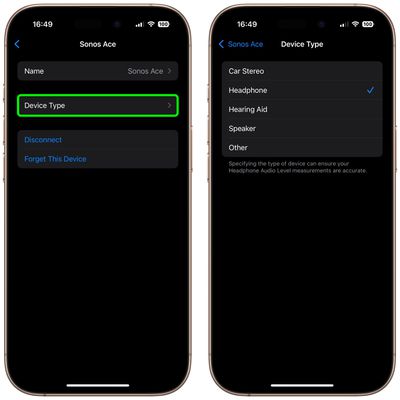
device type bluetooth
Labeling your Bluetooth accessories helps to identify connected devices and improve audio notifications. Apple says that classifying Bluetooth accessories like this can also ensure that real-time Headphone Audio Level measurements are accurate.

When using headphones with an iPhone, for example, you can check the audio level in decibels by viewing the Hearing control in Control Center. In the Health app, you can also review the history of your headphone listening habits.

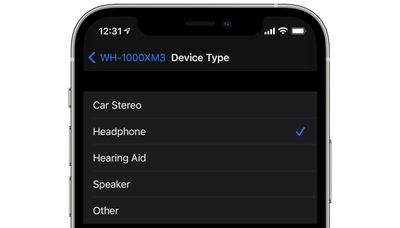
Apple provides five categories with which to label your Bluetooth accessories: Car Stereo, Headphone, Hearing Aid, Speaker, and Other. Here's how to access them.

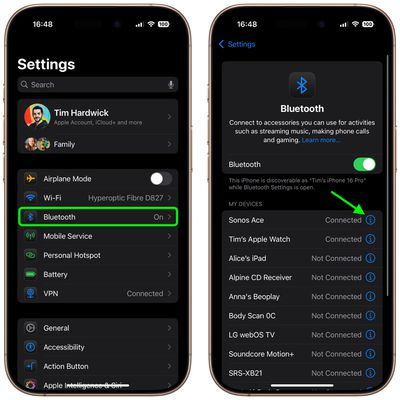
  1. Launch the Settings app on your iPhone or iPad.
  2. Select Bluetooth.
  3. Tap the info button (the encircled 'i') next to a Bluetooth device in the list that you want to label.
    settings

  4. Tap Device Type.
  5. Select a label if the accessory is not already correctly identified.
    settings

Note that iOS recognizes AirPods and AirPods Max as headphones, so there isn't an option to change their Bluetooth label. (The same goes for Apple Watch.) However, you can still change the name of Apple earphones and headphones as they appear in Bluetooth device lists.


Top Rated Comments

DutchApplePie Avatar
11 months ago
It would be nice when playing music in a car through bluetooth if notification sounds would come from the phone instead of momentarily lowering the music volume.
Score: 7 Votes (Like | Disagree)
ambientdaw Avatar
11 months ago
My experience with Bluetooth pairing with speakers from my iPhone and Mac is nothing short of miserable. Sometimes it works but it is 50/50 at best.
Score: 2 Votes (Like | Disagree)
klasma Avatar
11 months ago

What would you want to change them to?..
I would want Apple to document what the effect of each setting is, and letting me decide if I want my AirPods to work like e.g. a speaker. Instead it's "Tell us what you have (but for AirPods we already know), and we'll decide what is good for you."
Score: 1 Votes (Like | Disagree)
11 months ago
Have set it up for some of my Bluetooth accessories. Will try enabling them for the rest of them and see.
Score: 1 Votes (Like | Disagree)
11 months ago
What we need is mic gain controls like we have on the Mac, why is this not available in iOS?! 🤦🏼
Score: 1 Votes (Like | Disagree)
thejadedmonkey Avatar
11 months ago
I've always wondered, is a stereo with a bluetooth input the same as a speaker, in Apple land? Or should I select "Other" for my stereo?
Score: 1 Votes (Like | Disagree)

Popular Stories

imac video apple feature

Apple Released Yet Another New Product Today

Friday March 20, 2026 2:39 pm PDT by
Apple has unveiled a whopping nine new products so far this March, including an iPhone 17e, iPad Air models with the M4 chip, MacBook Air models with the M5 chip, MacBook Pro models with M5 Pro and M5 Max chips, the all-new MacBook Neo, an updated Studio Display, a higher-end Studio Display XDR, AirPods Max 2, and now the Nike Powerbeats Pro 2. iPhone 17e features the same overall design as...
iPhone 18 Pro Deep Red Feature

iPhone 18 Pro Launching Later This Year With These 12 New Features

Wednesday March 18, 2026 7:39 am PDT by
While the iPhone 18 Pro and iPhone 18 Pro Max are not expected to launch for another six months or so, there are already plenty of rumors about the devices. It was initially reported that the iPhone 18 Pro models would have fully under-screen Face ID, with only a front camera visible in the top-left corner of the screen. However, the latest rumors indicate that only one Face ID component...
ios 26 4 pastel

iOS 26.4: Top 10 New Features Coming to Your iPhone

Friday March 20, 2026 2:44 pm PDT by
iOS 26.4 isn't the major update with new Siri features that we hoped for, but there are some useful quality of life improvements, and a little bit of fun with an AI playlist generator and new emoji characters. Playlist Playground - Apple Music has a Playlist Playground option that lets you generate playlists from text-based descriptions. You can include moods, feelings, activities, or...
Related Apple News: South Africa | Travel | Entertainment | Reviews | Culture