There are two types of backup available to iOS users. iCloud backups are encrypted automatically and stored in the cloud, and you can create and use them anywhere with a Wi-Fi connection. By contrast, Mac-based backups are created and stored on your Mac, encryption is optional, and you have to connect your device to your computer to restore one. This article shows you how to back up your iPhone, iPad, or iPod touch to a Mac running macOS Catalina or later.

In macOS 10.4 and earlier, backing up an iOS device to your Mac involved using the iTunes app. However, since the release of macOS 10.5 Catalina in 2019, Apple has offered separate Mac apps for Music, Podcasts, and Apple TV, meaning the functions for managing a connected iPhone, iPad or iPod touch needed a new home.
macoscatalinafinder
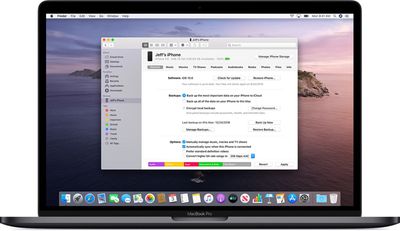
It's not immediately obvious, but Apple chose to integrate these device functions into the Finder, meaning that you can choose media sync settings, manage iCloud and local backups, and restore or update your iOS device without even opening another application on your Mac.

Keeping a local backup of your iOS device ensures that, should you ever lose it, you'll be able to restore all your information on a replacement device. You can also encrypt your local backup to keep private information like your passwords and personal health or activity data safe and secure. Keep reading to learn how.

How to Back Up Your iOS Device in macOS

  1. Plug your iPhone, iPad, or iPod touch into your Mac using the supplied cable.
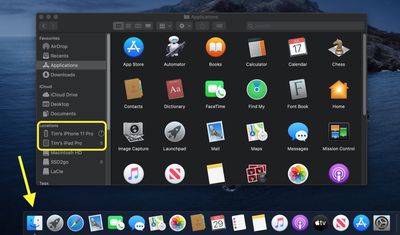
  2. Open a Finder window by clicking the Finder icon in the Dock.
  3. Click your iOS device's name in the sidebar.
    finder

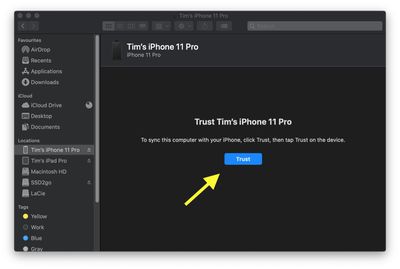
  4. If this is the first time connecting your device to your Mac, click Trust in the Finder window.
    finder

  5. Tap Trust on your device when prompted, then enter your passcode to confirm.
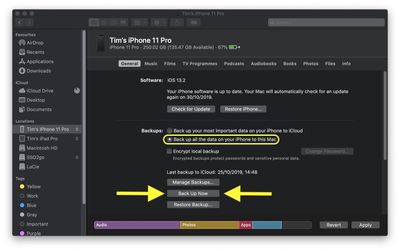
  6. In the General tab, click the circle next to where it says Back up all of the data on your [iPhone/iPad/iPod touch] to this Mac.

  7. If you don't want to create an encrypted backup, or you've already set up encrypted backups, click Back Up Now at the bottom of the General tab.
    finder

When the backup is finished, you can find the date and time of the last backup in the General tab, just above the Manage Backups button.

How to Encrypt an iOS Device Backup in macOS

  1. Plug your iPhone, iPad, or iPod touch into your Mac using the supplied cable.
  2. Open a Finder window by clicking the Finder icon in the Dock.
  3. Click your iOS device's name in the sidebar.
    finder

  4. If this is the first time connecting your device to your Mac, click Trust in the Finder window.
    finder

  5. Tap Trust on your device when prompted, then enter your passcode to confirm.
  6. Click the checkbox next to Encrypt local backup in the General tab.
  7. Choose a password to protect your device backup, then verify it and tick the box if you want to remember the password in your keychain.
  8. Click Set Password.
    finder

  9. Enter your passcode on your iOS device to begin the backup.
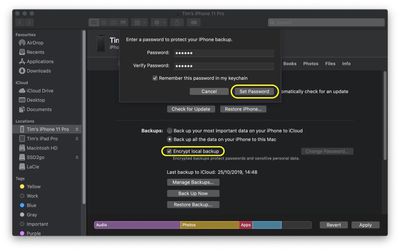
When the backup is finished, you can find the date and time of the last backup in the General tab, just above the Manage Backups button.


Popular Stories

iOS 26

6 New Things Your iPhone Can Do in iOS 26.1

Wednesday October 29, 2025 4:22 am PDT by
Apple is about to drop iOS 26.1, the first major point release since iOS 26 was rolled out in September, and there are at least six notable changes and improvements to look forward to. We've rounded them up below. Apple has already provided developers and public beta testers with the release candidate version of iOS 26.1, which means Apple will likely roll out the update to all compatible...
iOS 26

iOS 26.1 Coming Soon: New Features for Your iPhone and Release Date

Monday October 27, 2025 7:55 am PDT by
The upcoming iOS 26.1 update includes a handful of new features and changes for iPhones, including a toggle for changing the appearance of the Liquid Glass design, "slide to stop" for alarms in the Clock app, and more. Below, we outline key details about iOS 26.1. Release Date Given that Apple has yet to seed an iOS 26.1 Release Candidate, which is typically the final beta version, the...
iPhone 17 Pro Cosmic Orange

8 Reasons to Wait for Next Year's iPhone 18 Pro

Thursday October 30, 2025 4:42 am PDT by
Apple's iPhone development roadmap runs several years into the future and the company is continually working with suppliers on several successive iPhone models at the same time, which is why we often get rumored features months ahead of launch. The iPhone 18 series is no different, and we already have a good idea of what to expect for the iPhone 18 Pro and iPhone 18 Pro Max. One thing worth...
ios 26 1 slide to stop

iOS 26.1 Brings Back 2007 Feature in New Way

Friday October 31, 2025 1:40 pm PDT by
The upcoming iOS 26.1 update includes a small but helpful change for iPhones, and it could prevent you from running late to something important. Specifically, when an alarm goes off in the Clock app, there is a new "slide to stop" control on the screen for turning off the alarm. On previous iOS 26 versions, there is simply a large "stop" button, which could be accidentally tapped. The new ...
M5 MacBook Pro

Waiting for New Macs? Apple Just Shared Bad News

Friday October 31, 2025 7:32 am PDT by
Apple has just given a strong indication that it will not be releasing any additional new Macs for the remainder of the year. Apple's CFO Kevan Parekh dropped the hint during the company's earnings call on Thursday:On Mac, keep in mind, we expect to face a very difficult compare against the M4 MacBook Pro, Mac mini, and iMac launches in the year-ago quarter.Parekh essentially gave a heads up ...
maxresdefault

Apple TV 4K Could Still Launch Before 2025 Ends: All the Rumored Features

Monday October 27, 2025 4:51 pm PDT by
Apple is designing an updated version of the Apple TV 4K, and rumors suggest that it could come out sometime in the next couple of months. We're not expecting a major overhaul with design changes, but even a simple chip upgrade will bring major improvements to Apple's set-top box. Subscribe to the MacRumors YouTube channel for more videos. We've rounded up all the latest Apple TV rumors. ...
ipad mini 7 feature blue

OLED iPad Mini: Release Date, Pricing, and What to Expect

Wednesday October 29, 2025 7:13 am PDT by
Rumors are stoking excitement for the next-generation iPad mini that Apple is reportedly close to launching. So what should we expect from the successor to the iPad mini 7 that Apple released over a year ago? Read on to find out. Processor and Performance Apple is working on a next-generation version of the iPad mini (codename J510/J511) that features the A19 Pro chip, according to...
iOS 26

Apple Seeds iOS 26.1, iPadOS 26.1, and macOS Tahoe 26.1 Release Candidates

Tuesday October 28, 2025 1:07 pm PDT by
Apple today provided developers and public beta testers with the release candidate versions of upcoming iOS 26.1, iPadOS 26.1, macOS Tahoe 26.1, tvOS 26.1, watchOS 26.1, and visionOS 26.1 updates for testing purposes. The RCs betas come a week after Apple released the fourth betas. The new betas can be downloaded from the Settings app on a compatible device by going to General > Software...
apple tv hd

Apple Launched Its Big New Vision for TV 10 Years Ago Today

Thursday October 30, 2025 8:58 am PDT by
Apple launched the Apple TV HD, the Siri Remote, tvOS, and their accompanying App Store a decade ago today, marking a major overhaul of the device. The new vision for the Apple TV was unveiled on September 9, 2015 during Apple's "Hey Siri" event in San Francisco, where CEO Tim Cook introduced the device with the statement, "The future of TV is apps." The announcement represented a major...