How to Configure iOS to Auto-Close Safari Browser Tabs - MacRumorsOpen MenuShow RoundupsShow Forums menuVisit ForumsOpen Sidebar
Skip to Content

How to Configure iOS to Auto-Close Safari Browser Tabs

by

ios7 safari iconIn iOS 13, Apple has added new functionality to its Safari mobile browser that makes it easier for you to manage how many tabs you have open at the same time.

The number of active browser tabs in Safari can quickly get out of hand on iPhone because of the way the browser displays tabs in a vertical array when viewed in the popular portrait orientation. Hyperlinks that open websites in a new tab only exacerbate the situation.
how to close ios safari tabs based on when you last viewed them
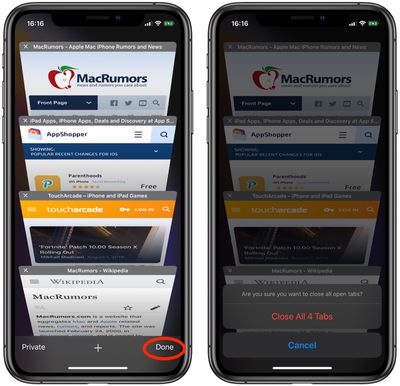
Using the Close All Tabs option (long pressing Done reveals it) is one solution for restoring order to your browser session, but it's no good if you have a handful of newer tabs that are still useful to have open.

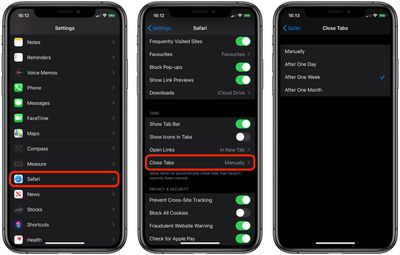
Fortunately, iOS 13 can close Safari's browser tabs on your behalf, based on when you last viewed them. Launch the Settings app and select Safari -> Close Tabs, and you'll find options to make the browser automatically close tabs that have not been viewed After One Day, After One Week, or After One Month.
how to close ios safari tabs based on when you last viewed them 1
Safari also iOS 13 includes a new feature that lets you bookmark multiple tabs in a just couple of taps and save them all in a new or existing bookmark folder. Click here to learn how it works.


Tag: Safari
Related Forum: iOS 13

Popular Stories

iOS 27 on iPhone 17 1

iOS 27 Will Add These New Features to Your iPhone

Saturday May 2, 2026 8:43 am PDT by
Apple is expected to unveil iOS 27 during its WWDC 2026 keynote on June 8, and there are already many rumored features and changes for iPhones. The first developer beta of iOS 27 will likely be available immediately following the keynote, and a public beta typically follows in July. Following beta testing, the software update should be released to all users with a compatible iPhone in...
Apple MacBook Pro M4 hero

Why You Might Want to Wait to Buy a MacBook Pro

Friday May 1, 2026 3:43 pm PDT by
Apple refreshed the 14-inch and 16-inch MacBook Pro with M5 Pro and M5 Max models in March 2026, but depending on your needs and interests, you might want to skip this generation because there's something better in the works. The M5 Pro and M5 Max MacBook Pro models have faster chips, but the same design that Apple has used since 2021. An updated design with new display technology and faster ...
macOS 27 on MacBook Pro

Apple to Unveil macOS 27 Next Month With These New Features

Friday May 1, 2026 1:21 pm PDT by
Apple will unveil its latest software platforms during its WWDC 2026 keynote on Monday, June 8, and one of them will be macOS 27 for the Mac. The first developer beta of macOS 27 will likely be available immediately following the keynote, and a public beta typically follows in July. Following beta testing, the software update should be released to all users in September. macOS 26 is known ...
Related Apple News: Sport | Culture | Mac | Motoring | Business