Apple Vision Pro: How to Screenshot or Record Your View - MacRumorsOpen MenuShow RoundupsShow Forums menuVisit ForumsOpen Sidebar
Skip to Content

Apple Vision Pro: How to Screenshot or Record Your View

by

If you want to share what you see when you're wearing Apple Vision Pro, you can capture the entire view as an image, or alternatively, make a video recording. Keep reading to learn how.

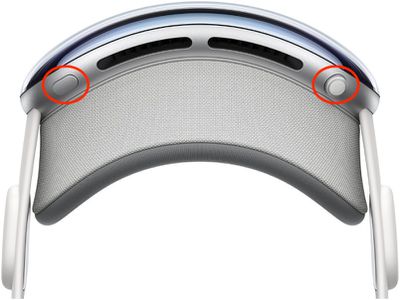
Apple Vision Pro Digital Crown
On Vision Pro headsets, Apple has built in a function that lets you capture a still picture of your entire field of view that gets saved as an image file, making it convenient for sharing.

It works similarly to the way you take screenshots on iPhone and Apple Watch. Except with Vision Pro, everything you see is included, including your physical room, active Environments, and any apps you are using.

How to Capture Your View

Here are two different methods you can use to capture a still image of your view on ‌Apple Vision Pro‌.

  • Simultaneously press the Digital Crown and the top button.
    apple vision pro screenshot

  • Say, "Siri, take a screenshot."

When you take a capture, it's automatically saved to Photos. Note that your view is obscured when entering a password or passcode.

How to Record Your View

You can also record a video clip of your view when wearing ‌Apple Vision Pro‌.

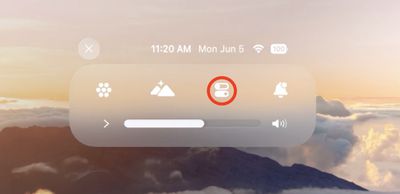
  1. Look up and tap the downward pointing chevron near the top of your view.
  2. Tap the Control Center button (the icon made up of two horizontal switches).
    control center

  3. Tap the Record button, and your recording will begin when the countdown ends.
    control center

  4. To stop recording, tap the Record button again or the red status bar at the top of your view, then tap Stop.
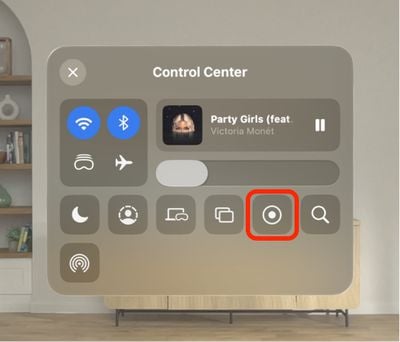
If you don't see the Screen Recording button in Control Center, go to Settings ➝ Control Center, then add the control in question and follow the above steps again.

Related Roundup: Apple Vision Pro
Buyer's Guide: Vision Pro (Buy Now)
Related Forum: Apple Vision Pro

Popular Stories

iPhone 18 Pro Deep Red Feature

iPhone 18 Pro Launching Later This Year With These 12 New Features

Wednesday March 18, 2026 7:39 am PDT by
While the iPhone 18 Pro and iPhone 18 Pro Max are not expected to launch for another six months or so, there are already plenty of rumors about the devices. It was initially reported that the iPhone 18 Pro models would have fully under-screen Face ID, with only a front camera visible in the top-left corner of the screen. However, the latest rumors indicate that only one Face ID component...
ios 26 4 yellow

Here Are Apple's Release Notes for iOS 26.4

Wednesday March 18, 2026 11:56 am PDT by
Apple provided developers and public beta testers with the release candidate versions of iOS 26.4 and iPadOS 26.4, which means we're going to see a public launch as soon as next week. The RC versions of the software include Apple's official release notes, giving us final details on what's included in the update. Apple Music - Playlist Playground (beta) generates a playlist from your...
Apple Logo Sketch Feature

Apple Has Now Unveiled Eight New Products This Month

Tuesday March 17, 2026 9:25 am PDT by
Apple has unveiled a whopping eight new products so far this March, including an iPhone 17e, iPad Air models with the M4 chip, MacBook Air models with the M5 chip, MacBook Pro models with M5 Pro and M5 Max chips, the all-new MacBook Neo, an updated Studio Display, a higher-end Studio Display XDR, and now the AirPods Max 2 this week. iPhone 17e features the same overall design as the iPhone...
Related Apple News: Mac | Ipad | Business | Iphone | Education