How to Access Back Issues of a Magazine in Apple News+ - MacRumorsOpen MenuShow RoundupsShow Forums menuVisit ForumsOpen Sidebar
Skip to Content

How to Access Back Issues of a Magazine in Apple News+

by

The Apple News+ service lets you access current and past issues of more than 200 magazines, but the interface for the app is a bit confusing and it can be hard to find past issues.

There are a couple methods that will let you see back issues of magazines, which we've outlined below.

Accessing Back Issues Through a Magazine's Overview Page

Every magazine has an overview page in ‌Apple News‌+, and though it's not immediately obvious, it's easy to get to.

  1. Open up ‌Apple News‌.
  2. Select the ‌Apple News‌+ section.
  3. Tap on any magazine that you want to read. backissuesapplenews1

  4. Tap on the title of the magazine at the top of the app.

This method will let you see the overview page for the magazine, where all back issues are listed. You can swipe to scroll through them and tap the download icon to download them for offline reading.

Accessing Back Issues Through Search

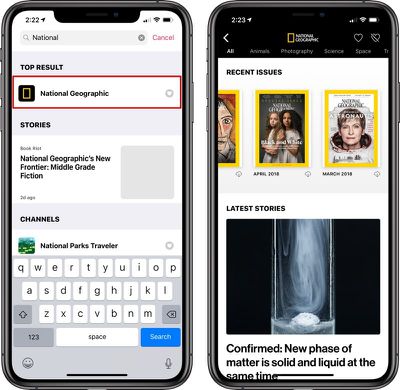
You can get to the same magazine overview page through the search function in ‌Apple News‌, without having to open up a magazine.

  1. Open ‌Apple News‌.
  2. Access search. On iPad, it's on the sidebar. On iPhone, it's under the "Following" tab.
  3. Search for the magazine you want to find. backissuesapplenews2
  4. Tap the magazine's name.

All of the back issues for the magazine will be listed under "Recent Issues," and you can swipe through them as mentioned above.

While Texture users had issues dating back years, ‌Apple News‌+ is limited to issues of magazines from March 2018 on, which is the date when Apple acquired the Texture app.

Back issues before March 2018 are not available within ‌Apple News‌+, but going forward, Apple will presumably continue to keep older issues of magazines available.

For more on ‌Apple News‌+, make sure to check out our dedicated ‌Apple News‌+ guide. ‌Apple News‌ users can follow MacRumors on ‌Apple News‌ using this link.

Top Rated Comments

linrey Avatar
91 months ago
What a mess. Texture had it right.
The back issues for National Geographic in my Texture go back to January 2014. I'm tempted to delete almost everything from my old iPad Mini and download ALL of the back issues of my fav. mags. I don't update the iOS on this Mini because the last version of the Plex app that will recognize their server on my Mac Pro 1,1 is preserved there.
[doublepost=1555187062][/doublepost]
Or.... you could just get a ReadlyGo subscription for the same price and have more choices of magazines and a user interface that makes a LOT more sense. Definitely going to drop Apple News + when the sub ends. What a mess. *sigh*.

I really wonder sometimes if I'm using some of the more recent Apple-designed apps wrong or if their designers don't even use what they produce?
I'm an old-timer (started with an Apple][) and not so fond of multimedia in the middle of what I'm reading. I think a lot of the new stuff is aimed at a different demographic, one that didn't grow up with a stack of magazines on the coffee table.
Score: 2 Votes (Like | Disagree)
AxiomaticRubric Avatar
91 months ago
What a mess. Texture had it right.
Score: 2 Votes (Like | Disagree)
avanpelt Avatar
91 months ago
Tapping the magazine name to access previous issues. That’s REALLY intuitive. Slow clap for you there, Apple. :rolleyes:
Score: 1 Votes (Like | Disagree)
91 months ago
How to delete the app?
Score: 1 Votes (Like | Disagree)
rosegoldoli Avatar
91 months ago
this is pretty useful for college research etc
Score: 1 Votes (Like | Disagree)

Popular Stories

imac video apple feature

Apple Released Yet Another New Product Today

Friday March 20, 2026 2:39 pm PDT by
Apple has unveiled a whopping nine new products so far this March, including an iPhone 17e, iPad Air models with the M4 chip, MacBook Air models with the M5 chip, MacBook Pro models with M5 Pro and M5 Max chips, the all-new MacBook Neo, an updated Studio Display, a higher-end Studio Display XDR, AirPods Max 2, and now the Nike Powerbeats Pro 2. iPhone 17e features the same overall design as...
iPhone 18 Pro Deep Red Feature

iPhone 18 Pro Launching Later This Year With These 12 New Features

Wednesday March 18, 2026 7:39 am PDT by
While the iPhone 18 Pro and iPhone 18 Pro Max are not expected to launch for another six months or so, there are already plenty of rumors about the devices. It was initially reported that the iPhone 18 Pro models would have fully under-screen Face ID, with only a front camera visible in the top-left corner of the screen. However, the latest rumors indicate that only one Face ID component...
ios 26 4 pastel

iOS 26.4: Top 10 New Features Coming to Your iPhone

Friday March 20, 2026 2:44 pm PDT by
iOS 26.4 isn't the major update with new Siri features that we hoped for, but there are some useful quality of life improvements, and a little bit of fun with an AI playlist generator and new emoji characters. Playlist Playground - Apple Music has a Playlist Playground option that lets you generate playlists from text-based descriptions. You can include moods, feelings, activities, or...
Related Apple News: Culture | Ipad | Mac | Travel | Business