

When the iPhone X launched, there was no option to record multiple faces like there was to enter in multiple fingerprints with Touch ID, but that's something Apple changed in iOS 12 and later.

Now you can add a second face to Face ID, which is useful if you have a job where your face dramatically changes, such as with a surgeon's mask or protective goggles.
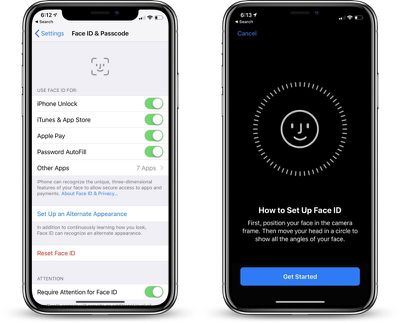
faceidalternateappearancesetup
Face ID can learn to overcome items like hats, sunglasses, and scarves, recognizing you anyway, but having the option for a second face while you're wearing frequently worn items makes sure Face ID works more seamlessly.

  1. Open the Settings app.
  2. Scroll down to Face ID & Passcode and tap it.
  3. Enter your passcode.
  4. Choose the "Set Up an Alternate Appearance."

From there, you can set up Face ID as you did when you first purchased and set up your iPhone X for the first time.

The iPhone will walk you through the steps of positioning your face in the camera and then moving your head in a circle.

Once your alternate appearance has been entered, there's no option to delete it. To re-add an appearance, you will need to tap the "Reset Face ID" button that has replaced the "Set Up Alternate Appearance" option.
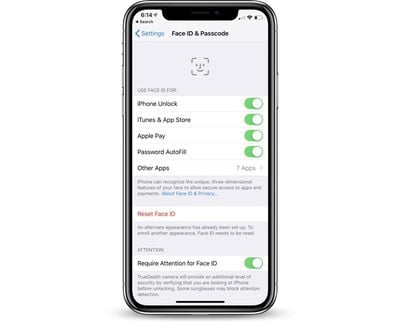
alternateappearancesetup
Be aware, there's no confirmation screen when you tap the "Reset Face ID" option. Once it's tapped, all of your Face ID data is cleared.


Top Rated Comments

dominiongamma Avatar
97 months ago
Why not just bring back Touch ID? Whatever alleged inconvenience bezels are, the trade-off for the inclusion of Touch ID, not having to deal with the troubles of Face ID not working under certain conditions, and elimination of that hideous notch are well worth it.
Greasy fingers, wet fingers kind of made Touch ID difficult to use, Face ID seems better
Score: 7 Votes (Like | Disagree)
billybobfred Avatar
97 months ago
Why not just bring back Touch ID? Whatever alleged inconvenience bezels are, the trade-off for the inclusion of Touch ID, not having to deal with the troubles of Face ID not working under certain conditions, and elimination of that hideous notch are well worth it.
There are many features that make Face ID a much better form of authentication. For one, Face ID is far more secure than Touch ID ever was. The massive amount of saved screen space is also a factor. As for the notch, I think that will go away as tech improves and lets them hide the sensors and camera under the screen.
Score: 4 Votes (Like | Disagree)
KazKam Avatar
97 months ago
This is a hack for adding another "identity" to Face ID. One of the things I liked about Touch ID was being able to register one of my fingers on the phones of my other family members (since I'm their IT support specialist) and being able to easily unlock. I also was able to put my wife's fingerprint on mine.

Face ID may be technically more secure, but I find it a helluva lot less convenient for my use cases, and in several cases, a downright nuisance.
Score: 4 Votes (Like | Disagree)
ThomasJL Avatar
97 months ago
Why not just bring back Touch ID? Whatever alleged inconvenience bezels are, the trade-off for the inclusion of Touch ID, not having to deal with the troubles of Face ID not working under certain conditions, and elimination of that hideous notch are well worth it.
Score: 3 Votes (Like | Disagree)
Blizzardman Avatar
97 months ago
Greasy fingers, wet fingers kind of made Touch ID difficult to use, Face ID seems better
And for me a very unique scenario where FaceID is MUCH better is trying to use my phone while having my Ski gear on. I have gloves which work with touchscreens but it was always a hassle with TouchID.
Score: 3 Votes (Like | Disagree)
justperry Avatar
97 months ago
Be aware, there's no confirmation screen when you tap the "Reset Face ID" option. Once it's tapped, all of your Face ID data is cleared.

As it should be, iOS and macOS/OS X got to verbose to my liking, bit like Windows, if I say delete then delete the damn thing.
Score: 2 Votes (Like | Disagree)

Popular Stories

Aston Martin CarPlay Ultra Screen

Apple's CarPlay Ultra to Expand to These Vehicle Brands Later This Year

Sunday February 1, 2026 10:08 am PST by
Last year, Apple launched CarPlay Ultra, the long-awaited next-generation version of its CarPlay software system for vehicles. Nearly nine months later, CarPlay Ultra is still limited to Aston Martin's latest luxury vehicles, but that should change fairly soon. In May 2025, Apple said many other vehicle brands planned to offer CarPlay Ultra, including Hyundai, Kia, and Genesis. In his Powe...
Apple Logo Black

Apple's Next Launch is 'Imminent'

Sunday February 1, 2026 12:31 pm PST by
The calendar has turned to February, and a new report indicates that Apple's next product launch is "imminent," in the form of new MacBook Pro models. "All signs point to an imminent launch of next-generation MacBook Pros that retain the current form factor but deliver faster chips," Bloomberg's Mark Gurman said on Sunday. "I'm told the new models — code-named J714 and J716 — are slated...
iOS 26

iOS 26.3 and iOS 26.4 Will Add These New Features to Your iPhone

Tuesday February 3, 2026 7:47 am PST by
We are still waiting for the iOS 26.3 Release Candidate to come out, so the first iOS 26.4 beta is likely still at least a week or two away. Following beta testing, iOS 26.4 will likely be released to the general public in March or April. Below, we have recapped known or rumored iOS 26.3 and iOS 26.4 features so far. iOS 26.3 iPhone to Android Transfer Tool iOS 26.3 makes it easier...
Apple MacBook Pro M4 hero

New MacBook Pros Reportedly Launching Alongside macOS 26.3

Sunday February 1, 2026 5:42 am PST by
Apple is planning to launch new MacBook Pro models with M5 Pro and M5 Max chips alongside macOS 26.3, according to Bloomberg's Mark Gurman. "Apple's faster MacBook Pros are planned for the macOS 26.3 release cycle," wrote Gurman, in his Power On newsletter today. "I'm told the new models — code-named J714 and J716 — are slated for the macOS 26.3 software cycle, which runs from...
iOS 26 Home Feature

Apple Gives Final Warning to Home App Users

Tuesday February 3, 2026 8:55 am PST by
In 2022, Apple introduced a new Apple Home architecture that is "more reliable and efficient," and the deadline to upgrade and avoid issues is fast approaching. In an email this week, Apple gave customers a final reminder to upgrade their Home app by February 10, 2026. Apple says users who do not upgrade may experience issues with accessories and automations, or lose access to their smart...















