Vision Pro Not Fitting Well? Here Are Apple's Tips for Improving It

Fit is the most important aspect of the Vision Pro, because if it's not on your head in the right way, it will feel heavy and uncomfortable, plus the displays might look blurry. Apple today published several support documents on getting a good fit with the Vision Pro and what to do if you have light leakage, eye setup issues, and other problems.
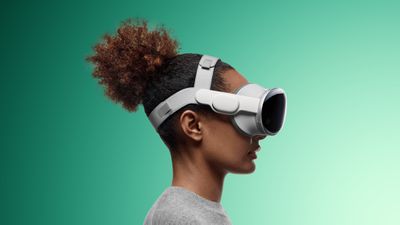
Apple Vision Pro Dual Loop Band Teal Feature 2

Selecting a Band

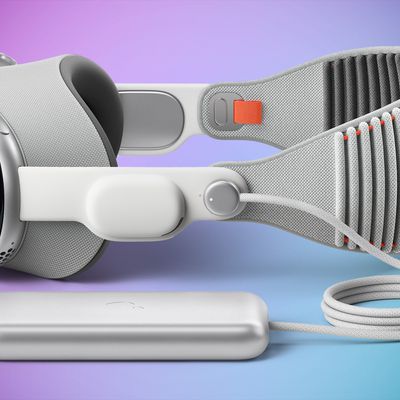
There are two bands for the Vision Pro, the Solo Knit Band and the Dual Loop Band. With either band, the Vision Pro should feel balanced across the cheeks and forehead, and it should be snug but not too tight. A head band that is too tight can cause skin sensitivity, general discomfort, or marks and indentations on the face, but Apple says that some "temporary, light markings" are expected after general usage.

Users should select the band that feels the most comfortable, and then adjust from there.

Solo Knit Band Adjustments

  • Rotate the Fit Dial counterclockwise and pull the device by the frame away from the face to loosen the band if it's too tight. If it won't loosen enough, you might need a larger size.
  • If the band feels too loose, turn it clockwise to tighten it. If it won't tighten more, a different size might be required.
  • If you feel pressure on your forehead, raise the Solo Knit Band by pulling it up slightly on the back of the head.
  • To fix pressure on the cheeks, lower the Solo Knit Band by pulling it slightly down on the back of the head.
  • To relieve pressure across the bridge of the nose, swap to the Light Cushion marked with a + or use the Dual Loop Band.

Dual Loop Band Adjustments

  • If the head band is too tight, hold the Vision Pro to your face and loosen the upper and lower straps of the Dual Loop Band with the other hand. Pull the device by the frame away from your face.
  • To relieve pressure on the forehead, hold the frame, loosen the lower strap, and tighten the upper strap.
  • To relieve pressure on the cheeks, hold the frame, pull down the lower strap, and loosen the upper strap.
  • To relieve pressure across the bridge of the nose, swap to the Light Cushion marked with a + or use the Solo Knit Band.

Light Seal Cushion Fit

  • If your eyelashes brush against the Vision Pro or you get a notification that your eyes are too close, swap to the Light Cushion marked with a +. If that does not fix it, a different Light Seal size might be required.
  • If your eyes are too far from the displays, swap to the thinner Light Seal Cushion. If that does not work, a different Light Seal Size might be required.

Realign Displays

If you feel pressure on the bridge of your nose and adjustments to the band don't help, Apple suggests using the Realign Displays feature under Settings > Eyes and Hands.

To move the displays slightly away from the nose, press the Top Button to move the displays outward. Press and hold the Digital Crown to move the displays inwards for ideal visual alignment.

Fixing Light Leakage

Apple says to determine whether you're experiencing light leakage, you should use the Vision Pro in both a brightly lit and dimly lit room.

If the Vision Pro experience improves in a dimly lit room, there is a light leakage problem that needs to be addressed by adjusting the fit of the Vision Pro head band or choosing a different Light Seal Cushion.

If the dimly lit room does not improve the experience, Apple says there may be light originating from the display causing some reflections within the optical system.

Some light leakage around the nose is normal.

Tips for Getting a Good Fit

  • Apple suggests that facial jewelry like nose rings or eyebrow rings should be removed before you put on Apple Vision Pro.
  • Uneven facial discomfort, such as pressure on the forehead, cheeks, or nose, is an indication that a different Light Seal or Light Seal Cushion might be required. Other signs include light leakage, eyelashes brushing on the display, and alerts about eye position.
  • Make sure that hair does not get caught in either the band or the cable to avoid tugging.
  • The Vision Pro is not designed to be worn by children under the age of 13 and it may not fit.

Solving Eye Setup Issues

If the Vision Pro eye setup feature cannot be completed, Apple has several solutions.

  • Ensure that the fit is correct and follow the directions of any alerts that are shown on the display.
  • If you're experiencing issues with eye setup, Apple warns that eyelash extensions and items near the eyes like rhinestones or glitter can cause problems.
  • Eyes that are too wet or too dry might impact eye setup.
  • Debris on the Vision Pro display or ZEISS Optical Inserts can cause issues.
  • Cosmetic contact lenses are not compatible with Vision Pro and need to be removed.
  • Hard contact lenses might not work with Vision Pro.
  • Medical conditions like eyelid drooping, changes in eye alignment, or uncontrolled eye movements can make it difficult for the Vision Pro to detect your eyes. There are several Accessibility features that can help.

More Help

Apple says that if the fit tips do not help, that users should visit a local Apple Store to get help. It is important to do this quickly because the exchange process must begin within 14 days of receiving the Vision Pro and accessories.

Related Roundup: Apple Vision Pro
Buyer's Guide: Vision Pro (Buy Now)
Related Forum: Apple Vision Pro

Popular Stories

iOS 26

iOS 26.2 Coming Soon With These 8 New Features on Your iPhone

Thursday December 11, 2025 8:49 am PST by
Apple seeded the second iOS 26.2 Release Candidate to developers earlier this week, meaning the update will be released to the general public very soon. Apple confirmed iOS 26.2 would be released in December, but it did not provide a specific date. We expect the update to be released by early next week. iOS 26.2 includes a handful of new features and changes on the iPhone, such as a new...
iOS 26

iOS 26.4 and iOS 27 Features Revealed in New Leak

Friday December 12, 2025 10:56 am PST by
Macworld's Filipe Espósito today revealed a handful of features that Apple is allegedly planning for iOS 26.4, iOS 27, and even iOS 28. The report said the features are referenced within the code for a leaked internal build of iOS 26 that is not meant to be seen by the public. However, it appears that Espósito and/or his sources managed to gain access to it, providing us with a sneak peek...
iOS 26

Apple Releases iOS 26.2 With Alarms for Reminders, Lock Screen Changes, Enhanced Safety Alerts and More

Friday December 12, 2025 10:10 am PST by
Apple today released iOS 26.2, the second major update to the iOS 26 operating system that came out in September, iOS 26.2 comes a little over a month after iOS 26.1 launched. ‌iOS 26‌.2 is compatible with the ‌iPhone‌ 11 series and later, as well as the second-generation ‌iPhone‌ SE. The new software can be downloaded on eligible iPhones over-the-air by going to Settings >...
AirPods Pro Firmware Feature

Apple Releases New Firmware for AirPods Pro 2 and AirPods Pro 3

Thursday December 11, 2025 11:28 am PST by
Apple today released new firmware designed for the AirPods Pro 3 and the prior-generation AirPods Pro 2. The AirPods Pro 3 firmware is 8B30, up from 8B25, while the AirPods Pro 2 firmware is 8B28, up from 8B21. There's no word on what's include in the updated firmware, but the AirPods Pro 2 and AirPods Pro 3 are getting expanded support for Live Translation in the European Union in iOS...
macOS Tahoe 26 Thumb

Apple Releases macOS Tahoe 26.2 With Edge Light

Friday December 12, 2025 10:08 am PST by
Apple today released macOS Tahoe 26.2, the second major update to the macOS Tahoe operating system that came out in September. macOS Tahoe 26.2 comes five weeks after Apple released macOS Tahoe 26.1. Mac users can download the macOS Tahoe update by using the Software Update section of System Settings. macOS Tahoe 26.2 includes Edge Light, a feature that illuminates your face with soft...
AirTag 2 Mock Feature

Apple AirTag 2: Four New Features Found in iOS 26 Code

Thursday December 11, 2025 10:31 am PST by
The AirTag 2 will include a handful of new features that will improve tracking capabilities, according to a new report from Macworld. The site says that it was able to access an internal build of iOS 26, which includes references to multiple unreleased products. Here's what's supposedly coming: An improved pairing process, though no details were provided. AirTag pairing is already...
ipados 26 1 slide over

Apple Releases iPadOS 26.2 With Multitasking Improvements

Friday December 12, 2025 10:09 am PST by
Apple today released iPadOS 26.2, the second major update to the iPadOS 26 operating system released in September. iPadOS 26.2 comes a month after iPadOS 26.1. The new software can be downloaded on eligible iPads over-the-air by going to Settings > General > Software Update. iPadOS 26.2 continues with the multitasking improvements that were added with iPadOS 26.1. You can now drag and...
bug security vulnerability issue fix larry

Update Now: iOS 26.2 Fixes 20+ Security Vulnerabilities

Friday December 12, 2025 11:11 am PST by
Apple today released iOS 26.2, iPadOS 26.2, and macOS 26.2, all of which introduce new features, bug fixes, and security improvements. Apple says that the updates address over 20 vulnerabilities, including two bugs that are known to have been actively exploited. There are a pair of WebKit vulnerabilities that could allow maliciously crafted web content to execute code or cause memory...

Top Rated Comments

Fuzzball84 Avatar
24 months ago
I thought this was MACrumors…. But i seem to keep getting redirected to a scuba diving forum…

People are talking about straps for best fit and hand gestures… ?
Score: 11 Votes (Like | Disagree)
Velin Avatar
24 months ago
Version two really needs to improve on this. First step: delete the front glass. The digital eyes are creepy as F.

Save weight, improve the internal OLED lenses, cut the price, make this thing much more comfortable and consumer-price friendly while delivering the most lifelike image possible.
Score: 9 Votes (Like | Disagree)
Chuckeee Avatar
24 months ago
Duct Tape. Always the answer when in doubt.
Score: 6 Votes (Like | Disagree)
Fuzzball84 Avatar
24 months ago

Is anyone getting a perfect seal down by the nose? I’ve tried on several light seals and bands and light keeps leaking in there.
Ive had alot of water get in before but if you tighten it up… it seems to do the trick.

I guess this is something they will really work on for the second gen… maybe even offer custom moldings.
Score: 6 Votes (Like | Disagree)
danielsutton Avatar
24 months ago

('https://www.macrumors.com/guide/vision-pro-fit/')

Fit is the most important aspect of the Vision Pro, because if it's not on your head in the right way, it will feel heavy and uncomfortable, plus the displays might look blurry. Apple today published several support documents on getting a good fit ('https://support.apple.com/en-us/117730') with the Vision Pro and what to do if you have light leakage ('https://support.apple.com/en-us/HT213953'), eye setup issues ('https://support.apple.com/en-us/HT214019'), and other problems.


Selecting a Band

There are two bands for the Vision Pro, the Solo Knit Band and the Dual Loop Band. With either band, the Vision Pro should feel balanced across the cheeks and forehead, and it should be snug but not too tight. A head band that is too tight can cause skin sensitivity, general discomfort, or marks and indentations on the face, but Apple says that some "temporary, light markings" are expected after general usage.

Users should select the band that feels the most comfortable, and then adjust from there.

Solo Knit Band Adjustments


* Rotate the Fit Dial counterclockwise and pull the device by the frame away from the face to loosen the band if it's too tight. If it won't loosen enough, you might need a larger size.
* If the band feels too loose, turn it clockwise to tighten it. If it won't tighten more, a different size might be required.
* If you feel pressure on your forehead, raise the Solo Knit Band by pulling it up slightly on the back of the head.
* To fix pressure on the cheeks, lower the Solo Knit Band by pulling it slightly down on the back of the head.
* To relieve pressure across the bridge of the nose, swap to the Light Cushion marked with a + or use the Dual Loop Band.

Dual Loop Band Adjustments


* If the head band is too tight, hold the Vision Pro to your face and loosen the upper and lower straps of the Dual Loop Band with the other hand. Pull the device by the frame away from your face.
* To relieve pressure on the forehead, hold the frame, loosen the lower strap, and tighten the upper strap.
* To relieve pressure on the cheeks, hold the frame, pull down the lower strap, and loosen the upper strap.
* To relieve pressure across the bridge of the nose, swap to the Light Cushion marked with a + or use the Solo Knit Band.

Light Seal Cushion Fit


* If your eyelashes brush against the Vision Pro or you get a notification that your eyes are too close, swap to the Light Cushion marked with a +. If that does not fix it, a different Light Seal size might be required.
* If your eyes are too far from the displays, swap to the thinner Light Seal Cushion. If that does not work, a different Light Seal Size might be required.

Realign Displays

If you feel pressure on the bridge of your nose and adjustments to the band don't help, Apple suggests using the Realign Displays feature under Settings > Eyes and Hands.

To move the displays slightly away from the nose, press the Top Button to move the displays outward. Press and hold the Digital Crown to move the displays inwards for ideal visual alignment.
Fixing Light Leakage

Apple says to determine whether you're experiencing light leakage, you should use the Vision Pro in both a brightly lit and dimly lit room.

If the Vision Pro experience improves in a dimly lit room, there is a light leakage problem that needs to be addressed by adjusting the fit of the Vision Pro head band or choosing a different Light Seal Cushion.

If the dimly lit room does not improve the experience, Apple says there may be light originating from the display causing some reflections within the optical system.

Some light leakage around the nose is normal.
Tips for Getting a Good Fit


* Apple suggests that facial jewelry like nose rings or eyebrow rings should be removed before you put on Apple Vision Pro.
* Uneven facial discomfort, such as pressure on the forehead, cheeks, or nose, is an indication that a different Light Seal or Light Seal Cushion might be required. Other signs include light leakage, eyelashes brushing on the display, and alerts about eye position.
* Make sure that hair does not get caught in either the band or the cable to avoid tugging.
* The Vision Pro is not designed to be worn by children under the age of 13 and it may not fit.

Solving Eye Setup Issues

If the Vision Pro eye setup feature cannot be completed, Apple has several solutions.

* Ensure that the fit is correct and follow the directions of any alerts that are shown on the display.
* If you're experiencing issues with eye setup, Apple warns that eyelash extensions and items near the eyes like rhinestones or glitter can cause problems.
* Eyes that are too wet or too dry might impact eye setup.
* Debris on the Vision Pro display or ZEISS Optical Inserts can cause issues.
* Cosmetic contact lenses are not compatible with Vision Pro and need to be removed.
* Hard contact lenses might not work with Vision Pro.
* Medical conditions like eyelid drooping, changes in eye alignment, or uncontrolled eye movements can make it difficult for the Vision Pro to detect your eyes. There are several Accessibility features ('https://support.apple.com/guide/apple-vision-pro/get-started-with-accessibility-features-tan426c48bdc/visionos') that can help.

More Help

Apple says that if the fit tips do not help, that users should visit a local Apple Store to get help. It is important to do this quickly because the exchange process must begin within 14 days of receiving the Vision Pro and accessories.

Article Link: Vision Pro Not Fitting Well? Here Are Apple's Tips for Improving It ('https://www.macrumors.com/guide/vision-pro-fit/')
You’re not wearing it the right way!!!!
Score: 5 Votes (Like | Disagree)
Poot Windbreaker Avatar
24 months ago
Here’s how you select the band:
Are you currently being filmed for an Apple advertisement or making a YouTube video that will be seen by at least 10 million people? If Yes: You choose the Solo Knit. If No: You Choose the Dual Band.
Score: 4 Votes (Like | Disagree)