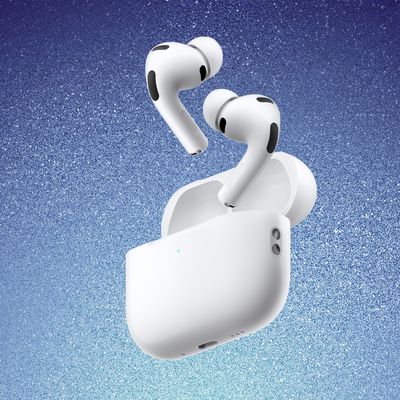
6+ AirPods Changes Coming in iOS 26

iOS 26 adds new functionality to the AirPods, which will be available this fall when Apple releases ‌iOS 26‌ and new AirPods firmware to the public.
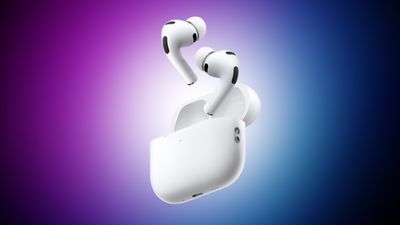
airpods pro 3 purple

Live Translation

Live Translation on the AirPods provides real-time translations for in-person conversations as long as you have an iPhone capable of Apple Intelligence. When someone speaks to you in another language, the AirPods will translate their speech to you in your own language. You can respond through your ‌iPhone‌, but if both people have AirPods, you can have a seamless conversation.
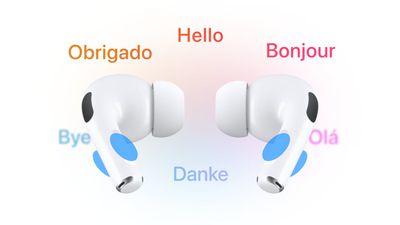
airpods translate
The feature supports real-time translation between English (UK and U.S.), French, German, Portuguese (Brazil), and Spanish. Apple plans to add Italian, Japanese, Korean, and Chinese (simplified) support later this year.

For now, Live Translation is not available for EU users who have an EU Apple account.

Camera Remote

The AirPods can be used as a camera remote for the Camera app or third-party iOS camera apps. Just connect your AirPods to your ‌iPhone‌, open the Camera app, and then press and hold on the AirPods stem to take a photo or start a video recording.

When you're finished, a second press and hold gesture will stop the recording. If you have an Apple Watch, you can already control your ‌iPhone‌ remotely from your wrist, but the AirPods have the potential to be even quicker since it's a physical gesture rather than a series of steps that include opening an Apple Watch app.

Studio-Quality Recording

The AirPods 4 and the AirPods Pro 2 support recording studio-quality audio for interviews, podcasts, songs, videos, and more. Apple says that the feature can be used to record high-quality vocals while on the go, with background sounds filtered out thanks to Voice Isolation.

You can record higher-quality audio when making videos or using your devices to do things like record a podcast.

Improved Audio Quality

The H2 chip in the ‌AirPods 4‌ and AirPods Pro 2 brings more natural vocal texture and clarity to ‌iPhone‌ calls, FaceTime calls, and all CallKit-enabled apps like Zoom.

Studio-quality audio recording and improved call quality are available across ‌iPhone‌, iPad, and Mac, and support the Camera app, Voice Memos, Messages dictation, third-party camera apps, and video conferencing apps.

Beta Updates

With ‌iOS 26‌, Apple is adding an option to more easily install beta updates on AirPods. There's a new update interface when you connect your AirPods to your ‌iPhone‌ and tap into them in the Settings app.

Pause Audio for Sleep

If you're listening to music, a podcast, or a book while you're in bed and you're wearing AirPods, the AirPods will pause your audio when you fall asleep if you toggle on the new "Pause Media When Falling Asleep" option.

You'll find it in the AirPods settings after connecting your AirPods to your ‌iPhone‌, but you'll need the new AirPods firmware and ‌iOS 26‌. In addition to saving your spot in an audiobook or podcast, it will also preserve battery by turning your AirPods off so they're not running all night.

This feature also works with Beats earbuds.

Keep Audio in Headphones

‌iOS 26‌ addresses an irritating issue that happens with CarPlay and AirPods. There's a new "Keep Audio in Headphones" option that prevents audio from switching to car speakers or Bluetooth speakers when you're listening to music through the AirPods.

With the option on, your music will continue playing in your AirPods when you get in the car. You can turn it on in ‌iOS 26‌ by going to Settings > General > AirPlay and Continuity.

Charging Reminders

When your AirPods case is low on battery, you'll get a notification reminding you to charge it.

Read More

We have a dedicated iOS 26 roundup that goes into detail on all of the new features that are available in the update.
Related Forums: AirPods, iOS 26

Popular Stories

iOS 26

iOS 26.4 and iOS 27 Features Revealed in New Leak

Friday December 12, 2025 10:56 am PST by
Macworld's Filipe Espósito today revealed a handful of features that Apple is allegedly planning for iOS 26.4, iOS 27, and even iOS 28. The report said the features are referenced within the code for a leaked internal build of iOS 26 that is not meant to be seen by the public. However, it appears that Espósito and/or his sources managed to gain access to it, providing us with a sneak peek...
iOS 26

iOS 26.2 Coming Soon With These 8 New Features on Your iPhone

Thursday December 11, 2025 8:49 am PST by
Apple seeded the second iOS 26.2 Release Candidate to developers earlier this week, meaning the update will be released to the general public very soon. Apple confirmed iOS 26.2 would be released in December, but it did not provide a specific date. We expect the update to be released by early next week. iOS 26.2 includes a handful of new features and changes on the iPhone, such as a new...
iOS 26

Apple Releases iOS 26.2 With Alarms for Reminders, Lock Screen Changes, Enhanced Safety Alerts and More

Friday December 12, 2025 10:10 am PST by
Apple today released iOS 26.2, the second major update to the iOS 26 operating system that came out in September, iOS 26.2 comes a little over a month after iOS 26.1 launched. ‌iOS 26‌.2 is compatible with the ‌iPhone‌ 11 series and later, as well as the second-generation ‌iPhone‌ SE. The new software can be downloaded on eligible iPhones over-the-air by going to Settings >...
AirPods Pro Firmware Feature

Apple Releases New Firmware for AirPods Pro 2 and AirPods Pro 3

Thursday December 11, 2025 11:28 am PST by
Apple today released new firmware designed for the AirPods Pro 3 and the prior-generation AirPods Pro 2. The AirPods Pro 3 firmware is 8B30, up from 8B25, while the AirPods Pro 2 firmware is 8B28, up from 8B21. There's no word on what's include in the updated firmware, but the AirPods Pro 2 and AirPods Pro 3 are getting expanded support for Live Translation in the European Union in iOS...
macOS Tahoe 26 Thumb

Apple Releases macOS Tahoe 26.2 With Edge Light

Friday December 12, 2025 10:08 am PST by
Apple today released macOS Tahoe 26.2, the second major update to the macOS Tahoe operating system that came out in September. macOS Tahoe 26.2 comes five weeks after Apple released macOS Tahoe 26.1. Mac users can download the macOS Tahoe update by using the Software Update section of System Settings. macOS Tahoe 26.2 includes Edge Light, a feature that illuminates your face with soft...
AirTag 2 Mock Feature

Apple AirTag 2: Four New Features Found in iOS 26 Code

Thursday December 11, 2025 10:31 am PST by
The AirTag 2 will include a handful of new features that will improve tracking capabilities, according to a new report from Macworld. The site says that it was able to access an internal build of iOS 26, which includes references to multiple unreleased products. Here's what's supposedly coming: An improved pairing process, though no details were provided. AirTag pairing is already...
ipados 26 1 slide over

Apple Releases iPadOS 26.2 With Multitasking Improvements

Friday December 12, 2025 10:09 am PST by
Apple today released iPadOS 26.2, the second major update to the iPadOS 26 operating system released in September. iPadOS 26.2 comes a month after iPadOS 26.1. The new software can be downloaded on eligible iPads over-the-air by going to Settings > General > Software Update. iPadOS 26.2 continues with the multitasking improvements that were added with iPadOS 26.1. You can now drag and...
bug security vulnerability issue fix larry

Update Now: iOS 26.2 Fixes 20+ Security Vulnerabilities

Friday December 12, 2025 11:11 am PST by
Apple today released iOS 26.2, iPadOS 26.2, and macOS 26.2, all of which introduce new features, bug fixes, and security improvements. Apple says that the updates address over 20 vulnerabilities, including two bugs that are known to have been actively exploited. There are a pair of WebKit vulnerabilities that could allow maliciously crafted web content to execute code or cause memory...

Top Rated Comments

tomtad Avatar
24 weeks ago
That's a great graphic btw
Score: 21 Votes (Like | Disagree)
iamgalt Avatar
24 weeks ago

The AirPods can be used as a camera remote for the Camera app or third-party iOS camera apps. Just connect your AirPods to your iPhone, open the Camera app, and then press and hold on the AirPods stem to take a photo or start a video recording.
Everyone's gonna start getting pictures of themselves with their hand up at their ears. :p?
Score: 8 Votes (Like | Disagree)
tim_apple Avatar
24 weeks ago
Clever thumbnail.
Score: 8 Votes (Like | Disagree)
breenmask Avatar
24 weeks ago
writer: "I came up with 5"
editor: "but you gotta come up with 6"
writer: "why?"
editor: "because we have this cool graphic that looks like a 6"
Score: 7 Votes (Like | Disagree)
jz0309 Avatar
24 weeks ago
it is actually great to see updates to the AirPods, while I will not use all of them, I do appreciate that.
Score: 6 Votes (Like | Disagree)
brilliantthings Avatar
24 weeks ago

Now can you stop the AirPods from switching between devices? Sometimes I have two audio sources going at one time and I don't want to switch!
You can do that on iOS 18
Score: 3 Votes (Like | Disagree)