

iOS 18 includes updates for many of Apple's built-in apps, and Safari is no exception. Apple's browser has some useful new features for more quickly getting to the information that you want most from websites.
This guide highlights everything that's new in Safari.
Highlights
Highlights detects relevant information on a webpage that you're visiting and surfaces it for you so you can find pertinent details without having to scour a page.
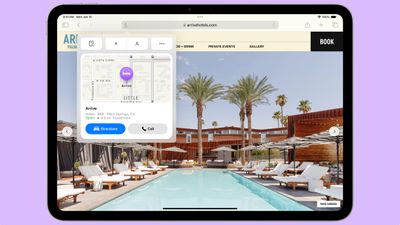
When a Highlight is available on a webpage, you'll see a small purple sparkle over the tool icon in the browser bar, along with a quick flash to the Highlight data that's available. If you tap on the icon with the sparkle, Safari will show you key website information like location, hours, and directions.
Information that's shown in Highlights depends on the website you're visiting. For stores, hotels, and other places you might want to go to, Safari provides directions. For other websites, you might see links to learn more about people, music, movies, and TV shows.
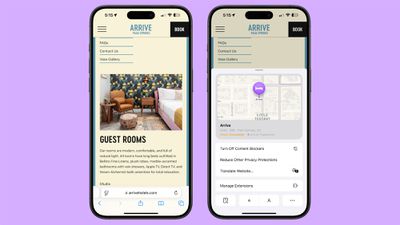
Highlights is available in U.S. English at the current time, and you won't see it on all websites. Highlights can be disabled by opening up the Safari section of the Settings app and toggling it off.
Reader Mode
Safari updated Reader Mode to provide a table of contents for long articles and also a quick summary of what's on the page.
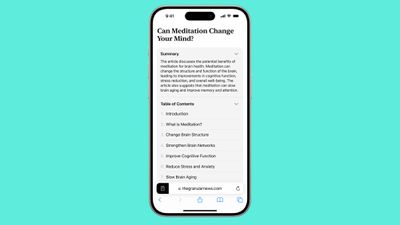
The new Reader Mode features give users a way to get to a specific part of an article as well as an overview of what's in an article in order to decide whether it's worth continuing to read.
New Reader Mode options are available in English (Australia), English (Canada), English (Ireland), English (New Zealand), English (South Africa), English (UK), and English (U.S.)
Design Changes
Apple updated the design of the Safari tools that can be accessed through the URL bar. The tool icon is now a box with two lines, and tapping it brings you into full overlay window that's at the bottom of the display.
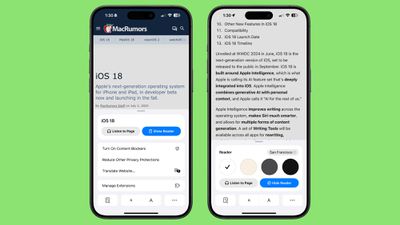
Not all tools are displayed at once anymore, with Apple prioritizing those people might want most like translate, Reader Mode, Privacy Protections, and font size. Tapping on the ellipsis at the bottom of the interface shows the rest of the Safari settings like Show IP Address, Request Desktop Website, and Hide Toolbar.
Apple has also changed the design of the tab management page, with a unified toolbar for separate sections and tab groups.
New Quick Access Options
Some of the features that used to be tucked away in the Share Sheet are now more readily available through the Safari toolbar.
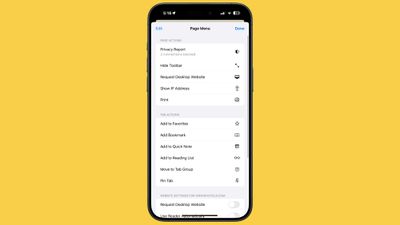
New options include the following:
- Add to Favorites
- Add Bookmark
- Add to Quick Note
- Add to Reading List
- Move to Tab Group
- Pin Tab
- Camera Access
- Microphone Access
- Location Access
- Open Links in Profile
The Page Menu can be edited so that you can customize which tools go in your list of favorites for quicker access.
All of these options are still available through the Share Sheet as well.
Distraction Control
Safari includes Distraction Control, a feature that cuts down on distracting elements on webpages like sign-in windows, cookie preference popups, GDPR notices, newsletter signup banners, autoplay videos, and more.
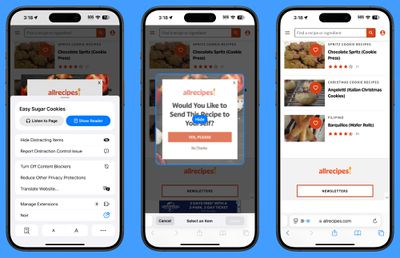
Distraction Control can be used to hide static content on a page, but it is not an ad blocker and cannot be used to permanently hide ads. An ad can be temporarily hidden, but the feature was not designed for ads, and an ad will reappear when it refreshes. It was not created for elements on a webpage that regularly change.
To use Distraction Control, go to the Page Menu and select Hide Distracting Items. You can select an area on the page that you want to hide, and static content that you select will remain hidden. It is a good way to eliminate the pesky popovers that show up when browsing online stores, reading articles, and more. iPhone, iPad, and Mac users need to opt in to hiding elements on the page, and Apple says that nothing is hidden that is not proactively selected.
When hiding a cookie banner or GDPR popup with Distraction Control, the function is the same as closing a banner without submitting website preferences at all.
Your Distraction Control settings are on-device and will not sync from device to device, so you will need to hide website elements on each one of your devices. You can use the "Show Hidden Items" option by going to the Safari search field to instantly see all hidden elements on a webpage.
Passwords
With a new dedicated Passwords app, Safari logins, passwords, and passkeys are filled in automatically if you have your information saved to the app.
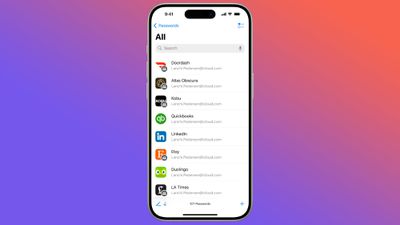
The Passwords app has the same functionality as the Passwords section in the Settings app, it's simply been split out into a standalone app for easier access. Safari can automatically save login and password information to the Passwords app, and everything syncs cross-device. Passwords can even be accessed on Windows PCs.
Locked Apps
Apps like Safari can be locked and hidden, requiring Face ID or Touch ID authentication to access them. Locking an app goes a step further than the protected private browsing feature that Apple introduced in an earlier version of iOS, as the entire Safari browser can be locked.
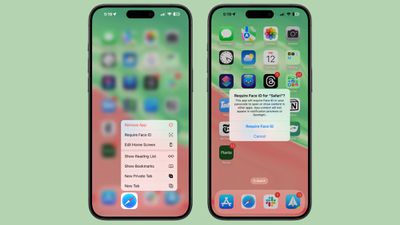
To open a locked app, you need to authenticate, so someone who has your unlocked phone still won't be able to see your browser if you lock Safari. Hiding an app locks it and removes it from the Home Screen, tucking it away in a secret Hidden apps folder in the App Library.
Read More
For more on the new features that Apple is adding in iOS 18, we have a dedicated iOS 18 roundup.



















