

iOS 17 Health App Features: Mood Tracking, Eye Health, Daylight Exposure and More

Apple in iOS 17 added new features to the Health app, introducing a mood logging function, tools for maintaining eye health, and more.
iOS 17 Health Feature
This guide highlights all of the features that are new in the Health app in iOS 17.

Mood Tracking

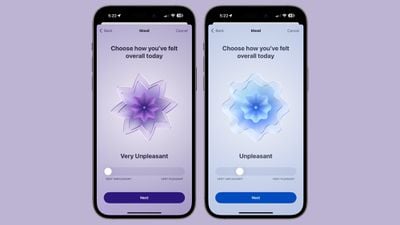
With iOS 17, Apple added a "State of Mind" feature to the Health app. This option is designed to allow you to track your emotions on a daily basis, to get an overall picture of mental wellbeing.
ios 17 beta 6 mood tracking
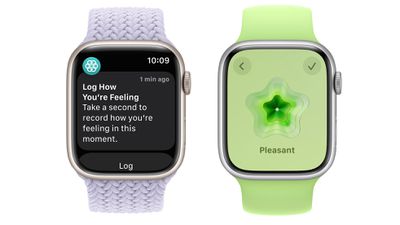
Through Health app notifications or the Apple Watch, you can log your mood at different times throughout the day and input an overall mood for the day.

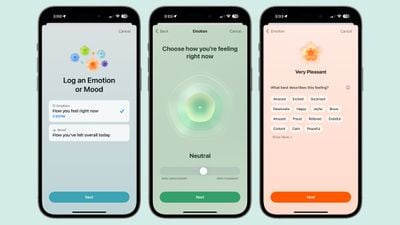
Logging a mood presents a slider bar with options ranging from Very Unpleasant to Neutral to Pleasant. The options are color coded (very unpleasant is purple, neutral is blue, and very pleasant is orange), and the idea is to drag the slider to the closest representation of your current mood.
ios 17 mood tracking
From there, Apple asks you what best describes the feeling, and presents a list of adjectives related to the mood that you can select from. The "Very Pleasant" mood, for example, has options like Amazed, Peaceful, Joyful, and Calm. The "Very Unpleasant" mood includes Angry, Sad, Drained, and Stressed, while Neutral moods include Peaceful, Indifferent, and Content.

You cannot input your own adjective, and must use one of the suggestions from Apple. There are a few dozen total options, so the idea is just to choose the closest match.

After you've selected a mood and an accompanying adjective for it, Apple asks what's causing the mood. Options include health, fitness, family, friends, partner, dating, weather, money, and current events, but again, you have to choose from Apple's list. You can, however, add context in this section, so you can write down details on why you've chosen a specific category.
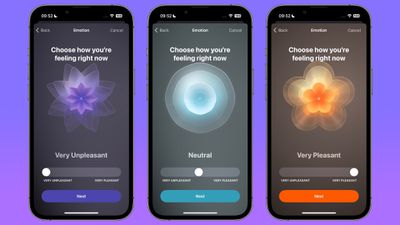
log mood animations
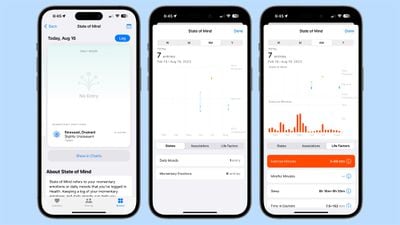
Your mood over time can be viewed on a chart with breakdowns for the week, month, six months, or a year. States, Associations, and Life Factors can all be tapped into so you can see contributing factors to what has influenced how you feel.
health app mental wellbeing
You can see what's causing issues or making you happy with a list of every entry broken down by association, the category that includes factors like work and relationships.
watchos 10 mood logging
Apple also logs life factors to show you patterns on actions that can influence your mood. Life factors include exercise minutes, mindfulness minutes, sleep, and time spent in daylight. Apple directly compares mood over time to exercise over time and other listed factors, so you can figure out if spending time working out or meditating has an impact on overall mood.

Mental Health Questionnaires

The Mental Wellbeing section of the Health app includes health questionnaires that screen for anxiety and depression so you can talk to your doctor if needed. These are screening tools typically used by doctors, and they ask questions related to how you have been feeling over the course of the last few weeks.

Taking these questionnaires populates anxiety and depression risk charts so you can see at a glance if you might need more self care or the help of a doctor at different periods throughout the year. Filling out the questionnaires will give you Anxiety Risk and Depression Risk readings.

Eye Health

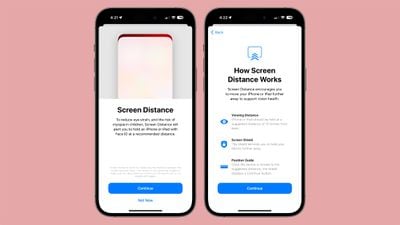
Apple in iOS 17 is adding new tools for improving eye health, most of which are aimed at children, but can be used by anyone. In Screen Time, there's a new "Screen Distance" setting that is meant to reduce eye strain by making sure an iPhone or an iPad is not held too close to the face.
ios 17 screen distance
If the ‌iPhone‌ or ‌iPad‌ is too close, an alert will let you (or your child) know that the display needs to be further away. Apple recommends a viewing distance of 12 inches for the eyes, and offers a position guide to help users know where to hold the device for optimal viewing without eye strain.

Time in Daylight

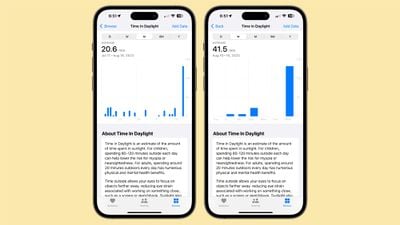
The Apple Watch can measure the amount of time that is spent in daylight, and this is another feature aimed at children. There are studies that suggest spending 80 to 120 minutes outdoors can lower the risk of nearsightedness or myopia, and so paired with an Apple Watch running watchOS 10, the Health app is able to tell you how much time was spent in the daylight.
time in daylight ios 17
Apple says that daylight is also useful for adults as spending 20 minutes outdoors has physical and mental health benefits. Time spent in daylight is one of the metrics that Apple uses for tracking Mental Wellbeing.

Medications

Apple added Follow Up Reminders for Medications that you track using the Health app. If you don't log a medication within 30 minutes after you receive an official notification, you can opt into getting a second notification so you don't miss taking your medication.
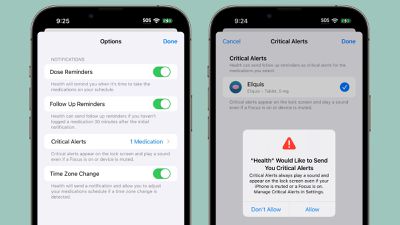
iOS 17 Health App Medication Follow Up Reminders
Further, Critical Alerts can be enabled, and these will appear on the screen and play a sound even if a Focus mode is enabled or a device is muted.

Health App for iPad

The Health app has been limited to the ‌iPhone‌ since it was introduced, but with iPadOS 17, it's also available on the ‌iPad‌. The ‌iPad‌ isn't collecting Health data, but it can display all of the information collected by the ‌iPhone‌ and other accessories on a bigger display.
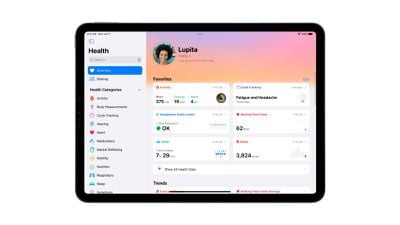
ipados 17 health app
It essentially shows you all of the same information that's available on the ‌iPhone‌ app, but it's sized for the ‌iPad‌ and has a navigation bar on the left side of the display.

Design

Apple has tweaked the design of the Health app. Sections like Heart, Medications, Sleep, Mobility, and more have their own background colors to add more visual interest to the data that the app presents.

Much of the Health app look is the same, but there have been small updates to colors and other tiny changes that refine the look.

Read More

More information on all of the new features in the iOS 17 update can be found in our iOS 17 roundup.


Related Forums: iOS 17, iPadOS 17

Popular Stories

iOS 26

iOS 26.4 and iOS 27 Features Revealed in New Leak

Friday December 12, 2025 10:56 am PST by
Macworld's Filipe Espósito today revealed a handful of features that Apple is allegedly planning for iOS 26.4, iOS 27, and even iOS 28. The report said the features are referenced within the code for a leaked internal build of iOS 26 that is not meant to be seen by the public. However, it appears that Espósito and/or his sources managed to gain access to it, providing us with a sneak peek...
apple beta 26 lineup

Apple Leak Confirms Work on Foldable iPhone, AirTag 2, and Dozens More Devices

Monday December 15, 2025 2:05 pm PST by
Last week, details about unreleased Apple devices and future iOS features were shared by Macworld. This week, we learned where the information came from, plus we have more findings from the leak. As it turns out, an Apple prototype device running an early build of iOS 26 was sold, and the person who bought it shared the software. The OS has a version number of 23A5234w, and the first...
Apple Foldable Thumb

Leak Reveals Foldable iPhone Details

Monday December 15, 2025 9:09 am PST by
The first foldable iPhone will feature a series of design and hardware firsts for Apple, according to details shared by the Weibo leaker known as Digital Chat Station. According to a new post, via machine translation, Apple is developing what the leaker describes as a "wide foldable" device, a term used to refer to a horizontally oriented, book-style foldable with a large internal display....
Apple Logo Top Half

Early iOS 26 Software Leak Uncovers Dozens of Upcoming Apple Features

Monday December 15, 2025 3:05 pm PST by
Software from an iPhone prototype running an early build of iOS 26 leaked last week, giving us a glimpse at future Apple devices and iOS features. We recapped device codenames in our prior article, and now we have a list of some of the most notable feature flags that were found in the software code. In some cases, it's obvious what the feature flags are referring to, while some are more...
iOS 26

Apple Releases iOS 26.2 With Alarms for Reminders, Lock Screen Changes, Enhanced Safety Alerts and More

Friday December 12, 2025 10:10 am PST by
Apple today released iOS 26.2, the second major update to the iOS 26 operating system that came out in September, iOS 26.2 comes a little over a month after iOS 26.1 launched. ‌iOS 26‌.2 is compatible with the ‌iPhone‌ 11 series and later, as well as the second-generation ‌iPhone‌ SE. The new software can be downloaded on eligible iPhones over-the-air by going to Settings >...
iOS 26

iOS 26.2 Coming Soon With These 8 New Features on Your iPhone

Thursday December 11, 2025 8:49 am PST by
Apple seeded the second iOS 26.2 Release Candidate to developers earlier this week, meaning the update will be released to the general public very soon. Apple confirmed iOS 26.2 would be released in December, but it did not provide a specific date. We expect the update to be released by early next week. iOS 26.2 includes a handful of new features and changes on the iPhone, such as a new...
macOS Tahoe 26 Thumb

Apple Releases macOS Tahoe 26.2 With Edge Light

Friday December 12, 2025 10:08 am PST by
Apple today released macOS Tahoe 26.2, the second major update to the macOS Tahoe operating system that came out in September. macOS Tahoe 26.2 comes five weeks after Apple released macOS Tahoe 26.1. Mac users can download the macOS Tahoe update by using the Software Update section of System Settings. macOS Tahoe 26.2 includes Edge Light, a feature that illuminates your face with soft...
airpods max 2024 colors

AirPods Max 2 Likely to Offer These 10 New Features

Monday December 15, 2025 7:41 am PST by
Apple released the AirPods Max on December 15, 2020, meaning the over-ear headphones launched five years ago today. While the AirPods Max were updated with a USB-C port and new color options last year, followed by support for lossless audio and ultra-low latency audio this year, the headphones lack some of the features that have been introduced for newer generations of the regular AirPods and the ...

Top Rated Comments

Robert.Walter Avatar
31 months ago
Badly need health and medications on the Mac so I can help my 90 yo mom manage her medication reminders.

It’s just too tough to set up using screen sharing.

If Apple really loves the Mac it should show it some respect and stop crippling it by reserving features for iOS only.

Also should require devs to have a companion Mac app if they are going to have an iOS or iPad one. (Now we have common basis for silicon it’s not an ARM vs Intel compatability issue anymore.)
Score: 11 Votes (Like | Disagree)
Apple Fan 2008 Avatar
31 months ago
Apple: "We care about your eye health!"
Also Apple: "Here take a screen that you strap to your face!"
Score: 10 Votes (Like | Disagree)
B4U Avatar
31 months ago
Manually log my own mood?
That is so advanced...[/sarcasm]

I am always angry!
Score: 9 Votes (Like | Disagree)
iPay Avatar
31 months ago
Mood Tracking: This option is designed to allow [S]us[/S] you to track your emotions on a daily basis
Valuable data in consumer behavior prediction, proudly brought to you in electronic form straight from the user.
Score: 7 Votes (Like | Disagree)
mebehere Avatar
31 months ago
Medications affect mood. That should be an option.
Score: 7 Votes (Like | Disagree)
Cunir Avatar
31 months ago
If someone tries to phone you maybe it could warn them that you're in a foul mood.
Score: 7 Votes (Like | Disagree)
















