With iOS 16, available now, Apple has made some major updates to the Messages app, introducing features that many people have been wanting for years. This guide highlights everything that's new with the Messages app in iOS 16, as well as iPadOS 16 and macOS Ventura coming in October, as many Messages features are cross-platform.
iMessage Editing
When you send an iMessage in iOS 16, you can edit for up to 15 minutes after it is sent. To edit an iMessage, you just long press on the message that you want to fix, add your edit, and then press the blue checkmark to resend.
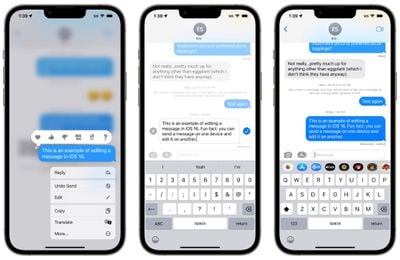
There are some caveats to be aware of when using this feature. It only works with iMessages, not SMS messages, so both people need to have an iPhone for it to work effectively. Edited messages will be repeated for those who are not running iOS 16.
Using the message editing feature as it is intended requires participants to be using Apple's latest updates, including iOS 16, iPadOS 16, macOS Ventura, and watchOS 9. People who are running an earlier operating system or those on Android will see text that says "Edited to [text]" when receiving an edited iMessage.
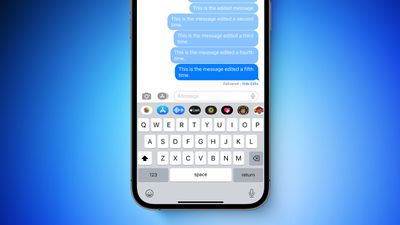
The Messages app provides a history of the iMessage that is edited, so the person on the other end will know what the change was if they tap on the "Edited" text. It's also worth noting that an iMessage can only be edited up to five times before the edit option disappears.
iMessage Undo Send
If you send an iMessage and then change your mind, you can use the undo send feature to retract it. You can unsend an iMessage for up to two minutes after sending it.
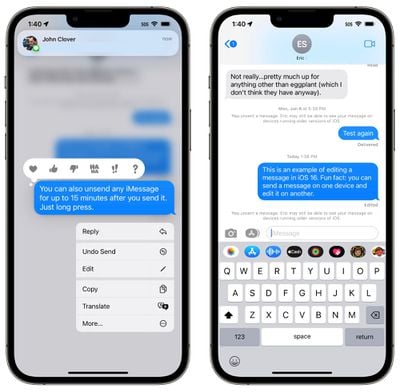
As with iMessage editing, iMessage unsending has limitations that you need to be aware of. If you use the undo send feature on a message sent to someone running an earlier version of iOS, it will not work and the message will not be unsent.
In this situation, the person on the other end will not see that you unsent it, even though it will disappear from your iPhone. If someone is running an earlier version of iOS, it will say the following:
"You unsent a message. [Person] may still be able to see your message on devices running older versions of iOS."
For undo send to work, participants need to be running iOS 16, iPadOS 16, macOS Ventura, and watchOS 9 on their devices. iMessage is required, as the feature does not work on SMS messages.
Mark as Unread
There is a new mark as unread feature in iOS 16, which allows you to mark an SMS message or iMessage as new, so it has the blue dot to remind you to return to it.
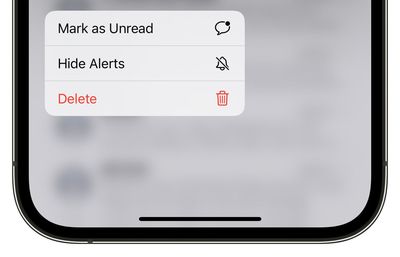
Mark as unread is useful if you get a message and don't have time to read it or address it in the moment because it keeps it as a new message with a notification badge on the Messages app.
To mark a thread as unread, long press on the conversation and then tap on the "Mark as Unread" option.
Recover Deleted Messages
Under the "Filters" interface in the Messages app, there is a new "Recently Deleted" section that aggregates all of the texts that you've deleted. If you accidentally delete a message that you did not mean to delete, you can recover it here.
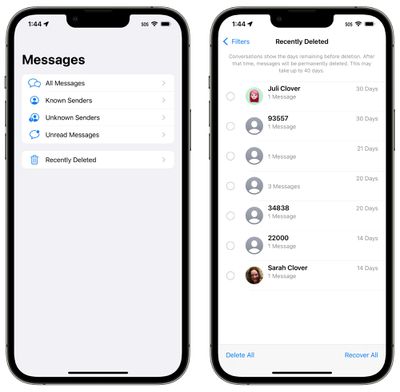
This interface has dedicated "Delete All" and "Recover All" options for dealing with all of the messages at once, or you can select an individual message and opt to delete it or recover it.
SharePlay Support
SharePlay, the feature that is designed to let you use apps, watch TV, listen to music, and more with friends and family over FaceTime, has expanded to the Messages app. In any app that supports SharePlay, you can opt to start a SharePlay session with the Messages app.
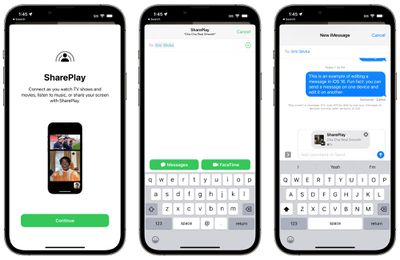
The participants in the SharePlay experience can see the same content, discussing it through iMessage. This is handy for collaborating on various apps, playing games, working out, talking about TV shows and movies, and nearly every other SharePlay interaction. SharePlay is now compatible with both Messages and FaceTime, so you can pick which method of communication you prefer.
Collaboration Integration
Collaboration is a new feature built into iOS apps. You can work together with colleagues, friends, or family in Files, Keynote, Numbers, Pages, Notes, Reminders, and Safari, sending an invite to collaborate through Messages.
When a Collaboration has begun, all invited participants will see Messages updates when the shared project in the app is edited. Collaborations can be initiated from Messages or FaceTime.
Junk Message Reporting
Apple is expanding the built-in "Report Junk" feature in the Messages app to cover SMS/MMS messages, allowing spam messages to be reported to select carriers in the United States.
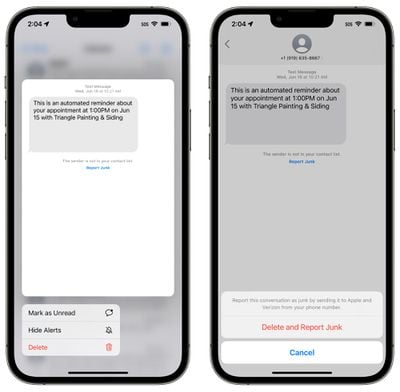
If you long press on an SMS/MMS message in the Unknown Senders section of the Messages app in iOS 16, you can select the "Report Junk" option. Using this option lets you report a message as junk, sending it to Apple and Verizon and deleting the message.
The Report Junk feature was previously available for iMessage, but the option to report SMS/MMS messages to both Apple and carriers is new.
Developer APIs
Apple is making the Shared with You API available to developers, so they can build a dedicated Shared with You section into their apps, which will aggregate app content that you've been sent from friends into that app. So, for example, if a friend sends a Zillow listing, you might be able to see it in a new Shared with You section in the Zillow app.
This is opt-in for third-party apps, and it is an expansion of the Shared with You function that Apple introduced in iOS 15. Shared with You takes Safari links, photos, music, and more, and makes them accessible in the relevant app so you don't miss content from friends.
Apple also has a Messages Collaboration API to allow third-party apps to take advantage of the new Collaboration feature that allows users to communicate in the Messages app while working together in another app.
Guide Feedback
Have questions about the iOS 16 Messages app, know of a feature we left out, or want to offer feedback on this guide? Send us an email here.