iOS 15: What's New With Notifications - MacRumorsOpen MenuShow RoundupsShow Forums menuVisit ForumsOpen Sidebar
Skip to Content

iOS 15: What's New With Notifications

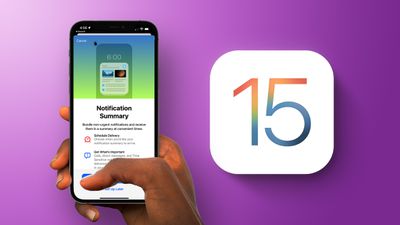
Apple in iOS 15 made some updates to notifications, improving how they look, how they're delivered to you, and the control that you have over them.
General iOS 15 Notifications Feature
This guide covers all of the changes that Apple made to notifications in the iOS and iPadOS 15 updates.

New Look for Notifications

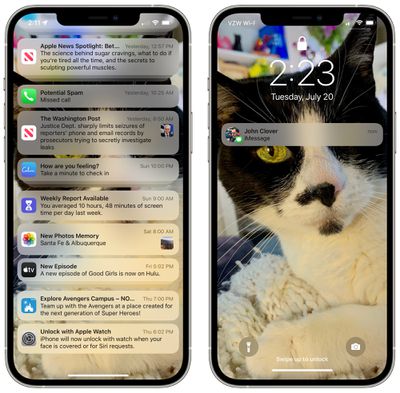
Notifications from apps now display larger app icons so it's easier to see what's what at a glance. When you get a text from someone from an app like Messages, it will include their contact photo to make it easier to identify who is messaging you.
ios 15 notification new look
This feature works with built-in Apple apps and third-party apps thanks to a notification API, so third-party apps like WhatsApp, Messenger, WeChat, and others will also be able to show contact photos in notifications.

Notification Summary

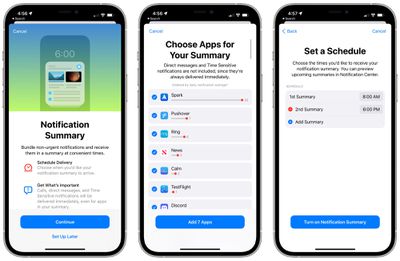
The Notification Summary is an opt-in feature that lets you control when notifications from unimportant apps are delivered. In the Notifications section of the Settings app, tapping on Notification Summary walks you through the initial setup process.
ios 15 notification summary
For Notification Summary, you can select specific times for notifications to be delivered, and decide which app notifications will be relegated to the Notification Summary. You can choose just a handful of apps or all of your apps.

Apps need to be selected one by one, but the iPhone will suggest the apps that send the most notifications. You can set the Notification Summary to be delivered multiple times per day.
notification summary 2
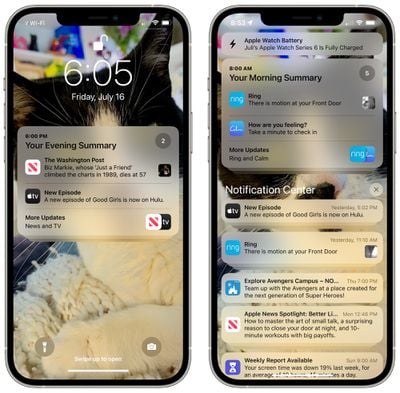
By default, the summaries will be set at 8:00 a.m. and 6:00 p.m., but the times can be changed and additional delivery times can be added. The Notification Summary also shows up on the iPhone in a dedicated section ahead of those times, so you're never really missing out on any of your notifications, even the unimportant ones.

Muting Notifications

Apps sending notifications or Messages threads can be muted temporarily, either for the next hour or for the entire day.

If you're part of a messaging thread that's particularly active but you aren't participating, your iPhone will send you a notification that suggests muting it so you're not bothered.

Time Sensitive Notifications

With Notification Summary, notifications that are time sensitive are still delivered right away. So if you're waiting on food delivery, a ride, or get a fraud alert from your bank, you'll know immediately and won't miss it in the Notification Summary.

Apple developed a Time Sensitive notification API for developers for apps that need to deliver notifications as soon as possible, so as of this fall, apps will be able to use the Time Sensitive notification feature.

Guide Feedback

Have questions about Notifications in iOS 15, know of a feature we left out, or want to offer feedback on this guide? Send us an email here.


Related Forum: iOS 15

Popular Stories

imac video apple feature

Apple Released Yet Another New Product Today

Friday March 20, 2026 2:39 pm PDT by
Apple has unveiled a whopping nine new products so far this March, including an iPhone 17e, iPad Air models with the M4 chip, MacBook Air models with the M5 chip, MacBook Pro models with M5 Pro and M5 Max chips, the all-new MacBook Neo, an updated Studio Display, a higher-end Studio Display XDR, AirPods Max 2, and now the Nike Powerbeats Pro 2. iPhone 17e features the same overall design as...
ios 26 4 pastel

iOS 26.4: Top 10 New Features Coming to Your iPhone

Friday March 20, 2026 2:44 pm PDT by
iOS 26.4 isn't the major update with new Siri features that we hoped for, but there are some useful quality of life improvements, and a little bit of fun with an AI playlist generator and new emoji characters. Playlist Playground - Apple Music has a Playlist Playground option that lets you generate playlists from text-based descriptions. You can include moods, feelings, activities, or...
HomePod mini and Apple TV Sage

New Apple TV and HomePod Mini Remain 'Ready' to Launch

Sunday March 22, 2026 6:33 am PDT by
Apple has unveiled nine new products this month, but the wait continues for the next-generation Apple TV 4K and HomePod mini models. In his Power On newsletter today, Bloomberg's Mark Gurman said new versions of the Apple TV and HomePod mini have been "ready" since last year, but he reiterated that Apple has held off on releasing them until the more personalized version of Siri and other...

Top Rated Comments

61 months ago
My biggest problem with notifications is how difficult it is to dismiss them - especially with a case. I shouldn't have to make such a large swiping motion just to clear a notification. And the "Clear All" should not require two taps. Everything needs to be made a little bit quicker, more refined, and easier. It's a bit clunky, and it's been that way since iOS 7(?) I believe.

On Android (from what I've seen - I don't own a device myself), it's a VERY simple swipe to dismiss a bunch of notifications at once.

Edit: And yes, I have most notifications off, but that doesn't change the fact that swiping should not be as difficult as it is.
Score: 4 Votes (Like | Disagree)
59 months ago

Did iOS 15 remove the functionality to open a notification (specifically messages) by swiping right on them?
Yes. Long press (hold) the notification instead.
Score: 2 Votes (Like | Disagree)
Rychiar Avatar
61 months ago
I still miss notifications being a tiny black bar at the top of the screen like when they were new… the last thing I want it bigger icons and peoples faces in the text ones
Score: 2 Votes (Like | Disagree)
61 months ago

How about taking the obnoxious red dot off trying to force me to use Apple Pay and 2 factor auth?
There’s always gotta be one of these guys….always
Score: 2 Votes (Like | Disagree)
TheYayAreaLiving 🎗️ Avatar
61 months ago
Love the changes. It looks so rich.
Score: 2 Votes (Like | Disagree)
mansplains Avatar
61 months ago
I've really enjoyed the new view for notifications. Most complaints I've heard about iOS notifications versus android is the view, but I think if people turned off notifications entirely for things they don't interact with, it would solve those problems for them. It's definitely nice to have options either way!
Score: 2 Votes (Like | Disagree)
Related Apple News: South Africa | Ipad | Ipad | Buyers Guide | Mac