Apple Releases watchOS 26.5 With New Pride Luminance Watch Face - MacRumorsOpen MenuShow RoundupsShow Forums menuVisit ForumsOpen Sidebar
Skip to Content

Apple Releases watchOS 26.5 With New Pride Luminance Watch Face

Apple today released watchOS 26.5, the fifth major update to the watchOS 26 operating system that came out in September. watchOS 26.5 comes a month and a half after Apple released watchOS 26.4.

watchos 26 gradient light
watchOS 26.5 can be downloaded for free on an iPhone running iOS 26.5 by opening up the Apple Watch app and going to General > Software Update, or initiating an update in the Settings app on the watch. To install the new software, the Apple Watch needs to have at least 50 percent battery and it needs to be placed on a charger.
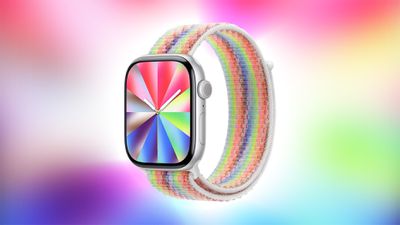
Apple Announces 2026 Pride Band Watch Face and iPhone Wallpaper Feature
watchOS 26.5 adds a new Pride Luminance watch face. It also fixes a bug with dual SIM iPhones and an issue that could cause audio alerts to fail to play in the Workout app. Apple's release notes for the update are below.

This update includes the following enhancements and bug fixes:
- Pride Luminance watch face that dynamically refracts a spectrum of colors, is available to add from the Face Gallery
- Fixes an issue where Messages on Apple Watch may use SMS instead of iMessage when paired with a dual SIM iPhone
- Fixes an issue where Workout app audio alerts could fail to play if the phone was not nearby Apple Watch
For information on the security content of Apple software please visit this website: https://support.apple.com/100100

More on the features in ‌watchOS 26‌ can be found in our watchOS 26 roundup.

Related Roundup: watchOS 26
Related Forum: Apple Watch

Popular Stories

General visionOS watchOS and tvOS Betas Feature Redux

Apple Releases Second watchOS 26.5, tvOS 26.5 and visionOS 26.5 Betas

Monday April 13, 2026 10:06 am PDT by
Apple today provided developers with the second betas of upcoming watchOS 26.5, tvOS 26.5, and visionOS 26.5 betas for testing purposes. The software comes two weeks after Apple released the first betas for each platform. The software updates are available through the Settings app on each device, and because these are developer betas, a free developer account is required. There's no word ...
General visionOS watchOS and tvOS Betas Feature Redux

Apple Releases Third watchOS 26.5, tvOS 26.5 and visionOS 26.5 Betas

Monday April 20, 2026 10:03 am PDT by
Apple today provided developers with the third betas of upcoming watchOS 26.5, tvOS 26.5, and visionOS 26.5 betas for testing purposes. The software comes a week after Apple released the second betas for each platform. The software updates are available through the Settings app on each device, and because these are developer betas, a free developer account is required. There's no word on ...
General visionOS watchOS and tvOS Betas Feature Redux

Apple Releases Fourth watchOS 26.5, tvOS 26.5 and visionOS 26.5 Betas

Monday April 27, 2026 10:01 am PDT by
Apple today provided developers with the fourth betas of upcoming watchOS 26.5, tvOS 26.5, and visionOS 26.5 betas for testing purposes. The software comes a week after Apple released the third betas for each platform. The software updates are available through the Settings app on each device, and because these are developer betas, a free developer account is required. There's no word on ...

Top Rated Comments

2 hours ago at 11:14 am
A reminder that this this face can display any colors you want to display. You’re not locked into the whole rainbow, thankfully.
Score: 3 Votes (Like | Disagree)
dmccombs Avatar
1 hour ago at 11:53 am
I'm on the latest Apple watch, full charge and plenty of free space on the watch, and the Preparing stage is taking Foorreeevveerrr..... I initiated the update from the watch (not the phone). The download didn't take long but the Preparing stage is awful. WTH Apple...

I don't mind doing updates on any of my devices EXCEPT the Apple watch. You have to put it on a charger, the updates take too long. I think Apple could make this process less of a PITA.

Sorry, for the rant, but obviously I have time on my hands while I update my watches. LOL
Score: 2 Votes (Like | Disagree)
BigMcGuire Avatar
2 hours ago at 10:37 am

Can you kindly remind me once again (I could search old threads but I'm lazy) how to update Watch OS the fast way, that is, via wifi instead of bluetooth?
I believe you just initiate the update, then turn off Bluetooth on your phone if I’m remembering correctly. That forces the watch to go to WiFi and poof, so much faster.
Score: 2 Votes (Like | Disagree)
BigMcGuire Avatar
1 hour ago at 11:57 am

I'm on the latest Apple watch, full charge and plenty of free space on the watch, and the Preparing stage is taking Foorreeevveerrr..... I initiated the update from the watch (not the phone). The download didn't take long but the Preparing stage is awful. WTH Apple...

I don't mind doing updates on any of my devices EXCEPT the Apple watch. You have to put it on a charger, the updates take too long. I think Apple could make this process less of a PITA.

Sorry, for the rant, but obviously I have time on my hands while I update my watches. LOL
I was just thinking this. Out of all my apple devices, my watch is the most disruptive when it comes to updates. Why can’t it just update when I sleep at night? I guess that might threaten the alarm if it doesn’t work… but still… my watch has been off now for an hour… lol

I wear my watch 24/7 except when I shower. Agreed… the preparing stage is really painful.
Score: 1 Votes (Like | Disagree)
Related Apple News: South Africa | Politics | Business | Iphone | Education