Apple Releases watchOS 26.2.1, Adding Precision Finding Support for AirTag 2
Apple today released watchOS 26.2.1, a minor update to the watchOS 26 update that came out last year. watchOS 26.2.1 comes six weeks after Apple released watchOS 26.2.
watchOS 26.2.1 can be downloaded for free on an iPhone running iOS 26.2.1 by opening up the Apple Watch app and going to General > Software Update, or initiating an update in the Settings app on the watch. To install the new software, the Apple Watch needs to have at least 50 percent battery and it needs to be placed on a charger.
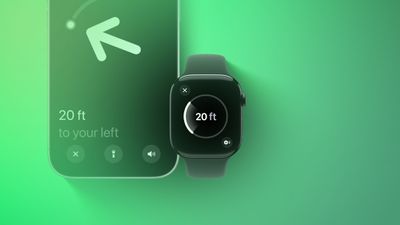
Today's update enables Precision Finding for the new AirTag 2 on the Apple Watch Series 9 and later and the Apple Watch Ultra 2 and later. Prior to now, Precision Finding for the AirTag has been limited to the iPhone.
It is not yet clear if the update enables Precision Finding on Apple Watch for the original AirTag, or if this is a feature limited to the new AirTag 2.
According to Apple's release notes, watchOS 26.2.1 also includes unspecified bug fixes.
Popular Stories
Apple today provided developers with the second betas of upcoming watchOS 26.5, tvOS 26.5, and visionOS 26.5 betas for testing purposes. The software comes two weeks after Apple released the first betas for each platform.
The software updates are available through the Settings app on each device, and because these are developer betas, a free developer account is required.
There's no word ...
Apple today provided developers with the third betas of upcoming watchOS 26.5, tvOS 26.5, and visionOS 26.5 betas for testing purposes. The software comes a week after Apple released the second betas for each platform.
The software updates are available through the Settings app on each device, and because these are developer betas, a free developer account is required.
There's no word on ...
Apple today provided developers with the fourth betas of upcoming watchOS 26.5, tvOS 26.5, and visionOS 26.5 betas for testing purposes. The software comes a week after Apple released the third betas for each platform.
The software updates are available through the Settings app on each device, and because these are developer betas, a free developer account is required.
There's no word on ...