Here Are All the States That Support Digital Driver's Licenses in the iPhone Wallet App

There are now 13 states that have added support for storing a driver's license or ID in the Apple Wallet app on iPhone and Apple Watch, with more to come.

Apple Wallet ID Cards

States With iPhone Digital ID Support

  • Arizona
  • California
  • Colorado
  • Georgia
  • Hawaii
  • Illinois
  • Iowa
  • Maryland
  • Montana
  • New Mexico
  • North Dakota
  • Ohio
  • West Virginia

Arizona, Maryland, and Colorado were some of the first states to add support back in 2022, while Montana, North Dakota, West Virginia, and Illinois just added support this year.

Digital IDs are also able to be added to the Wallet app in Puerto Rico.

States Planning to Add Support

Several states have announced plans to support digital IDs in the Wallet app in the future.

  • Connecticut
  • Kentucky
  • Mississippi
  • Oklahoma
  • Utah

There's no word on when these states plan to add support, nor on other states that have not yet committed to introducing the functionality.

Passport Digital IDs

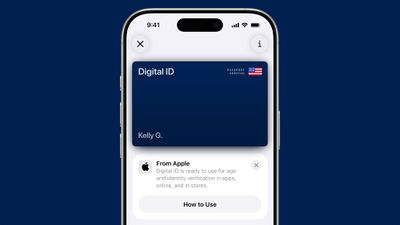
As of November 2025, Apple is allowing ‌iPhone‌ users to create a Digital ID in the Wallet app using a U.S. passport. ‌iPhone‌ and Apple Watch users who do not live in a state that supports digital IDs and driver's licenses can instead use their passport to create an ‌iPhone‌ ID.

ios 26 digital id passport wallet

Digital IDs created using a passport work the same way as state IDs and driver's licenses added to the Wallet app.

TSA Support

TSA security checkpoints at most major airports in the United States accept digital IDs in lieu of a physical ID. Digital IDs in the Wallet app can only be used for domestic travel.

Age Verification

State IDs stored in the Wallet app can be used for age verification purposes at businesses and retailers that support the functionality. Apple is also adding support for using IDs for age verification in apps and on websites.

Physical ID Requirements

Most states say that ‌iPhone‌ users are still required to present a physical ID if requested, and a digital ID cannot be used in lieu of an actual ID.

Digital IDs based on a passport cannot be used for international travel or border crossing purposes, so a physical passport is still required.

How to Add an ID

An eligible driver's license, ID, or passport can be added to the Wallet app on ‌iPhone‌ by tapping on the "+" sign in the upper right corner and then choosing the "Driver's License and ID Cards" option.

Device Compatibility

Using the digital ID feature in the Wallet app requires an ‌iPhone‌ 8 or later with iOS 16.5 or later or an Apple Watch Series 4 or later running watchOS 9.5 or later.

Adding a passport requires an ‌iPhone‌ 11 or later running iOS 26.1 or later or an Apple Watch Series 6 running watchOS 26.1 or later.

Popular Stories

iOS 26

iOS 26.4 and iOS 27 Features Revealed in New Leak

Friday December 12, 2025 10:56 am PST by
Macworld's Filipe Espósito today revealed a handful of features that Apple is allegedly planning for iOS 26.4, iOS 27, and even iOS 28. The report said the features are referenced within the code for a leaked internal build of iOS 26 that is not meant to be seen by the public. However, it appears that Espósito and/or his sources managed to gain access to it, providing us with a sneak peek...
iOS 26

iOS 26.2 Coming Soon With These 8 New Features on Your iPhone

Thursday December 11, 2025 8:49 am PST by
Apple seeded the second iOS 26.2 Release Candidate to developers earlier this week, meaning the update will be released to the general public very soon. Apple confirmed iOS 26.2 would be released in December, but it did not provide a specific date. We expect the update to be released by early next week. iOS 26.2 includes a handful of new features and changes on the iPhone, such as a new...
iOS 26

Apple Releases iOS 26.2 With Alarms for Reminders, Lock Screen Changes, Enhanced Safety Alerts and More

Friday December 12, 2025 10:10 am PST by
Apple today released iOS 26.2, the second major update to the iOS 26 operating system that came out in September, iOS 26.2 comes a little over a month after iOS 26.1 launched. ‌iOS 26‌.2 is compatible with the ‌iPhone‌ 11 series and later, as well as the second-generation ‌iPhone‌ SE. The new software can be downloaded on eligible iPhones over-the-air by going to Settings >...
AirPods Pro Firmware Feature

Apple Releases New Firmware for AirPods Pro 2 and AirPods Pro 3

Thursday December 11, 2025 11:28 am PST by
Apple today released new firmware designed for the AirPods Pro 3 and the prior-generation AirPods Pro 2. The AirPods Pro 3 firmware is 8B30, up from 8B25, while the AirPods Pro 2 firmware is 8B28, up from 8B21. There's no word on what's include in the updated firmware, but the AirPods Pro 2 and AirPods Pro 3 are getting expanded support for Live Translation in the European Union in iOS...
macOS Tahoe 26 Thumb

Apple Releases macOS Tahoe 26.2 With Edge Light

Friday December 12, 2025 10:08 am PST by
Apple today released macOS Tahoe 26.2, the second major update to the macOS Tahoe operating system that came out in September. macOS Tahoe 26.2 comes five weeks after Apple released macOS Tahoe 26.1. Mac users can download the macOS Tahoe update by using the Software Update section of System Settings. macOS Tahoe 26.2 includes Edge Light, a feature that illuminates your face with soft...
AirTag 2 Mock Feature

Apple AirTag 2: Four New Features Found in iOS 26 Code

Thursday December 11, 2025 10:31 am PST by
The AirTag 2 will include a handful of new features that will improve tracking capabilities, according to a new report from Macworld. The site says that it was able to access an internal build of iOS 26, which includes references to multiple unreleased products. Here's what's supposedly coming: An improved pairing process, though no details were provided. AirTag pairing is already...
ipados 26 1 slide over

Apple Releases iPadOS 26.2 With Multitasking Improvements

Friday December 12, 2025 10:09 am PST by
Apple today released iPadOS 26.2, the second major update to the iPadOS 26 operating system released in September. iPadOS 26.2 comes a month after iPadOS 26.1. The new software can be downloaded on eligible iPads over-the-air by going to Settings > General > Software Update. iPadOS 26.2 continues with the multitasking improvements that were added with iPadOS 26.1. You can now drag and...
bug security vulnerability issue fix larry

Update Now: iOS 26.2 Fixes 20+ Security Vulnerabilities

Friday December 12, 2025 11:11 am PST by
Apple today released iOS 26.2, iPadOS 26.2, and macOS 26.2, all of which introduce new features, bug fixes, and security improvements. Apple says that the updates address over 20 vulnerabilities, including two bugs that are known to have been actively exploited. There are a pair of WebKit vulnerabilities that could allow maliciously crafted web content to execute code or cause memory...

Top Rated Comments

Plutonius Avatar
4 weeks ago
Why bother if you are still required to carry the physical ID ?
Score: 6 Votes (Like | Disagree)
I7guy Avatar
4 weeks ago
Come on New York and New Jersey!
Score: 3 Votes (Like | Disagree)
al256 Avatar
4 weeks ago
Pull a page from the Koch brothers… Apple could hire local lawyers to draft the legislation for the respective legislatures and allow the collection of the number interested persons for each state to be collected in Apple Wallet for each state to examine. Something like a “I’m interest in a mobile Driver’s License but my state isn’t listed” button for people to use. Make it easy for the legislators, make it clear to the legislators.
Score: 3 Votes (Like | Disagree)
SpotOnT Avatar
4 weeks ago
Sometimes I feel like I am in the Twilight Zone. I mean, I just don’t get why anyone would ever use this.

1) What is the point of using this when you are still required to carry around physical copies?

2) Why on earth would you ever hand over your phone to the police….I mean we just had that trial where cops were taking people’s phones and downloading photos/banking details during traffic stops…
Score: 2 Votes (Like | Disagree)
gsmornot Avatar
4 weeks ago
Tried my Digital ID in Miami at TSA Pre. The machine sat there until we decided to cancel and use my drivers license. I was then randomly selected for security check. The wiped my iPads and handed them back. Ah well, I will try again later.
Score: 2 Votes (Like | Disagree)
VulchR Avatar
4 weeks ago
It'd be nice to have the US passport feature be available for those of us living overseas. I get that it doesn't replace physical passports for international travel, but ID's have uses other than just travel. I can't help but feel electronic ID's are more secure that a printed piece of paper or plastic that somebody could steal.
Score: 2 Votes (Like | Disagree)