Apple Expands Spotlight Clipboard Settings in macOS Tahoe 26.1

Apple quietly added a small but notable enhancement to Spotlight in macOS Tahoe 26.1, which was released on Monday. The update introduces new clipboard history controls for Spotlight, allowing users to decide how long copied items remain accessible in search results.
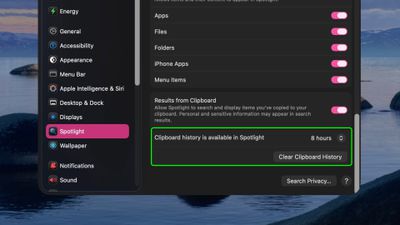
spotlight clipboard history settings 26 1%402x
Previously, Spotlight could optionally retain clipboard contents for up to eight hours, but the latest update expands that flexibility with three options – 30 minutes, 8 hours, or 7 days. There's also a new "Clear Clipboard History" button in System Settings ➝ Spotlight, giving users the ability to manually wipe stored clipboard data without having to wipe Spotlight search history wholesale.

The changes should be welcomed by anyone wanting finer control over how long potentially sensitive information is retained by Spotlight, and it puts the feature more on par with third-party clipboard management apps. Apple did not mention the change in its macOS 26.1 release notes, suggesting it may be just one of several under-the-radar refinements to macOS Tahoe 26.

Related Roundup: macOS Tahoe
Related Forum: macOS Tahoe

Popular Stories

Aston Martin CarPlay Ultra Screen

Apple's CarPlay Ultra to Expand to These Vehicle Brands Later This Year

Sunday February 1, 2026 10:08 am PST by
Last year, Apple launched CarPlay Ultra, the long-awaited next-generation version of its CarPlay software system for vehicles. Nearly nine months later, CarPlay Ultra is still limited to Aston Martin's latest luxury vehicles, but that should change fairly soon. In May 2025, Apple said many other vehicle brands planned to offer CarPlay Ultra, including Hyundai, Kia, and Genesis. In his Powe...
Apple Logo Black

Apple's Next Launch is 'Imminent'

Sunday February 1, 2026 12:31 pm PST by
The calendar has turned to February, and a new report indicates that Apple's next product launch is "imminent," in the form of new MacBook Pro models. "All signs point to an imminent launch of next-generation MacBook Pros that retain the current form factor but deliver faster chips," Bloomberg's Mark Gurman said on Sunday. "I'm told the new models — code-named J714 and J716 — are slated...
Apple MacBook Pro M4 hero

New MacBook Pros Reportedly Launching Alongside macOS 26.3

Sunday February 1, 2026 5:42 am PST by
Apple is planning to launch new MacBook Pro models with M5 Pro and M5 Max chips alongside macOS 26.3, according to Bloomberg's Mark Gurman. "Apple's faster MacBook Pros are planned for the macOS 26.3 release cycle," wrote Gurman, in his Power On newsletter today. "I'm told the new models — code-named J714 and J716 — are slated for the macOS 26.3 software cycle, which runs from...
iOS 26

iOS 26.3 and iOS 26.4 Will Add These New Features to Your iPhone

Tuesday February 3, 2026 7:47 am PST by
We are still waiting for the iOS 26.3 Release Candidate to come out, so the first iOS 26.4 beta is likely still at least a week or two away. Following beta testing, iOS 26.4 will likely be released to the general public in March or April. Below, we have recapped known or rumored iOS 26.3 and iOS 26.4 features so far. iOS 26.3 iPhone to Android Transfer Tool iOS 26.3 makes it easier...
14 inch MacBook Pro Keyboard

Apple Changes How You Order a Mac

Saturday January 31, 2026 10:51 am PST by
Apple recently updated its online store with a new ordering process for Macs, including the MacBook Air, MacBook Pro, iMac, Mac mini, Mac Studio, and Mac Pro. There used to be a handful of standard configurations available for each Mac, but now you must configure a Mac entirely from scratch on a feature-by-feature basis. In other words, ordering a new Mac now works much like ordering an...

Top Rated Comments

sniffies Avatar
13 weeks ago
Still barebones clipboard compared to Raycast's, but the 7-day history is definitely a much needed improvement.

Other improvements I'd like to see:

[LIST=1]
* Single-step keyboard shortcut; ⌘-space-4 just ain't cuttin it
* Full contents of copied data
* Copied image size and dimensions
* Number of characters/words for copied text
* Allowlist and blocklist for apps; for example, allow copying from Passwords app
* 30-, 60-, 90-day history
* Copied data filtering; for example, show text only, images only, links only, etc.
* Copied data previewing (not opening); for example, preview images, links, etc.
* Pinning, which would prevent pinned entries from getting cleared beyond history limit
Score: 6 Votes (Like | Disagree)
tkermit Avatar
13 weeks ago

Still barebones clipboard compared to Raycast's, but the 7-day history is definitely a much needed improvement.

Other improvements I'd like to see:
...
I had hoped to see something closer to Paste ('https://pasteapp.io'), which feels way more Apple-like... this is barely an MVP.
Score: 1 Votes (Like | Disagree)
Devnul0 Avatar
13 weeks ago

so what happens to our passwords copied with 1password? do they get indexed for everyone to find?
Hopefully whatever it is that password managers do to keep the things that they stuff into the pasteboard from getting involved with Continuity (copy on one device, paste on the other), will keep them out of the hands of Spotlight. But realistically it needs to be tested to be sure, because Apple has shown us some really stupid things.
Score: 1 Votes (Like | Disagree)
jarman92 Avatar
13 weeks ago

so what happens to our passwords copied with 1password? do they get indexed for everyone to find?
Do you think Spotlight...publishes its index publicly?
Score: 1 Votes (Like | Disagree)
bmustaf Avatar
13 weeks ago
"Apple quietly added a small..."

Oh, with Spotlight involved it'll be anything but quiet and small.

mds, mds_stores, etc are things of nightmares, hahaha.
Score: 1 Votes (Like | Disagree)
WWP99 Avatar
13 weeks ago
I just want it to work. Spotlight is so poorly designed that I can never find a file I literally type the name of. Have to use third-party apps, which are much better.
Score: 1 Votes (Like | Disagree)