Apple Upgrades CarPlay in Two Ways - MacRumorsOpen MenuShow RoundupsShow Forums menuVisit ForumsOpen Sidebar
Skip to Content

Apple Upgrades CarPlay in Two Ways

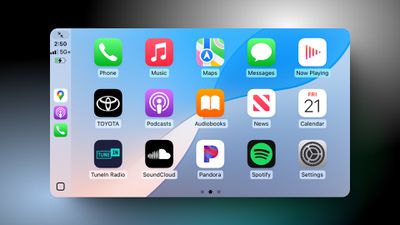
The upcoming iOS 18.4 update for the iPhone includes a smaller but meaningful improvement for Apple's in-car iPhone mirroring system CarPlay.
ios 18 4 carplay
Specifically, CarPlay now shows a third row of icons, up from two rows previously. However, this change is only visible in vehicles with a larger center display. For example, a MacRumors Forums member noticed the change in a Toyota Tundra with a 14-inch screen.

In our testing, CarPlay still showed two rows of four icons in a Honda Civic with a 9-inch screen.

While this is only a minor change, CarPlay showing more icons when possible is a nice quality-of-life improvement, allowing drivers to quickly access more apps with less swiping between pages and keep their eyes on the road.

iOS 18.4 is currently in beta testing. The software update will be released to the general public in early April, according to Apple's website.

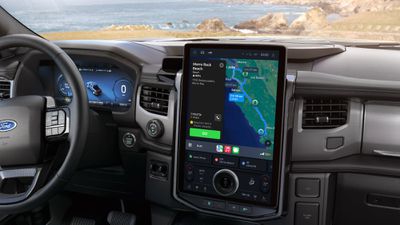
In addition, the Apple Maps electric vehicle routing feature on CarPlay gained support for the North American Charging System (NACS) charging connector standard this week. Ford recently began selling an adapter that allows its Mustang Mach-E and F-150 Lightning vehicles to be charged by a Tesla Supercharger, and now the Apple Maps electric vehicle routing feature can plan routes that include stops at Tesla Superchargers.
ford nacs ev routing
Ford says this capability is available now on CarPlay with an iPhone running iOS 17 or later, so no new software update is required.

Here are Ford's instructions on how to use the feature:

- Connect your Apple iPhone to CarPlay.
- Open Apple Maps, go to Settings and confirm your preferred charging network(s) – make sure you select a NACS fast charging station, such as Tesla Supercharger. You only have to do this once.
- Enter a destination.
- Apple Maps will then calculate the estimated state of charge you will have when you get to a destination.
- If a charge is required, depending on the fastest route, it will automatically route you to a NACS fast charging station.*

* When a route is started that includes Tesla Superchargers, drivers may see a warning that the route requires a Fast Charging Adapter (NACS) – drivers should make sure to have it with them to use. Battery preconditioning when enroute to a charger is not available for Apple Maps EV Routing.

Looking further ahead into the future, Apple confirmed that it continues to work with several auto makers on next-generation CarPlay. However, Apple is no longer providing a timeframe for next-generation CarPlay's launch.

Related Roundup: CarPlay

Popular Stories

whatsapp carplay

WhatsApp Gets New CarPlay App

Tuesday April 7, 2026 4:32 pm PDT by
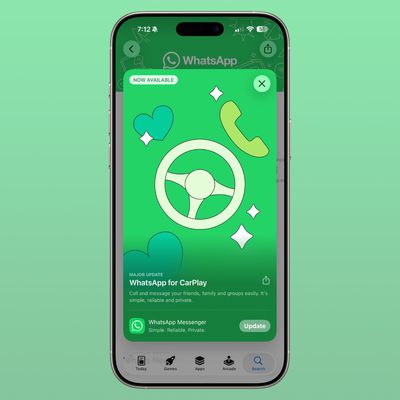
Facebook-owned messaging app WhatsApp was today updated with expanded support for CarPlay. CarPlay users are able to more easily call and message their friends and family members in WhatsApp directly from the car interface. WhatsApp had CarPlay integration before, but with limited Siri-based functionality. The new app has a full native CarPlay interface with a list of recent chats and call...
Aston Martin CarPlay Ultra Screen

Apple Says CarPlay Ultra is Coming to These Vehicle Brands

Saturday April 18, 2026 5:59 am PDT by
Last year, Apple launched CarPlay Ultra, the long-awaited next-generation version of its CarPlay software system for vehicles. Nearly a year later, CarPlay Ultra is still limited to Aston Martin's latest luxury vehicles, but that should change fairly soon. In May 2025, Apple said many other vehicle brands planned to offer CarPlay Ultra, including Hyundai, Kia, and Genesis. CarPlay Ultra...
Apple Sports Feature

Apple Sports App Receives Two New Features Across iPhone and CarPlay

Monday April 20, 2026 9:31 am PDT by
Apple today updated its Sports app with weather conditions for F1 Grand Prix races and smaller widget options for both the iPhone's Home Screen and CarPlay. The widget lets you view scores for your favorite leagues and teams at a glance. CarPlay gained support for widgets on iOS 26. To view them, swipe right on CarPlay's interface until you reach the Dashboard screen, shown below....

Top Rated Comments

15 months ago
Excellent news. I love Apple CarPlay. It just works, and works incredibly well.
Score: 9 Votes (Like | Disagree)
jblank Avatar
15 months ago

There aren't enough useful CarPlay apps to fill out three rows. Plenty have a CarPlay icon, but why would I use Panera from there?

Maps, music, podcasts, text, calls. That's about it.
What we need (and what I have been calling for for years), is a functioning, auto-updating, weather radar and an upcoming weather alerts system. If I am traveling on I-40 and a Severe Thunderstorm Warning is 15 miles ahead of me, show me that on the screen, tell me, alert me somehow.
Score: 6 Votes (Like | Disagree)
Veinticinco Avatar
15 months ago
Finally, the wait is over!!!

CarPlay 1.0.1
Score: 6 Votes (Like | Disagree)
WarmWinterHat Avatar
15 months ago
There aren't enough useful CarPlay apps to fill out three rows. Plenty have a CarPlay icon, but why would I use Panera from there?

Maps, music, podcasts, text, calls. That's about it.
Score: 4 Votes (Like | Disagree)
jblank Avatar
15 months ago

I don’t know who goes into their car and looks at icons.
The answer is nobody.......until they need to press one on their in-car display.
Score: 3 Votes (Like | Disagree)
ProbablyDylan Avatar
15 months ago
So improvements for newer cars and nothing for the rest of us, huh? Does Apple think people upgrade cars as often as they do phones or something?
Score: 2 Votes (Like | Disagree)
Related Apple News: Google | Reviews | App Store | Safaris Compact Tab Bar Back On Mac And Ipad | Apple Pay