Apple's Latest Updates Re-Enable Apple Intelligence on Some Devices - MacRumorsOpen MenuShow RoundupsShow Forums menuVisit ForumsOpen Sidebar
Skip to Content

Apple's Latest Updates Re-Enable Apple Intelligence on Some Devices

Some users are reporting that Apple's latest software updates are quietly re-enabling Apple Intelligence features, even after they had explicitly disabled them in the previous update.

apple intelligence black
If you're catching up, Apple on Monday pushed out new macOS Sequoia 15.3.1 and iOS/iPadOS 18.3.1 point releases that include important security fixes and are recommended for all users. Shortly after the rollout, software developer Jeff Johnson collated some early reports complaining about the apparent behavior, noting that devices displaying a Welcome screen after updating were particularly susceptible to having Apple Intelligence automatically re-enabled.

Indeed, MacRumors testing confirms this behavior on certain devices. In our tests using an M4 Pro Mac mini, iPhone 16 Pro, iPhone 15 Pro, and M4 iPad Pro – all with Apple Intelligence previously disabled in iOS/iPadOS 18.3 and macOS 15.3 – we found that while the iPhones and iPad maintained their disabled status after updating to iOS/iPadOS 18.3.1, the Mac mini automatically re-enabled the feature after updating.

The key trigger does seem to be the appearance of a Welcome screen announcing Apple Intelligence features. We saw it on the M4 Pro Mac mini after updating to macOS 15.3.1, but not on the iPhones or iPad Pro. Notably, unlike typical setup screens, this one lacks the usual "Set Up Later" option, effectively forcing you to proceed with enabling the feature.
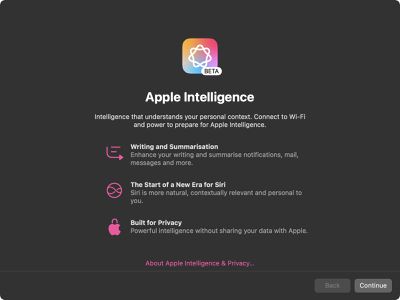
apple intelligence

Apple Intelligence splash screen on macOS Sequoia 15.3.1

This automatic re-enabling obviously raises concerns about user choice, particularly given that Apple Intelligence requires up to 7GB of storage space on each device where it's activated. The storage requirement stems from the need to download and maintain local AI models for Apple's privacy-focused processing. Apple in macOS Sequoia 15.3 and iOS/iPadOS 18.3 controversially made Apple Intelligence an opt-out feature, meaning it is turned on automatically on compatible devices.

Users who prefer to keep Apple Intelligence disabled should verify their settings after updating. On iPhone and iPad, check that the Apple Intelligence toggle is off in Settings → Apple Intelligence & Siri. Mac users can find the toggle in System Settings → Apple Intelligence & Siri. Did you update to iOS/iPadOS 18.3.1 or macOS Sequoia 15.3.1 overnight? Let us know in the comments what your experience was.


Popular Stories

imac video apple feature

Apple Released Yet Another New Product Today

Friday March 20, 2026 2:39 pm PDT by
Apple has unveiled a whopping nine new products so far this March, including an iPhone 17e, iPad Air models with the M4 chip, MacBook Air models with the M5 chip, MacBook Pro models with M5 Pro and M5 Max chips, the all-new MacBook Neo, an updated Studio Display, a higher-end Studio Display XDR, AirPods Max 2, and now the Nike Powerbeats Pro 2. iPhone 17e features the same overall design as...
iPhone 18 Pro Deep Red Feature

iPhone 18 Pro Launching Later This Year With These 12 New Features

Wednesday March 18, 2026 7:39 am PDT by
While the iPhone 18 Pro and iPhone 18 Pro Max are not expected to launch for another six months or so, there are already plenty of rumors about the devices. It was initially reported that the iPhone 18 Pro models would have fully under-screen Face ID, with only a front camera visible in the top-left corner of the screen. However, the latest rumors indicate that only one Face ID component...
ios 26 4 pastel

iOS 26.4: Top 10 New Features Coming to Your iPhone

Friday March 20, 2026 2:44 pm PDT by
iOS 26.4 isn't the major update with new Siri features that we hoped for, but there are some useful quality of life improvements, and a little bit of fun with an AI playlist generator and new emoji characters. Playlist Playground - Apple Music has a Playlist Playground option that lets you generate playlists from text-based descriptions. You can include moods, feelings, activities, or...

Top Rated Comments

Mr_Ed Avatar
15 months ago

Could be incompetence. I've caught them reenabling icloud features I don't want on updates before, but it hasn't happened at least for the last 2 major OS versions.

We'll never know if they fixed it or they got scared and removed the intentional feature though.
Yeah, but what seems different here is the “introduction” screen after update lacking the option to leave it off. This is deliberate, and I think coming from Apple, it’s a real shame they decided to go down this path.
Score: 28 Votes (Like | Disagree)
cjsuk Avatar
15 months ago
Yeah mine did this. Bloody annoying.

This is how I end up on a Pixel with LineageOS out of spite!
Score: 17 Votes (Like | Disagree)
contacos Avatar
15 months ago
I guess if no one uses it, you gotta force it. I still think the name is unfortunate. "Intelligence" sounds like spyware by some rogue government entity if you watched too many action movies or listened to one too many "Pegasus" podcasts
Score: 16 Votes (Like | Disagree)
thefrost Avatar
15 months ago
Deliberate behaviour?
Score: 15 Votes (Like | Disagree)
15 months ago

Just their typical lack of testing and not thinking about how everyone operates.

They pushed out this update because of an edge case where physical access was needed and assumed everyone already was using their AI tools so never tested if they weren't.
Makes you question their privacy marketing when they can't even respect the settings on a device you supposedly own....
Score: 12 Votes (Like | Disagree)
turbineseaplane Avatar
15 months ago

I like the features of apple intelligence
Noted
👍

Whether one "likes Apple Intelligence", or doesn't like it, isn't the actual point

Not respecting the preferences of those who've turned it off is indeed "ramming it down their throat"

If you already had it on ... and it's still "on", nothing has changed for you anyhow
This particular discussion simply doesn't apply to you
Score: 11 Votes (Like | Disagree)
Related Apple News: Ipad | Motoring | South Africa | World News | Technology