Everything New in iOS 18.3 Beta 3 - MacRumorsOpen MenuShow RoundupsShow Forums menuVisit ForumsOpen Sidebar
Skip to Content

Everything New in iOS 18.3 Beta 3

Apple provided the third beta of iOS 18.3 to developers today, and while the betas have so far been light on new features, the third beta makes some major changes to Notification Summaries and also tweaks a few other features.
Generic iOS 18

Notification Summary Changes

Apple made multiple changes to Notification Summaries in response to complaints about inaccurate summaries of news headlines.
ios 18 3 notification summary italics

  • For now, summaries for apps in the News and Entertainment category have been disabled. Apple Intelligence will no longer summarize news notifications, but this is temporary and will be reinstated in a future update when Apple has made some changes.
  • In the Settings app, the Notifications Summaries section makes it clear that this is a beta feature and that errors are a possibility.
  • During setup, Apple has added the following wording for Notification Summaries: "Summarization may change the meaning of the original headlines. Double check important information."
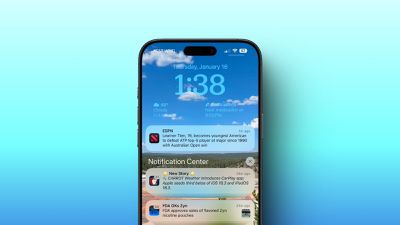
  • Summarized notifications are now shown with the text italicized to distinguish them from standard notifications.
  • Notification Summaries can be disabled on a per-app basis directly from the Lock Screen by swiping on a notification and tapping on the "Options" button to get to an interface for turning off summaries.

All of the Notification Summary changes have been made in iOS 18.3, iPadOS 18.3, and macOS Sequoia 15.3.

Camera Control

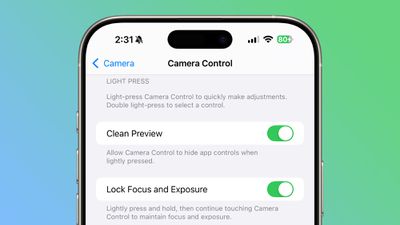
On iPhone 16 models, the Camera Control section in the Settings has a renamed toggle. The toggle for AE/AF lock has been renamed to "Lock Focus and Exposure," which would be clearer to non-photographers who do not know what AE/AF Lock is.
ios 18 3 lock focus
Lock Focus and Exposure is an optional setting that lets you lock your settings with a light press and hold on the Camera Control button, and it is meant to work similarly to a DSLR camera.

Messages

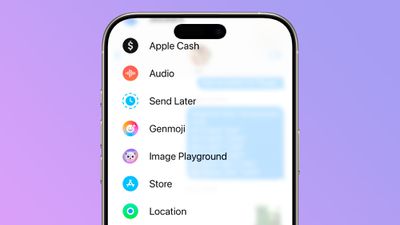
In the Messages sidebar that's accessible by tapping on the "+" button in any conversation, there is now a Genmoji entry, and tapping it takes you to the ‌Genmoji‌ creation interface.

ios 18 3 genmoji messages
This is simply another way to get to the ‌Genmoji‌ creation tools, which have previously been available by tapping on the emoji keyboard button.

PDF Editing

When editing a PDF through the screenshot interface, if you crop content out, Apple now provides a warning that cropped content is not removed from the PDF.
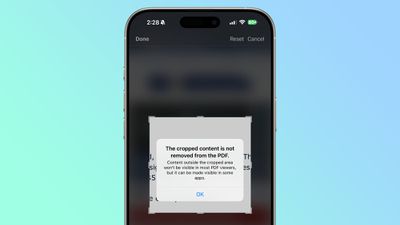
ios 18 3 pdf crop
"Content outside the cropped area won't be visible in most PDF viewers, but it can be made visible in some apps," reads the message.

More Features

Know of something new in the latest iOS 18.3 beta that we left out? Let us know in the comments below.


Related Forums: iOS 18, iPadOS 18

Popular Stories

imac video apple feature

Apple Released Yet Another New Product Today

Friday March 20, 2026 2:39 pm PDT by
Apple has unveiled a whopping nine new products so far this March, including an iPhone 17e, iPad Air models with the M4 chip, MacBook Air models with the M5 chip, MacBook Pro models with M5 Pro and M5 Max chips, the all-new MacBook Neo, an updated Studio Display, a higher-end Studio Display XDR, AirPods Max 2, and now the Nike Powerbeats Pro 2. iPhone 17e features the same overall design as...
iPhone 18 Pro Deep Red Feature

iPhone 18 Pro Launching Later This Year With These 12 New Features

Wednesday March 18, 2026 7:39 am PDT by
While the iPhone 18 Pro and iPhone 18 Pro Max are not expected to launch for another six months or so, there are already plenty of rumors about the devices. It was initially reported that the iPhone 18 Pro models would have fully under-screen Face ID, with only a front camera visible in the top-left corner of the screen. However, the latest rumors indicate that only one Face ID component...
ios 26 4 pastel

iOS 26.4: Top 10 New Features Coming to Your iPhone

Friday March 20, 2026 2:44 pm PDT by
iOS 26.4 isn't the major update with new Siri features that we hoped for, but there are some useful quality of life improvements, and a little bit of fun with an AI playlist generator and new emoji characters. Playlist Playground - Apple Music has a Playlist Playground option that lets you generate playlists from text-based descriptions. You can include moods, feelings, activities, or...

Top Rated Comments

15 months ago

Interesting they removed notification summaries for now. AI still has a long way to go before being mature. Hardly unexpected.
The notification summary thing is a solution looking for a problem. Seemed like a forced attempt to apply AI wherever possible.

Notifications are inherently already brief summaries of things that were written as intended.
Score: 5 Votes (Like | Disagree)
15 months ago

Genmoji should be available from every menu in the settings, but I digress.

It seems Apple doesn't really want people to use the phone since fixing a terrible battery performance is not a priority.
YMMV, but my battery has been great. No complaints.
Score: 4 Votes (Like | Disagree)
surfzen21 Avatar
15 months ago
I wish I could whitelist certain email senders or email chains from summary. I doubt Apple would implement this granular level of control for us users though.
Score: 4 Votes (Like | Disagree)
centauratlas Avatar
15 months ago
I’d like the option to block or filter calls that don’t have the checkmark: “calls with a check mark have been verified by the carrier.” Ditto for texts.
Score: 3 Votes (Like | Disagree)
TroyBoy30 Avatar
15 months ago
groundbreaking stuff!
Score: 3 Votes (Like | Disagree)
Avenged110 Avatar
15 months ago

I wish I could whitelist certain email senders or email chains from summary. I doubt Apple would implement this granular level of control for us users though.
I'm still waiting to be able to blacklist domains or filter junk mail before applying sorting rules account-wide on iCloud.com – things which seem like pretty basic functions of email to me. I'm not optimistic.
Score: 3 Votes (Like | Disagree)
Related Apple News: Buyers Guide | Travel | Iphone | Sport | Health