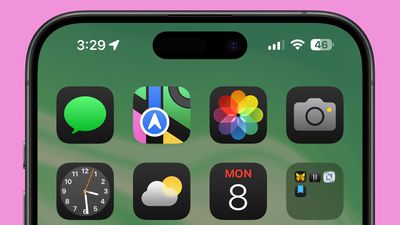
Everything New in iOS 18 Beta 3

With the third betas of iOS 18 and iPadOS 18 that Apple released today, there are additional tweaks to a number of features like Dark Mode icons, the Photos app, emoji in Messages, and more, with Apple appearing to be preparing for the launch of Apple Intelligence.
iOS 18 on iPhone Feature
Apple will continue updating iOS 18‌ over the course of the next couple of months, refining the beta prior to its launch. We've highlighted everything new in the third ‌iOS 18‌ beta.

Dark Mode Icons

There are now ‌Dark Mode‌ icons for many third-party apps like Facebook, Etsy, Telegram, Signal, Slack, Notion, YouTube, and more. Apple appears to be adding the ‌Dark Mode‌ icons automatically to apps that have icons with a handful colors.
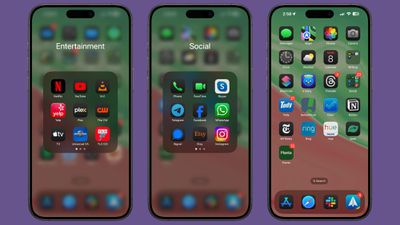
ios 18 dark mode third party icons
With some icons, the secondary color becomes the main color, while the background color is turned to black, and in others, a white icon background transitions to black.

Apps with complicated icon designs in many colors do not change to a ‌Dark Mode‌ color at this time, but Apple does tint them to be darker. When iOS 18 launches, app developers will be able to provide their own dark-tinted icons to be used in lieu of Apple's defaults.

Photos App

Apple added a Select button for choosing multiple images to the main ‌Photos‌ interface, so there is no longer a need to swipe down to get to the Select button.
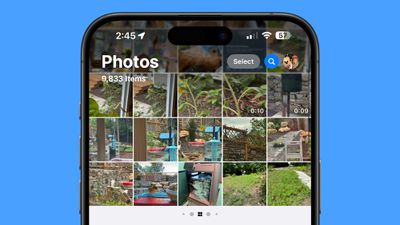
ios 18 photos select button
With this change, the Search button is now just a magnifying glass, but it is highlighted blue to make it stand out more.

Emoji

In Messages, emoji, Memoji, and stickers have all been combined into one interface, which can be navigated using the tiny icons at the bottom of the display. There are icons you can tap into to get to stickers or Memoji, and you can scroll through your Memoji to more quickly find specific characters and poses.
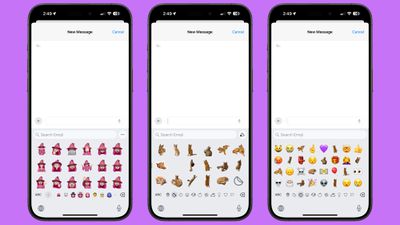
ios 18 emoji stickers memoji
You can create both stickers and Memoji from this interface, and you can use stickers right in your messages like you can use emoji. This works with non-moving stickers only, and those with animation from Live Photos will display in the larger attachment sticker size. The smaller stickers used as emoji are, however, hard to see.

Emoji are displayed larger than before, so you see more detail but fewer characters before having to scroll, and there are more emoji and stickers displayed at once in the Recent section.

Apple likely made these changes to prepare for the debut of ‌Apple Intelligence‌, Genmoji, and Image Playground.

Wallpaper

There is a dynamic version of the iOS 18 wallpaper that transitions through different colors based on the time of day.
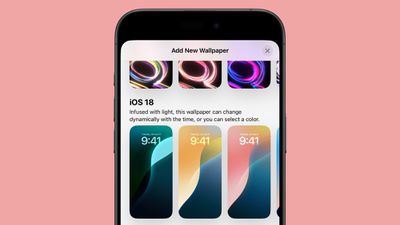
ios 18 dynamic wallpaper option

Flashlight Interface

When you activate the Flashlight, or tap on the controls from the Dynamic Island, there is a larger and more intuitive interface for changing the brightness and the spread of the LED Flash used for the Flashlight feature.
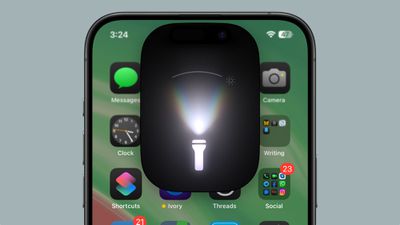
ios 18 flashlight refinement

Maps

Apple has once again tweaked the colors of the Maps icon when ‌Dark Mode‌ is activated.

ios 18 maps dark mode color

RCS in Messages

The interface for RCS in the Messages section of the Settings app has changed. Rather than just showing up as an on/off toggle, it is now a tap-in menu that provides some additional context. Apple explains that sending and receiving messages with ‌RCS‌ uses wireless data, and cellular network identifiers may be shared with carriers and their partners.
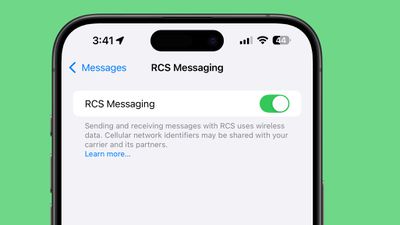
ios 18 beta 3 messages rcs toggle
Some iPhone users in Canada and other countries are also now seeing the ‌RCS‌ toggle, though it is unclear if ‌RCS‌ is working outside of the United States.

Apple Intelligence

There are some mentions of ‌Apple Intelligence‌ features in the code, further hinting at the upcoming addition of AI to the iOS 18 beta. Code references ‌Genmoji‌, ‌Image Playground‌, Writing Tools, Image Wand, and more.

More New Changes

Know of a new feature in iOS 18 beta 3 that we left out? Let us know in the comments below.

Related Forums: iOS 18, iPadOS 18

Popular Stories

iOS 26

iOS 26.4 and iOS 27 Features Revealed in New Leak

Friday December 12, 2025 10:56 am PST by
Macworld's Filipe Espósito today revealed a handful of features that Apple is allegedly planning for iOS 26.4, iOS 27, and even iOS 28. The report said the features are referenced within the code for a leaked internal build of iOS 26 that is not meant to be seen by the public. However, it appears that Espósito and/or his sources managed to gain access to it, providing us with a sneak peek...
iOS 26

iOS 26.2 Coming Soon With These 8 New Features on Your iPhone

Thursday December 11, 2025 8:49 am PST by
Apple seeded the second iOS 26.2 Release Candidate to developers earlier this week, meaning the update will be released to the general public very soon. Apple confirmed iOS 26.2 would be released in December, but it did not provide a specific date. We expect the update to be released by early next week. iOS 26.2 includes a handful of new features and changes on the iPhone, such as a new...
iOS 26

Apple Releases iOS 26.2 With Alarms for Reminders, Lock Screen Changes, Enhanced Safety Alerts and More

Friday December 12, 2025 10:10 am PST by
Apple today released iOS 26.2, the second major update to the iOS 26 operating system that came out in September, iOS 26.2 comes a little over a month after iOS 26.1 launched. ‌iOS 26‌.2 is compatible with the ‌iPhone‌ 11 series and later, as well as the second-generation ‌iPhone‌ SE. The new software can be downloaded on eligible iPhones over-the-air by going to Settings >...
AirPods Pro Firmware Feature

Apple Releases New Firmware for AirPods Pro 2 and AirPods Pro 3

Thursday December 11, 2025 11:28 am PST by
Apple today released new firmware designed for the AirPods Pro 3 and the prior-generation AirPods Pro 2. The AirPods Pro 3 firmware is 8B30, up from 8B25, while the AirPods Pro 2 firmware is 8B28, up from 8B21. There's no word on what's include in the updated firmware, but the AirPods Pro 2 and AirPods Pro 3 are getting expanded support for Live Translation in the European Union in iOS...
macOS Tahoe 26 Thumb

Apple Releases macOS Tahoe 26.2 With Edge Light

Friday December 12, 2025 10:08 am PST by
Apple today released macOS Tahoe 26.2, the second major update to the macOS Tahoe operating system that came out in September. macOS Tahoe 26.2 comes five weeks after Apple released macOS Tahoe 26.1. Mac users can download the macOS Tahoe update by using the Software Update section of System Settings. macOS Tahoe 26.2 includes Edge Light, a feature that illuminates your face with soft...
AirTag 2 Mock Feature

Apple AirTag 2: Four New Features Found in iOS 26 Code

Thursday December 11, 2025 10:31 am PST by
The AirTag 2 will include a handful of new features that will improve tracking capabilities, according to a new report from Macworld. The site says that it was able to access an internal build of iOS 26, which includes references to multiple unreleased products. Here's what's supposedly coming: An improved pairing process, though no details were provided. AirTag pairing is already...
ipados 26 1 slide over

Apple Releases iPadOS 26.2 With Multitasking Improvements

Friday December 12, 2025 10:09 am PST by
Apple today released iPadOS 26.2, the second major update to the iPadOS 26 operating system released in September. iPadOS 26.2 comes a month after iPadOS 26.1. The new software can be downloaded on eligible iPads over-the-air by going to Settings > General > Software Update. iPadOS 26.2 continues with the multitasking improvements that were added with iPadOS 26.1. You can now drag and...
bug security vulnerability issue fix larry

Update Now: iOS 26.2 Fixes 20+ Security Vulnerabilities

Friday December 12, 2025 11:11 am PST by
Apple today released iOS 26.2, iPadOS 26.2, and macOS 26.2, all of which introduce new features, bug fixes, and security improvements. Apple says that the updates address over 20 vulnerabilities, including two bugs that are known to have been actively exploited. There are a pair of WebKit vulnerabilities that could allow maliciously crafted web content to execute code or cause memory...

Top Rated Comments

ppdix Avatar
19 months ago
I am a photographer and use the Photos app constantly.
It's really confusing now. I really don't like it. The summary feature only works on albums and the summarized photos are square, which crop the image too much. There should be a square/normal toggle.
Also, when you click on a photo to view it and, if the photo is vertical, there is a rounded corner and the photo doesn't reach the edge of the display, making it smaller than necessary. If the photo is horizontal, the rounded corners are not there and the image reaches the edge of the display.
What are the designers doing?
Slightly disappointed to say the least...
Score: 21 Votes (Like | Disagree)
Unggoy Murderer Avatar
19 months ago
In the Photos app, you’re no longer forced to full-screen when zooming on a photo, you can zoom in just a little again. This was a HUGE peeve in b1 and b2, really glad they reversed it. ?

Also, just spotted the emoji keyboard has changed, the keys are much larger.
Score: 12 Votes (Like | Disagree)
zorinlynx Avatar
19 months ago

I am a photographer and use the Photos app constantly.
It's really confusing now. I really don't like it. The summary feature only works on albums and the summarized photos are square, which crop the image too much. There should be a square/normal toggle.
Also, when you click on a photo to view it and, if the photo is vertical, there is a rounded corner and the photo doesn't reach the edge of the display, making it smaller than necessary. If the photo is horizontal, the rounded corners are not there and the image reaches the edge of the display.
What are the designers doing?
Slightly disappointed to say the least...
I have to agree. The Photos app changes are the biggest example of "change for the sake of change" I've ever seen. None of the changes make it easier to use. It's just different, for no real good reason, and requires a lot more swiping around whereas before you had the convenient "tabs" on the bottom.

Right now I'd be ecstatic if Apple abandoned the changes to the Photos app and just kept it the same as iOS 17. There was literally no reason to make these changes.
Score: 11 Votes (Like | Disagree)
RigSatMe Avatar
19 months ago
Finally dark icons - Awesome!
Score: 9 Votes (Like | Disagree)
contacos Avatar
19 months ago
Thought I’d like the dark mode icons but to my own surprise I don’t. Makes it harder for me to find my apps. I am a person of habits I guess.
Score: 6 Votes (Like | Disagree)
KoolAid-Drink Avatar
19 months ago
The blue search button in Photos is giving me Mac OS X v10.4 Tiger vibes. :)
Score: 6 Votes (Like | Disagree)