

iOS 18 and iPadOS 18 Include Support for Formatting External Drives - MacRumorsOpen MenuShow RoundupsShow Forums menuVisit ForumsOpen Sidebar
Skip to Content

iOS 18 and iPadOS 18 Include Support for Formatting External Drives

Apple wants iPhone and iPad users to be able to format external drives connected to their device, without the need for a Mac, based on the latest find in the iOS 18 and iPadOS 18 developer betas (via MacStories).
iPadOS 18 on iPad Feature
Writing in his ByteBits substack, Kaleb Cadle said he made the discovery of new file format options while tinkering with the Files app:

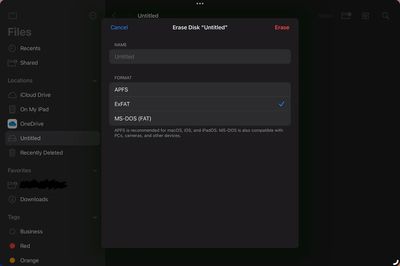
Now in the Files app on iPadOS 18, when we right click or hold press on an external drive and select "Erase", new options appear for reformatting the drive. Currently, the format options here are APFS (with options for Case Sensitive or Encrypted), ExFAT, and MS-DOS (FAT), the same format options available in Disc Utility (with the exception of macOS extension formats which wouldn't make much sense for this feature on iPadOS). This is a major improvement for iPad power users and it will be interesting to keep an eye out for new improvements to this functionality and others within the Files app over the course of the iPadOS 18 beta cycle. It seems Apple may be taking a similar tact to the way they incorporated much of the functionality of the Preview app into the Files app via Quick Look, but now with functionality from Disc Utility.
files app format drives

File format options in the Files app on iPadOS 18 (Image: Kaleb Cadle).

iPadOS 18 and iOS 18 are currently in beta. Apple plans to release the second betas to developers on Monday.

Update: Added iOS 18 beta references after confirmation that the formatting options are present on iPhones as well as iPads.


Related Forums: iOS 18, iPadOS 18

Popular Stories

imac video apple feature

Apple Released Yet Another New Product Today

Friday March 20, 2026 2:39 pm PDT by
Apple has unveiled a whopping nine new products so far this March, including an iPhone 17e, iPad Air models with the M4 chip, MacBook Air models with the M5 chip, MacBook Pro models with M5 Pro and M5 Max chips, the all-new MacBook Neo, an updated Studio Display, a higher-end Studio Display XDR, AirPods Max 2, and now the Nike Powerbeats Pro 2. iPhone 17e features the same overall design as...
iPhone 18 Pro Deep Red Feature

iPhone 18 Pro Launching Later This Year With These 12 New Features

Wednesday March 18, 2026 7:39 am PDT by
While the iPhone 18 Pro and iPhone 18 Pro Max are not expected to launch for another six months or so, there are already plenty of rumors about the devices. It was initially reported that the iPhone 18 Pro models would have fully under-screen Face ID, with only a front camera visible in the top-left corner of the screen. However, the latest rumors indicate that only one Face ID component...
ios 26 4 pastel

iOS 26.4: Top 10 New Features Coming to Your iPhone

Friday March 20, 2026 2:44 pm PDT by
iOS 26.4 isn't the major update with new Siri features that we hoped for, but there are some useful quality of life improvements, and a little bit of fun with an AI playlist generator and new emoji characters. Playlist Playground - Apple Music has a Playlist Playground option that lets you generate playlists from text-based descriptions. You can include moods, feelings, activities, or...

Top Rated Comments

cicalinarrot Avatar
23 months ago
Gee, I never realised iPads couldn't autonomously perform basic OS tasks like this.
Score: 11 Votes (Like | Disagree)
Kylo83 Avatar
23 months ago
but you can’t eject a drive
Score: 7 Votes (Like | Disagree)
Alfred.Woodden Avatar
23 months ago
Fantastic and FINALLY!
Score: 6 Votes (Like | Disagree)
Carrotstick Avatar
23 months ago
Wow, this should have added when the files app was introduced.
Score: 6 Votes (Like | Disagree)
DaniTheFox Avatar
23 months ago

but you can’t eject a drive
This eject is a thing from the past. On iOS and iPadOS you never had to do it.
Score: 5 Votes (Like | Disagree)
MrENGLISH Avatar
23 months ago
Maybe in another 15 years we’ll finally be able to replace our Macs with an iPad 🙄
Score: 4 Votes (Like | Disagree)
Related Apple News: Reviews | Opinion | Iphone | South Africa | Mac
















