

iOS 18 Lets You Lock and Hide Your Apps for Added Privacy

Apple is improving privacy in iOS 18, introducing a feature that allows apps to be locked or hidden, which makes them inaccessible without a Face ID scan.
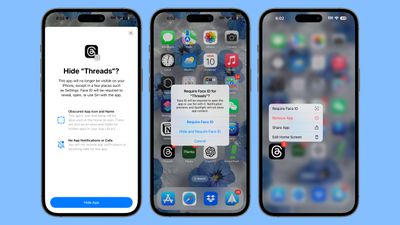
ios 18 lock apps
If someone is using your phone and you've locked an app, when they try to open that app, they'll see a popup that says it can't be accessed without secondary authentication. Locking an app can be done by long pressing on it and selecting the Require ‌Face ID‌ option (or Touch ID on the iPhone SE).

Not all apps can be locked, with Apple not providing an option for innocuous apps like Maps, Clock, Calculator, and Stocks, but almost every other app can be locked, including third-party apps. When you lock an app, you have the option to hide it as well, which moves it into a locked, hidden apps folder that requires authentication to open.

Locked or hidden apps are not only unable to be opened, but also hidden from search, notifications, and other places across the operating system. Enabling a lock on an app also shows the apps that have access to it, such as apps that are able to write images to the Photos app. Hiding an app means that you will not receive incoming notifications or calls from it, and it will only be available from a "Hidden" folder in the App Library.

If you want to turn off the locking feature, you can long press on an app icon and choose the "Don't Require ‌Face ID‌" option. Turning the lock on and off requires a ‌Face ID‌ scan, so it can't be turned off without your knowledge. Locking and hiding apps is also a feature that works on the iPad.


Related Forums: iOS 18, iPadOS 18

Popular Stories

Aston Martin CarPlay Ultra Screen

Apple's CarPlay Ultra to Expand to These Vehicle Brands Later This Year

Sunday February 1, 2026 10:08 am PST by
Last year, Apple launched CarPlay Ultra, the long-awaited next-generation version of its CarPlay software system for vehicles. Nearly nine months later, CarPlay Ultra is still limited to Aston Martin's latest luxury vehicles, but that should change fairly soon. In May 2025, Apple said many other vehicle brands planned to offer CarPlay Ultra, including Hyundai, Kia, and Genesis. In his Powe...
Apple Logo Black

Apple's Next Launch is 'Imminent'

Sunday February 1, 2026 12:31 pm PST by
The calendar has turned to February, and a new report indicates that Apple's next product launch is "imminent," in the form of new MacBook Pro models. "All signs point to an imminent launch of next-generation MacBook Pros that retain the current form factor but deliver faster chips," Bloomberg's Mark Gurman said on Sunday. "I'm told the new models — code-named J714 and J716 — are slated...
iOS 26

iOS 26.3 and iOS 26.4 Will Add These New Features to Your iPhone

Tuesday February 3, 2026 7:47 am PST by
We are still waiting for the iOS 26.3 Release Candidate to come out, so the first iOS 26.4 beta is likely still at least a week or two away. Following beta testing, iOS 26.4 will likely be released to the general public in March or April. Below, we have recapped known or rumored iOS 26.3 and iOS 26.4 features so far. iOS 26.3 iPhone to Android Transfer Tool iOS 26.3 makes it easier...
Apple MacBook Pro M4 hero

New MacBook Pros Reportedly Launching Alongside macOS 26.3

Sunday February 1, 2026 5:42 am PST by
Apple is planning to launch new MacBook Pro models with M5 Pro and M5 Max chips alongside macOS 26.3, according to Bloomberg's Mark Gurman. "Apple's faster MacBook Pros are planned for the macOS 26.3 release cycle," wrote Gurman, in his Power On newsletter today. "I'm told the new models — code-named J714 and J716 — are slated for the macOS 26.3 software cycle, which runs from...
iOS 26 Home Feature

Apple Gives Final Warning to Home App Users

Tuesday February 3, 2026 8:55 am PST by
In 2022, Apple introduced a new Apple Home architecture that is "more reliable and efficient," and the deadline to upgrade and avoid issues is fast approaching. In an email this week, Apple gave customers a final reminder to upgrade their Home app by February 10, 2026. Apple says users who do not upgrade may experience issues with accessories and automations, or lose access to their smart...

Top Rated Comments

mw360 Avatar
22 months ago

If your kids can "take" your phone, maybe you shouldn't have things in your phone that they should be seeing. But, your kid shouldn't be able to "take" and unlock your phone in the first place.
Why you being so weird about this?
Score: 16 Votes (Like | Disagree)
211 Avatar
22 months ago

Who do you have to hide your apps from?
Nosey people like you ?
Score: 12 Votes (Like | Disagree)
Anonymous Freak Avatar
22 months ago

innocuous apps like Maps, Clock, Calculator, and Stocks
I would argue that Maps and Stocks could be "not innocuous" - maps can show you recent searched places, revealing information you might not want to share. Stock can reveal stocks you follow, which may indicate investment, which can be considered financial information; although of course it doesn't show actual portfolio amounts, nor does it guarantee a followed stock is one with investments. Maps is the concerning one. At least lock "view searched history/pinned places" behind FaceID.
Score: 12 Votes (Like | Disagree)
Wiesenlooser Avatar
22 months ago
This is great! I twill be much easier to organise my affairs because now I can hide Hinge and Tinder from my significant other

*irony off*

but for real this will probably be the most common use case lol
Score: 9 Votes (Like | Disagree)
JCCL Avatar
22 months ago

Who do you have to hide your apps from?
A potential thief snatching your phone while you have it unlocked? It happens, you know.
Score: 8 Votes (Like | Disagree)
Mrkevinfinnerty Avatar
22 months ago
Great for hiding Grindr from your wife !
Score: 8 Votes (Like | Disagree)















