Optic ID: Apple Explains Vision Pro's Iris Authentication System

Following the launch of the Vision Pro, Apple has shared additional details about the headset's Optic ID iris authentication option.
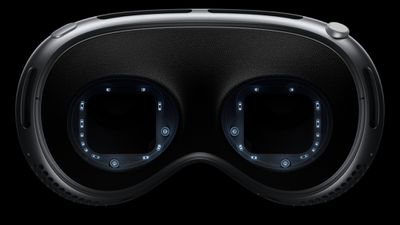
apple vision pro eye tracking
Optic ID can recognize the uniqueness of your irises, the colored part of your eyes, allowing you to quickly unlock your Vision Pro, authorize Apple Pay purchases, sign in to many third-party apps, access sensitive personal data, and more. Apps that support Face ID and Touch ID on the iPhone and iPad automatically support Optic ID. After setting up Optic ID, it also becomes a requirement in order use your Persona.

"In the same way that Touch ID revolutionized authentication using a fingerprint and Face ID revolutionized authentication using facial recognition, Optic ID revolutionizes authentication using iris recognition," says Apple. "Optic ID provides intuitive and secure authentication that uses the uniqueness of your iris, made possible by Apple Vision Pro's high-performance eye-tracking system of LEDs and infrared cameras."

Optic ID scans both of your eyes by default. Given that the size of your irises and pupils change in various lighting conditions, Apple says Optic ID adapts by updating your enrolled template after each successful authentication. Apple ensures that all biometric data is encrypted and never backed up to iCloud or anywhere else.

There is an accessibility option for using Optic ID with one eye only that can be turned on in the Settings app under Accessibility → Eye Input. Optic ID can also be kept off entirely, in which case you authenticate with a passcode only.
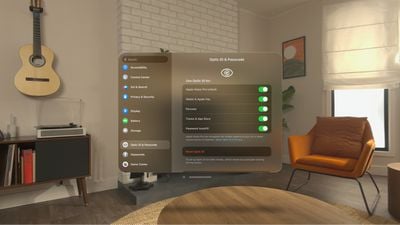
Apple Vision Pro Optic ID
For users who require vision correction, Optic ID works with the Vision Pro's ZEISS optical inserts and prescription soft contact lenses.

Apple says Optic ID uses "advanced hardware and software" for iris recognition.

"When you set up Optic ID, spatiotemporally modulated eye-safe near-infrared light illuminates the eye, so that the Apple Vision Pro eye cameras can capture images of your iris," says Apple. "This iris image data is sent to and processed on the Secure Enclave and a portion of the Apple M2 chip's neural engine that's protected within the Secure Enclave, where it is transformed into a mathematical representation for enrollment. When you authenticate with Optic ID, the authentication attempt uses the same process to compare your iris to the enrolled biometric data to determine whether there is a match."

Optic ID complies with international safety standards and "won't cause harm to the eyes or skin due to the low output of the emitters," according to Apple.

Apple says that a probability that a random person could unlock your Vision Pro using Optic ID is less than one in a million, similar to Face ID. The company explains that Optic ID matches against "detailed iris structure in the near-infrared domain," which "reveals highly unique patterns independent of iris pigmentation."

Optic ID allows a maximum of five unsuccessful match attempts before a passcode is required. As an additional layer of protection, you can set the Vision Pro to erase all information, media, and personal settings after 10 consecutive failed passcode attempts.

You also need to enter your passcode when:

  • The device has just been turned on or restarted.
  • The device hasn't been unlocked for more than 48 hours.
  • The passcode hasn't been used to unlock the device in the last six-and-a-half days and Optic ID hasn't unlocked the device in the last 4 hours.

You may still be able to use Optic ID in these cases if your iPhone is nearby, as Apple explains in its support document about setting up and using Optic ID.

Related Roundup: Apple Vision Pro
Buyer's Guide: Vision Pro (Buy Now)
Related Forum: Apple Vision Pro

Popular Stories

iOS 26

iOS 26.2 Coming Soon With These 8 New Features on Your iPhone

Thursday December 11, 2025 8:49 am PST by
Apple seeded the second iOS 26.2 Release Candidate to developers earlier this week, meaning the update will be released to the general public very soon. Apple confirmed iOS 26.2 would be released in December, but it did not provide a specific date. We expect the update to be released by early next week. iOS 26.2 includes a handful of new features and changes on the iPhone, such as a new...
iOS 26

iOS 26.4 and iOS 27 Features Revealed in New Leak

Friday December 12, 2025 10:56 am PST by
Macworld's Filipe Espósito today revealed a handful of features that Apple is allegedly planning for iOS 26.4, iOS 27, and even iOS 28. The report said the features are referenced within the code for a leaked internal build of iOS 26 that is not meant to be seen by the public. However, it appears that Espósito and/or his sources managed to gain access to it, providing us with a sneak peek...
iOS 26

Apple Releases iOS 26.2 With Alarms for Reminders, Lock Screen Changes, Enhanced Safety Alerts and More

Friday December 12, 2025 10:10 am PST by
Apple today released iOS 26.2, the second major update to the iOS 26 operating system that came out in September, iOS 26.2 comes a little over a month after iOS 26.1 launched. ‌iOS 26‌.2 is compatible with the ‌iPhone‌ 11 series and later, as well as the second-generation ‌iPhone‌ SE. The new software can be downloaded on eligible iPhones over-the-air by going to Settings >...
AirPods Pro Firmware Feature

Apple Releases New Firmware for AirPods Pro 2 and AirPods Pro 3

Thursday December 11, 2025 11:28 am PST by
Apple today released new firmware designed for the AirPods Pro 3 and the prior-generation AirPods Pro 2. The AirPods Pro 3 firmware is 8B30, up from 8B25, while the AirPods Pro 2 firmware is 8B28, up from 8B21. There's no word on what's include in the updated firmware, but the AirPods Pro 2 and AirPods Pro 3 are getting expanded support for Live Translation in the European Union in iOS...
macOS Tahoe 26 Thumb

Apple Releases macOS Tahoe 26.2 With Edge Light

Friday December 12, 2025 10:08 am PST by
Apple today released macOS Tahoe 26.2, the second major update to the macOS Tahoe operating system that came out in September. macOS Tahoe 26.2 comes five weeks after Apple released macOS Tahoe 26.1. Mac users can download the macOS Tahoe update by using the Software Update section of System Settings. macOS Tahoe 26.2 includes Edge Light, a feature that illuminates your face with soft...
AirTag 2 Mock Feature

Apple AirTag 2: Four New Features Found in iOS 26 Code

Thursday December 11, 2025 10:31 am PST by
The AirTag 2 will include a handful of new features that will improve tracking capabilities, according to a new report from Macworld. The site says that it was able to access an internal build of iOS 26, which includes references to multiple unreleased products. Here's what's supposedly coming: An improved pairing process, though no details were provided. AirTag pairing is already...
ipados 26 1 slide over

Apple Releases iPadOS 26.2 With Multitasking Improvements

Friday December 12, 2025 10:09 am PST by
Apple today released iPadOS 26.2, the second major update to the iPadOS 26 operating system released in September. iPadOS 26.2 comes a month after iPadOS 26.1. The new software can be downloaded on eligible iPads over-the-air by going to Settings > General > Software Update. iPadOS 26.2 continues with the multitasking improvements that were added with iPadOS 26.1. You can now drag and...
iphone fold text

'iPhone Fold' Arrival Expected to Cement Book-Style Era for Foldables

Friday December 12, 2025 3:55 am PST by
Foldable smartphone panel shipments are projected to jump 46% year-over-year in 2026, with Apple's entry into the market serving as the main catalyst, according to Counterpoint Research's latest Foldable-Rollable Display Shipment Tracker. "Apple is the key driver as it starts to procure panels for its first foldable iPhone," said Counterpoint's Guillaume Chansin. The research firm expects...

Top Rated Comments

klasma Avatar
24 months ago

Lasers beaming right into your retinas. What could go wrong? You'd be crazy not to try it!
Hopefully they’ll add a LASIK surgery app, so you don’t need those Zeiss inserts anymore. This could be done automatically on setup.
Score: 16 Votes (Like | Disagree)
anthogag Avatar
24 months ago
Vision Pro is a technological tour de force.

Ideally, when I put on the device I want it to be ready right-away. Hello iris scan. ?
Score: 9 Votes (Like | Disagree)
styymy Avatar
24 months ago

Lasers beaming right into your retinas. What could go wrong? You'd be crazy not to try it!
It's really wavelength from eye safe infrared light which is absorbed by the cornea and lens before reaching the retina.
Score: 7 Votes (Like | Disagree)
klasma Avatar
24 months ago

I was thinking Iris ID would be a cool name. ?
At least it’s not Eye ID.
Score: 6 Votes (Like | Disagree)
SFjohn Avatar
24 months ago

It does not work with Zeiss lenses according to some reports.
They work fine for me. ??
Score: 5 Votes (Like | Disagree)
SFjohn Avatar
24 months ago

With a 2h battery life sounds like 90% of the time you’ll need to use the passcode. But I guess iris scanning is cool.
It plugs into a power brick so you can use it for as long as you want.
Score: 5 Votes (Like | Disagree)