Apple Seeds First Public Beta of macOS Sonoma 14.2

Apple today seeded the first public beta of an upcoming macOS Sonoma 14.2 update, allowing non-developers to test out the software ahead of its release. The public beta comes a day after the first developer beta.
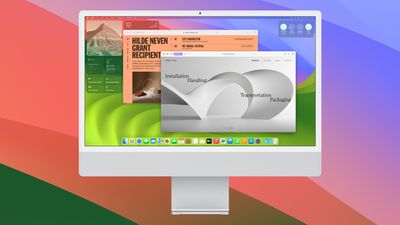
macos sonoma 4
Beta testers can opt-in through the Software Update section of the System Settings app. Under Beta updates, simply toggle on the Sonoma Public Beta. Note that you must sign up to participate on Apple's beta testing website.

macOS Sonoma 14.2 adds Messages sticker reactions, which make it quicker to add a sticker or an emoji to an iMessage. It also includes support for collaborative Apple Music playlists, allowing multiple people to add songs to a single playlist.

There's a new Favorites ‌Apple Music‌ playlist as well, better support for Messages in iCloud syncing, and iMessage Contact Key Verification for people who face extraordinary digital threats.

Related Forum: macOS Sonoma

Popular Stories

iOS 26

iOS 26.4 and iOS 27 Features Revealed in New Leak

Friday December 12, 2025 10:56 am PST by
Macworld's Filipe Espósito today revealed a handful of features that Apple is allegedly planning for iOS 26.4, iOS 27, and even iOS 28. The report said the features are referenced within the code for a leaked internal build of iOS 26 that is not meant to be seen by the public. However, it appears that Espósito and/or his sources managed to gain access to it, providing us with a sneak peek...
apple beta 26 lineup

Apple Leak Confirms Work on Foldable iPhone, AirTag 2, and Dozens More Devices

Monday December 15, 2025 2:05 pm PST by
Last week, details about unreleased Apple devices and future iOS features were shared by Macworld. This week, we learned where the information came from, plus we have more findings from the leak. As it turns out, an Apple prototype device running an early build of iOS 26 was sold, and the person who bought it shared the software. The OS has a version number of 23A5234w, and the first...
Apple Logo Top Half

Early iOS 26 Software Leak Uncovers Dozens of Upcoming Apple Features

Monday December 15, 2025 3:05 pm PST by
Software from an iPhone prototype running an early build of iOS 26 leaked last week, giving us a glimpse at future Apple devices and iOS features. We recapped device codenames in our prior article, and now we have a list of some of the most notable feature flags that were found in the software code. In some cases, it's obvious what the feature flags are referring to, while some are more...
Apple Foldable Thumb

Leak Reveals Foldable iPhone Details

Monday December 15, 2025 9:09 am PST by
The first foldable iPhone will feature a series of design and hardware firsts for Apple, according to details shared by the Weibo leaker known as Digital Chat Station. According to a new post, via machine translation, Apple is developing what the leaker describes as a "wide foldable" device, a term used to refer to a horizontally oriented, book-style foldable with a large internal display....
iOS 26

Apple Releases iOS 26.2 With Alarms for Reminders, Lock Screen Changes, Enhanced Safety Alerts and More

Friday December 12, 2025 10:10 am PST by
Apple today released iOS 26.2, the second major update to the iOS 26 operating system that came out in September, iOS 26.2 comes a little over a month after iOS 26.1 launched. ‌iOS 26‌.2 is compatible with the ‌iPhone‌ 11 series and later, as well as the second-generation ‌iPhone‌ SE. The new software can be downloaded on eligible iPhones over-the-air by going to Settings >...
iOS 26

iOS 26.2 Coming Soon With These 8 New Features on Your iPhone

Thursday December 11, 2025 8:49 am PST by
Apple seeded the second iOS 26.2 Release Candidate to developers earlier this week, meaning the update will be released to the general public very soon. Apple confirmed iOS 26.2 would be released in December, but it did not provide a specific date. We expect the update to be released by early next week. iOS 26.2 includes a handful of new features and changes on the iPhone, such as a new...
macOS Tahoe 26 Thumb

Apple Releases macOS Tahoe 26.2 With Edge Light

Friday December 12, 2025 10:08 am PST by
Apple today released macOS Tahoe 26.2, the second major update to the macOS Tahoe operating system that came out in September. macOS Tahoe 26.2 comes five weeks after Apple released macOS Tahoe 26.1. Mac users can download the macOS Tahoe update by using the Software Update section of System Settings. macOS Tahoe 26.2 includes Edge Light, a feature that illuminates your face with soft...
airpods max 2024 colors

AirPods Max 2 Likely to Offer These 10 New Features

Monday December 15, 2025 7:41 am PST by
Apple released the AirPods Max on December 15, 2020, meaning the over-ear headphones launched five years ago today. While the AirPods Max were updated with a USB-C port and new color options last year, followed by support for lossless audio and ultra-low latency audio this year, the headphones lack some of the features that have been introduced for newer generations of the regular AirPods and the ...

Top Rated Comments

Realityck Avatar
28 months ago
The install of 14.2 beta 1 on top of 14.1 RC was fairly quick. Not seeing anything really amiss with my two AS Macs.

What was released yesterday to devs/PB testers today

* iOS 17.2 beta (21C5029g)
* iPadOS 17.2 beta (21C5029g)
* macOS 14.2 beta (23C5030f)
* tvOS 17.2 beta (21K5330g)
* watchOS 10.2 beta (21S6331f)
Score: 4 Votes (Like | Disagree)
Realityck Avatar
28 months ago

BTW, I still despise the new System Setting introduced in Ventura. Real, genuine hatred. I thought it would grow on me and I'd develop some muscle memory after more than a year, bit I still can't remember where anything is. I used to be able to get to 80% of what I needed with one click. Now it's at least two, sometimes three or four clicks.
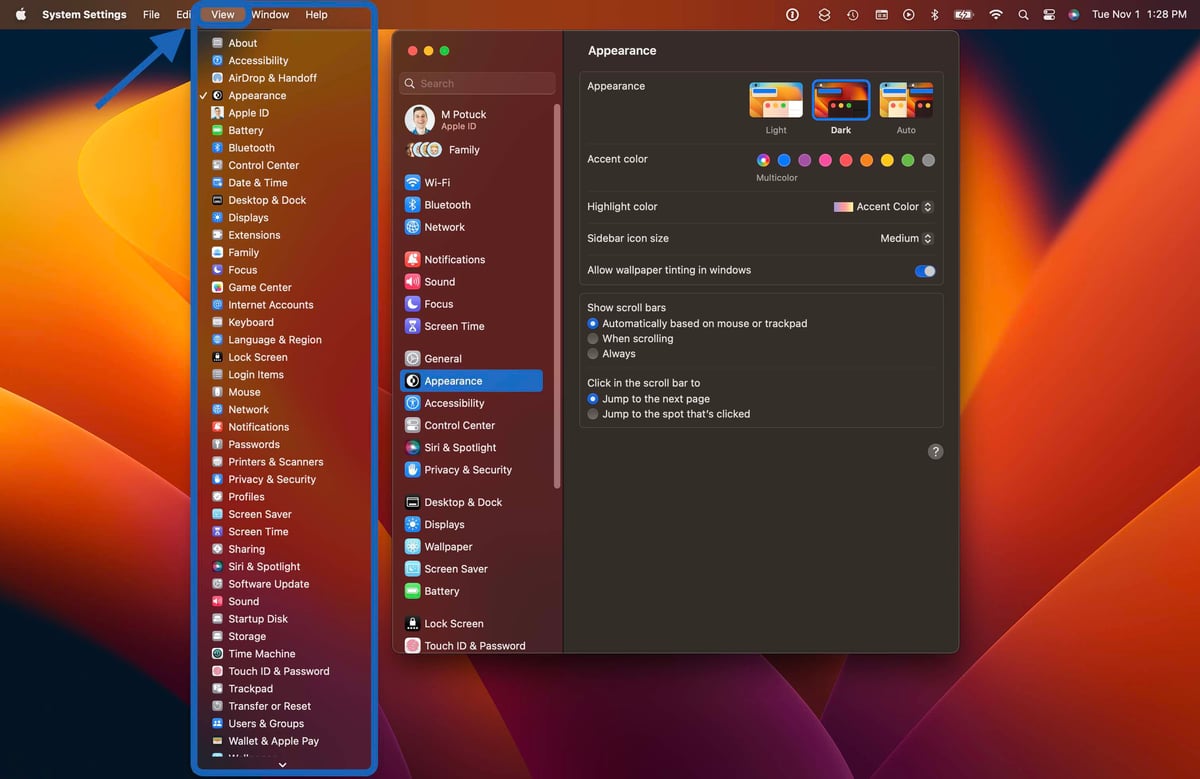
Don't forget about the Alphabetical list view in Mac System Settings. While the below image is from Ventura, Sonoma is the same.

Score: 3 Votes (Like | Disagree)
achtung! Avatar
28 months ago
Finally, Apple Music has received more updates. I am looking forward to seeing what's in store for the future. There's plenty of room for improvement.
Score: 3 Votes (Like | Disagree)
mudflap Avatar
28 months ago

What's the overall consensus with Sonoma? I'm curious as to how stable it's been.
Sonoma is solid for me.

This is the first macOS in quite some time that worked with all of my software out of the box. Adobe CC has a couple glitches here and there but it works, generally. And of course — although I'm going to sound like a borked record — the screensaver/wallpapers are absolutely stunning, especially in HDR on a 14" or 16" MacBook Pro. I do miss the third party Mail Receipt plugin for Mail.app; Apple got rid of plugins altogether and are moving to extensions. So maybe we'll have an alternative in the future but for now, nope.

Apple Remote Desktop is noticeably more responsive administering a couple Mac minis I have set up as audio and video servers. That was a very pleasant surprise!

I just installed it yesterday, waiting until I was finished with a big project to be safe. The only issues I've seen so far; sometimes an app's window is stuck behind or in front of another window. I might update to 14.2b to see if that fixes it, as long as it doesn't introduced other problems. And I swear everything really does feel a little zippier on my 14" M1 Pro.

BTW, I still despise the new System Setting introduced in Ventura. Real, genuine hatred. I thought it would grow on me and I'd develop some muscle memory after more than a year, bit I still can't remember where anything is. I used to be able to get to 80% of what I needed with one click. Now it's at least two, sometimes three or four clicks.
Score: 3 Votes (Like | Disagree)
Mr.Mozi Avatar
28 months ago
Journal app maybe?
Score: 2 Votes (Like | Disagree)
jbmelby Avatar
28 months ago

Sonoma is solid for me.

This is the first macOS in quite some time that worked with all of my software out of the box. Adobe CC has a couple glitches here and there but it works, generally. And of course — although I'm going to sound like a borked record — the screensaver/wallpapers are absolutely stunning, especially in HDR on a 14" or 16" MacBook Pro. I do miss the third party Mail Receipt plugin for Mail.app; Apple got rid of plugins altogether and are moving to extensions. So maybe we'll have an alternative in the future but for now, nope.

Apple Remote Desktop is noticeably more responsive administering a couple Mac minis I have set up as audio and video servers. That was a very pleasant surprise!

I just installed it yesterday, waiting until I was finished with a big project to be safe. The only issues I've seen so far; sometimes an app's window is stuck behind or in front of another window. I might update to 14.2b to see if that fixes it, as long as it doesn't introduced other problems. And I swear everything really does feel a little zippier on my 14" M1 Pro.

BTW, I still despise the new System Setting introduced in Ventura. Real, genuine hatred. I thought it would grow on me and I'd develop some muscle memory after more than a year, bit I still can't remember where anything is. I used to be able to get to 80% of what I needed with one click. Now it's at least two, sometimes three or four clicks.
Solid as a rock for me.
Score: 2 Votes (Like | Disagree)