

Latest iOS 17 Beta Makes Haptic Touch Faster

The second beta of iOS 17 that Apple released to developers yesterday includes a setting that makes the haptic feedback feature activate faster than before, which some users may prefer.
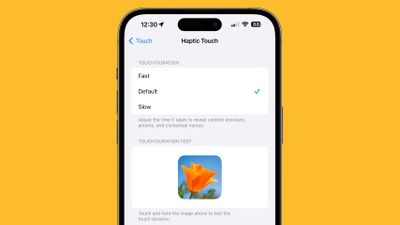
haptic touch ios 17 fast
An Accessibility option, faster haptic feedback can be activated in the Settings app by going to Accessibility > Touch > Haptic Touch. From there, the options are Fast, Default, and Slow. Toggling on Fast speeds up ‌Haptic Touch‌, and the duration can be tested using the image in the Settings app.

In iOS 16 and the first beta of iOS 17, options for ‌Haptic Touch‌ included Fast and Slow, with "Fast" previously being equivalent to the Default option in the new interface. The new Fast toggle is a step up in speed compared to the old Fast option.


Setting ‌Haptic Touch‌ to Fast makes a noticeable difference in how quick haptic menus pop up under the finger when an icon or on-screen element is long pressed. The speed brings ‌Haptic Touch‌ interactions closer to 3D Touch interactions.

As many iPhone users might remember, ‌3D Touch‌ was an interactive haptic feature that Apple introduced in 2015 with the ‌iPhone‌ 6s and used prior to the ‌iPhone‌ XR. With the ‌iPhone‌ XR in 2018, Apple transitioned away from ‌3D Touch‌ and instead implemented the simplified ‌Haptic Touch‌. ‌3D Touch‌ supported multiple levels of pressure for different interactions depending on how hard you pressed, with Apple implementing "Peek and Pop" gestures. Comparatively, ‌Haptic Touch‌ supports just a single level of pressure for the long press gesture.

‌Haptic Touch‌ has always worked slower than ‌3D Touch‌ because of the two levels of pressure that ‌3D Touch‌ allowed for. The first ‌3D Touch‌ pressure level activated quickly when pressing on the display, so those who became used to ‌3D Touch‌ may have found the ‌Haptic Touch‌ replacement to be too sluggish. On Fast mode in iOS 17, ‌Haptic Touch‌ is quicker and feels more sensitive.

It's still not entirely clear why Apple got rid of ‌3D Touch‌, but it has been speculated that Apple eliminated it in order to bring gesture parity to the ‌iPhone‌ and the iPad. ‌3D Touch‌ was always an iPhone-only feature, but ‌Haptic Touch‌ is available on both the ‌iPhone‌ and the ‌iPad‌.

Related Forums: iOS 17, iPadOS 17

Popular Stories

iOS 26

iOS 26.4 and iOS 27 Features Revealed in New Leak

Friday December 12, 2025 10:56 am PST by
Macworld's Filipe Espósito today revealed a handful of features that Apple is allegedly planning for iOS 26.4, iOS 27, and even iOS 28. The report said the features are referenced within the code for a leaked internal build of iOS 26 that is not meant to be seen by the public. However, it appears that Espósito and/or his sources managed to gain access to it, providing us with a sneak peek...
Apple Foldable Thumb

Leak Reveals Foldable iPhone Details

Monday December 15, 2025 9:09 am PST by
The first foldable iPhone will feature a series of design and hardware firsts for Apple, according to details shared by the Weibo leaker known as Digital Chat Station. According to a new post, via machine translation, Apple is developing what the leaker describes as a "wide foldable" device, a term used to refer to a horizontally oriented, book-style foldable with a large internal display....
iOS 26

Apple Releases iOS 26.2 With Alarms for Reminders, Lock Screen Changes, Enhanced Safety Alerts and More

Friday December 12, 2025 10:10 am PST by
Apple today released iOS 26.2, the second major update to the iOS 26 operating system that came out in September, iOS 26.2 comes a little over a month after iOS 26.1 launched. ‌iOS 26‌.2 is compatible with the ‌iPhone‌ 11 series and later, as well as the second-generation ‌iPhone‌ SE. The new software can be downloaded on eligible iPhones over-the-air by going to Settings >...
apple beta 26 lineup

Apple Leak Confirms Work on Foldable iPhone, AirTag 2, and Dozens More Devices

Monday December 15, 2025 2:05 pm PST by
Last week, details about unreleased Apple devices and future iOS features were shared by Macworld. This week, we learned where the information came from, plus we have more findings from the leak. As it turns out, an Apple prototype device running an early build of iOS 26 was sold, and the person who bought it shared the software. The OS has a version number of 23A5234w, and the first...
iOS 26

iOS 26.2 Coming Soon With These 8 New Features on Your iPhone

Thursday December 11, 2025 8:49 am PST by
Apple seeded the second iOS 26.2 Release Candidate to developers earlier this week, meaning the update will be released to the general public very soon. Apple confirmed iOS 26.2 would be released in December, but it did not provide a specific date. We expect the update to be released by early next week. iOS 26.2 includes a handful of new features and changes on the iPhone, such as a new...
macOS Tahoe 26 Thumb

Apple Releases macOS Tahoe 26.2 With Edge Light

Friday December 12, 2025 10:08 am PST by
Apple today released macOS Tahoe 26.2, the second major update to the macOS Tahoe operating system that came out in September. macOS Tahoe 26.2 comes five weeks after Apple released macOS Tahoe 26.1. Mac users can download the macOS Tahoe update by using the Software Update section of System Settings. macOS Tahoe 26.2 includes Edge Light, a feature that illuminates your face with soft...
AirPods Pro Firmware Feature

Apple Releases New Firmware for AirPods Pro 2 and AirPods Pro 3

Thursday December 11, 2025 11:28 am PST by
Apple today released new firmware designed for the AirPods Pro 3 and the prior-generation AirPods Pro 2. The AirPods Pro 3 firmware is 8B30, up from 8B25, while the AirPods Pro 2 firmware is 8B28, up from 8B21. There's no word on what's include in the updated firmware, but the AirPods Pro 2 and AirPods Pro 3 are getting expanded support for Live Translation in the European Union in iOS...
Apple Logo Top Half

Early iOS 26 Software Leak Uncovers Dozens of Upcoming Apple Features

Monday December 15, 2025 3:05 pm PST by
Software from an iPhone prototype running an early build of iOS 26 leaked last week, giving us a glimpse at future Apple devices and iOS features. We recapped device codenames in our prior article, and now we have a list of some of the most notable feature flags that were found in the software code. In some cases, it's obvious what the feature flags are referring to, while some are more...

Top Rated Comments

alternamelka Avatar
33 months ago
I know we're all thinking it but GOD do I miss 3D touch ??? The little tease you could do with it to see whether you wanted to commit fully to the action ?

Bring her back!!
Score: 40 Votes (Like | Disagree)
TheYayAreaLiving ?️ Avatar
33 months ago
I'm loving this. iPhone is well-responsive and fast. You can really notice a difference.

It feels like 3D-Touch is back on iPhones that are running iOS 17 Beta 2. I really hope Apple does not remove this feature in future beta releases.
Score: 17 Votes (Like | Disagree)
KaliYoni Avatar
33 months ago

3D Touch was an interactive haptic feature that Apple introduced in 2018 with the iPhone XR
3D Touch dates back at least to the iPhone 6s (2015):
https://support.apple.com/kb/SP726?viewlocale=en_US&locale=en_US
Score: 16 Votes (Like | Disagree)
Kylo83 Avatar
33 months ago
Can we speed up overall system animations would be nice
Score: 15 Votes (Like | Disagree)
Radeon85 Avatar
33 months ago

In my opinion, Haptic Touch was already 99% the same thing as 3D Touch.
It's not even close, 3D touch was amazing and I used it heavily on a daily basis on the phone and watch haptic touch cannot replace the missing features. Removing it was one of the worst decisions they've made in a very long time.

3D touch was like a car accelerator, pressure sensitive now its just like tapping a button. It's complete crap.

There was games especially that made full use of it, hold the screen gently to accelerate and the harder you pressed the faster you went. Or waking, touch gently to walk and the harder you press the faster you ran. 3D touch worked exactly like an anoluge trigger which haptic can't do.
Score: 15 Votes (Like | Disagree)
macduke Avatar
33 months ago
I still miss 3D Touch. At least once per day I think about how much better it was, such as when I go to select text on the spacebar. I recently learned about the secondary tap trick to actually select when moving the cursor, but that's more clunky and doesn't seem to work as well for me either, but it's better than nothing.
Score: 14 Votes (Like | Disagree)

















