5 New AirDrop Features Coming in iOS 17 - MacRumorsOpen MenuShow RoundupsShow Forums menuVisit ForumsOpen Sidebar
Skip to Content

5 New AirDrop Features Coming in iOS 17

Since its introduction in iOS 7, AirDrop has become the favored means for iPhone users to instantly share photos, videos, documents, and more to nearby Apple devices with relative ease. Given its widespread popularity, the feature hasn't changed all that much over the years. But this year, Apple is stepping things up a gear by bringing several new capabilities to AirDrop that should make it more powerful than ever.

5 New AirDrop Features Feature
The following five features are coming with Apple's iOS 17 software update, which is expected to arrive in the fall. Are any of them likely to fundamentally change the way you use AirDrop? Let us know in the comments at the bottom of the article.

1. NameDrop

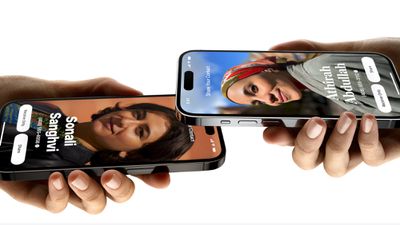
NameDrop was Apple's headline new AirDrop feature in its iOS 17 preview. Rather than type in the number of someone new to call or text them so that they have your number, NameDrop allows you to simply hold your iPhone near their iPhone to swap contact details.
ios 17 namedrop
When two iPhones are held close to each other, each person's Contact Poster appears (a picture of yourself that you can customize and edit, new to iOS 17). Users can then select which numbers and email addresses in their contact card that they want to share.

The feature also works between an iPhone and a nearby Apple Watch running an upcoming software update, which Apple says will be available "later this year."

2. New AirDrop Gesture to Share Content

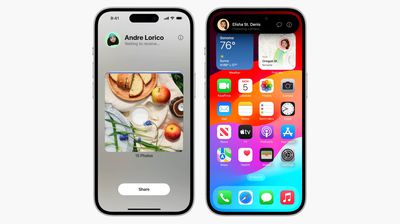
The same iPhone-to-iPhone proximity gesture that works for NameDrop also allows users to share content like photos and files.
airdrop ios 17
Simply bringing the two phones close together initiates the transfer over AirDrop, thereby removing the current requirement to manually select the person from the AirDrop device locator via the Share Sheet.

3. Continue AirDrop Over the Internet

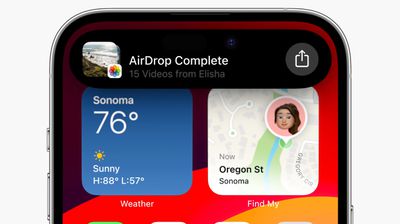
The way AirDrop currently works, you have to stay within close proximity to the other person's device for any transfer to complete - if you leave AirDrop range, the transfer fails and the content isn't shared. This can be particularly frustrating when you're sending or receiving several large files like video content.
airdrop videos ios 17
By contrast, if you leave AirDrop range in iOS 17, the content you are trying to share with someone continues to be sent securely, and in full quality, over the internet. The only requirement is that both you and your recipient are signed in to iCloud.

4. SharePlay Over AirDrop

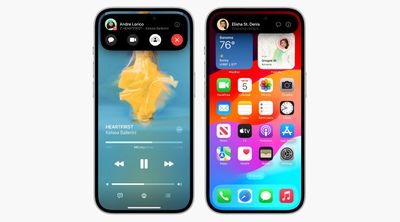
Holding two iPhones close together can also be used to initiate a shared activity via SharePlay. This allows the two of you to listen to music or watch a movie together.
airdrop shareplay ios 17
And thanks to a new SharePlay API, third-party developers can make their apps support the gesture, allowing you to drop into the same game together or watch the same stream while using your separate devices.

5. Explicit Image Blurring

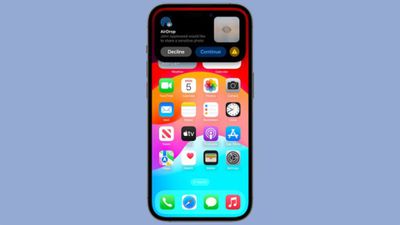
iOS doesn't allow just anyone to share a photo or document to your device unless you actively choose to accept it. A longstanding issue with AirDrop however is that it displays a preview of the proposed shared content on your device's screen, whether or not you actually want to see it.
block airdrop image
This had led people to be subjected to unsolicited nude and explicit images. To prevent this in iOS 17, Apple is introducing a new opt-in feature that is designed to automatically blur images sent over AirDrop that may have sensitive content like nudity. The content will be blocked, but can be viewed by tapping a "Show" button.

These Sensitive Content Warnings work like the Communication Safety functionality that Apple added for children, with all detection done on device so Apple does not see the content that's being shared.


Tag: AirDrop
Related Forums: iOS 17, iPadOS 17

Popular Stories

Apple Event Logo

Apple Just Released a New Accessory

Monday May 4, 2026 8:13 am PDT by
Apple today released a new Pride Edition Sport Loop for the Apple Watch. The band features a rainbow design with 11 colors of woven nylon yarns. The new Pride Edition Sport Loop is available to order now on Apple.com and in the Apple Store app in 40mm, 42mm, and 46mm sizes, and it will be available at Apple Store locations starting later this week. In the U.S., the band costs $49. There...
iOS 26

Apple Says iOS 26.5 Adds Three New Features to Your iPhone

Tuesday May 5, 2026 7:36 am PDT by
iOS 26.5 includes three new features for iPhones, according to Apple's release notes for the update, which is expected to be released next week. As discovered during beta testing, iOS 26.5 enables end-to-end encryption for RCS messaging between iOS and Android devices. Apple says this security upgrade is limited to supported carriers around the world and will continue to roll out....
mac mini green 2

Apple Cuts More Mac Studio and Mac Mini RAM Options as Memory Shortage Worsens

Tuesday May 5, 2026 12:34 pm PDT by
Apple has removed more desktop Macs from its online store as the global memory shortage continues. Mac mini models with 32GB and 64GB of RAM are no longer available for purchase, nor is the M3 Ultra Mac Studio with 256GB RAM. The M3 Ultra Mac Studio is now available only in a 96GB RAM configuration, with higher-tier options eliminated. Both M3 Mac Studio and M4 Max Mac Studio models have...

Top Rated Comments

fwmireault Avatar
38 months ago

NameDrop seems like it's an annoying feature - potentially a privacy concern.
If you find it annoying, you don’t have to use it and can share your contact card in a more traditional way. And it’s hardly a privacy concern if you have the control to allow the sharing or not.

This is just an extra option, nobody has to use it
Score: 22 Votes (Like | Disagree)
38 months ago

There are/were the business card sharing apps, which work by tapping two phones together.

But yeah, both functionality and privacy concerns here. And that name: how did the gem "name drop" get anyone's approval?
I actually thought the name was quite clever 🤷‍♂️
Score: 18 Votes (Like | Disagree)
38 months ago

If proximity things almost never work the way you want them to then Apple Pay is in the *******
Apple Pay is great. I use it everyday. But this is different. This is iPhone to iPhone.

Heck, I can’t even get Airdrop from my friend to show up half the time while standing next to each other.
Score: 13 Votes (Like | Disagree)
TheYayAreaLiving 🎗️ Avatar
38 months ago
My only wish for AirDrops: To work efficiently & properly. 🙌🏻
Score: 10 Votes (Like | Disagree)
henryngan2006 Avatar
38 months ago

I swear we had a feature like NameDrop from many years ago. Or am I crazy? Maybe it was a Linkedin feature or some 3rd party apps.

NameDrop seems like it's an annoying feature - potentially a privacy concern.

It's one of those features that look cool in a demo but hardly anyone will ever use it, and it'll annoy people more than it will be used intentionally.

I also don't understand the new Airdrop feature. Why would you hold the phones close to each other, which is very unnatural, instead of just selecting who to Airdrop to? These proximity things almost never work the way you want them to.
If proximity things almost never work the way you want them to then Apple Pay is in the *******
Score: 10 Votes (Like | Disagree)
38 months ago

I actually thought the name was quite clever 🤷‍♂️
Stop it! Forum cred is not earned making positive comments.

Try: Jeeez... It's nice that Apple finally woke up, but my IBM PC could do that. TC needs to be fired for not making these features available 40 years ago.
Score: 8 Votes (Like | Disagree)
Related Apple News: Lifestyle | Local News | Entertainment | Mac | Politics