iOS 17 Enables Cinematic Mode Video Editing in Third-Party Apps - MacRumorsOpen MenuShow RoundupsShow Forums menuVisit ForumsOpen Sidebar
Skip to Content

iOS 17 Enables Cinematic Mode Video Editing in Third-Party Apps

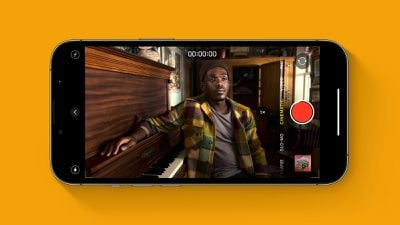
As outlined in a WWDC 2023 video, iOS 17 includes a new Cinematic API that enables developers to support Cinematic mode video playback and editing in third-party apps.
Cinematic Mode iPhone Feature
"The Cinematic framework enables you to add professional-level editing and playback features to movies, recorded with the Camera app's Cinematic mode, to your apps," says Apple's developer documentation. "These are the same features used in applications such as Final Cut Pro, Photos, and iMovie. For example, this enables your apps to change focus distance and aperture in movies, creating a bokeh effect, even after recording."

Apple offers Cinematic mode in the Camera app on iPhone 13 models and newer. Inspired by professional Hollywood films, the feature allows users to record video with a shallow depth of field and automatic focus changes between subjects.

Cinematic mode uses a technique called "rack focus" to seamlessly shift the focus from one subject to another. It does this by locking the focus on the subject in a scene and blurring the background to achieve depth of field. If you subsequently move the camera to center on a new subject, or a new subject enters the scene, Cinematic mode automatically switches the focal point to this new subject and blurs out the background.

For more details, read How to Shoot Video in Cinematic Mode on iPhone 13 and iPhone 14.
Related Roundup: WWDC 2026

Popular Stories

imac video apple feature

Apple Released Yet Another New Product Today

Friday March 20, 2026 2:39 pm PDT by
Apple has unveiled a whopping nine new products so far this March, including an iPhone 17e, iPad Air models with the M4 chip, MacBook Air models with the M5 chip, MacBook Pro models with M5 Pro and M5 Max chips, the all-new MacBook Neo, an updated Studio Display, a higher-end Studio Display XDR, AirPods Max 2, and now the Nike Powerbeats Pro 2. iPhone 17e features the same overall design as...
ios 26 4 pastel

iOS 26.4: Top 10 New Features Coming to Your iPhone

Friday March 20, 2026 2:44 pm PDT by
iOS 26.4 isn't the major update with new Siri features that we hoped for, but there are some useful quality of life improvements, and a little bit of fun with an AI playlist generator and new emoji characters. Playlist Playground - Apple Music has a Playlist Playground option that lets you generate playlists from text-based descriptions. You can include moods, feelings, activities, or...
iPhone 18 Pro Deep Red Feature

iPhone 18 Pro Launching Later This Year With These 12 New Features

Wednesday March 18, 2026 7:39 am PDT by
While the iPhone 18 Pro and iPhone 18 Pro Max are not expected to launch for another six months or so, there are already plenty of rumors about the devices. It was initially reported that the iPhone 18 Pro models would have fully under-screen Face ID, with only a front camera visible in the top-left corner of the screen. However, the latest rumors indicate that only one Face ID component...

Top Rated Comments

lazyrighteye Avatar
36 months ago

Remember the big to-do they made about Cinematic Mode in the keynote when the iPhone 13 was introduced? I wonder how many people have used it.
It's a neat feature that I'm glad is available, but one I seldom use.
1) I honestly forget about it and 2) that feature doesn't work so well from the soccer pitch sidelines. 😉
But when I have used it, in more controlled settings (where subjects offer the depth of field for the feature to work properly), it's pretty sweet. Especially for a built-in feature of a camera on a phone.
Score: 4 Votes (Like | Disagree)
Apple Fan 2008 Avatar
36 months ago
Apple seems to be opening things up more, hope this trend continues.
Score: 4 Votes (Like | Disagree)
Expos of 1969 Avatar
36 months ago
Remember the big to-do they made about Cinematic Mode in the keynote when the iPhone 13 was introduced? I wonder how many people have used it.
Score: 4 Votes (Like | Disagree)
36 months ago
Good to see this change in iOS 17
Score: 2 Votes (Like | Disagree)
36 months ago
Howdy friends. Great discussion. I thought I'd point you to a video I just did with the top end iPhone 14. This footage was shot with the 14, transferred to my MBP with a cable- into iPhoto. Then accessed through iMovie where I could adjust focus.


If this link isn't active, you can also go to YouTube and search "Glenwood Springs, Colorado parks, and recreation". The top video is called "South Canyon".

This was puzzling to figure out for the longest time, and I finally got it down. There are some tricks. For instance, when you transfer, you have to go into settings and choose transfer original format, or it will just spit out an MOV file where depth of field cannot be adjusted.
Score: 2 Votes (Like | Disagree)
36 months ago

I actually use cinematic mode sometimes when shooting video, but the focus switches sometimes, and adjusting the focus during editing isn’t available on iMovie. So I’m stuck either having to edit the focus on the iPhone or I’m forced to get Final Cut Pro which I wouldn’t need otherwise.

If I’m wrong and it’s doable in iMovie please correct me.
You can adjust the focus points in Photos on your Mac. If you select the video and go to Edit, it'll give you that same timeline focus point interface you get in iOS.

And then from there I believe you could probably import it into iMovie? You might need to export from Photos to an MOV file or something to "freeze" the focus points? Or maybe iMovie would recognize where you set them in Photos. Worth experimenting with.
Score: 2 Votes (Like | Disagree)
Related Apple News: Sport | News | Business | Technology | Health