iOS 17 Locks Your Safari Private Browsing Behind Face ID
Apple is enhancing the security of Safari in iOS 17, and private browsing now requires Face ID authentication or a passcode to access. If you open up a private browsing window in Safari, you will need to authenticate with Face ID.
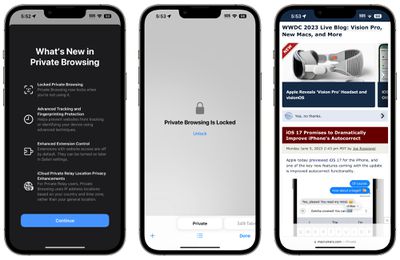
That means someone who has access to your unlocked phone and opens your Safari browser won't be able to get to your private browsing history without secondary authentication. Face ID or a passcode can be used to access the Safari private tabs.
Private browsing also completely blocks known trackers from loading on pages and removes tracking added to URLs as you browse, improving privacy. Websites are prevented from tracking or identifying your device with these new additions, plus Apple also offers improved extension control.
In private mode, extensions with website access are turned off, and you will need to manually re-enable them. iCloud Private Relay also uses IP address locations based on country and time zone rather than a general location.
Safari in iOS 17 is also gaining a Profiles feature so you can keep your personal browsing and work browsing separate, with different histories, Tab Groups, cookies, and favorites.
Popular Stories
Apple today released a new Pride Edition Sport Loop for the Apple Watch. The band features a rainbow design with 11 colors of woven nylon yarns.
The new Pride Edition Sport Loop is available to order now on Apple.com and in the Apple Store app in 40mm, 42mm, and 46mm sizes, and it will be available at Apple Store locations starting later this week. In the U.S., the band costs $49.
There...
iOS 26.5 includes three new features for iPhones, according to Apple's release notes for the update, which is expected to be released next week.
As discovered during beta testing, iOS 26.5 enables end-to-end encryption for RCS messaging between iOS and Android devices. Apple says this security upgrade is limited to supported carriers around the world and will continue to roll out....
Apple has removed more desktop Macs from its online store as the global memory shortage continues. Mac mini models with 32GB and 64GB of RAM are no longer available for purchase, nor is the M3 Ultra Mac Studio with 256GB RAM.
The M3 Ultra Mac Studio is now available only in a 96GB RAM configuration, with higher-tier options eliminated. Both M3 Mac Studio and M4 Max Mac Studio models have...