Atomic macOS Stealer Malware Can Steal Keychain Info, Files, Browser Wallets and More - MacRumorsOpen MenuShow RoundupsShow Forums menuVisit ForumsOpen Sidebar
Skip to Content

Atomic macOS Stealer Malware Can Steal Keychain Info, Files, Browser Wallets and More

While Apple's Macs are less targeted by malware than Windows PCs, concerning Mac malware does pop up regularly. This week, there's new Mac malware out in the wild that Mac users should be aware of.
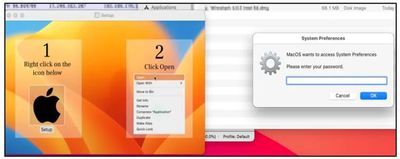
macos atomic malware demo
Called Atomic macOS Stealer (AMOS), the malware was found on Telegram by Cyble Research. A Telegram user was selling access to the malware, which is designed to steal sensitive information like usernames and passwords.

Whoever designed the Atomic macOS Stealer is working behind the scenes to improve it and add new functionality to make it more effective. In its current incarnation, AMOS is able to access keychain passwords, system information, files from the desktop and documents folder, and the password of the Mac.

It is able to infiltrate browser apps like Chrome and Firefox, extracting autofill information, passwords, cookies, wallets, and credit card information. Cryptowallets like Electrum, Binance, and Atomic are specific targets.
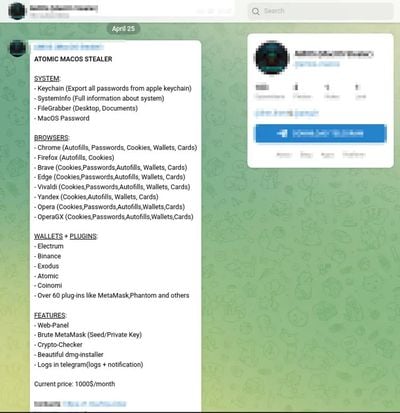
macos atomic malware
AMOS can be purchased with a web panel that makes it easy to manage malware targets, along with tools for brute-forcing private keys. The malware and accompanying services to make it easier to use against victims can be purchased on Telegram for $1,000 per month.

A .dmg file is used to get the malware on a victim's machine, and once installed, it immediately begins accessing sensitive information and sending it to a remote server. A fake system prompt is presented to get access to the system password, and it asks for access to files in the documents and desktop folders.

Because this requires a user to click on a .dmg file to install, Mac users can avoid the malware by not installing any kind of untrusted software from an unverified source. Cyble Research recommends installing software from the Mac App Store, using strong passwords and multi-factor authentication, and using biometric authentication where possible.

Users should also avoid opening links in emails, using caution whenever an app asks for permissions, and keeping devices, operating systems, and apps up to date.


Popular Stories

Apple Event Logo

Apple Just Released a New Accessory

Monday May 4, 2026 8:13 am PDT by
Apple today released a new Pride Edition Sport Loop for the Apple Watch. The band features a rainbow design with 11 colors of woven nylon yarns. The new Pride Edition Sport Loop is available to order now on Apple.com and in the Apple Store app in 40mm, 42mm, and 46mm sizes, and it will be available at Apple Store locations starting later this week. In the U.S., the band costs $49. There...
iOS 26

Apple Says iOS 26.5 Adds Three New Features to Your iPhone

Tuesday May 5, 2026 7:36 am PDT by
iOS 26.5 includes three new features for iPhones, according to Apple's release notes for the update, which is expected to be released next week. As discovered during beta testing, iOS 26.5 enables end-to-end encryption for RCS messaging between iOS and Android devices. Apple says this security upgrade is limited to supported carriers around the world and will continue to roll out....
Instagram Feature 2

PSA: Instagram Encrypted Messaging Ends on Friday, May 8

Tuesday May 5, 2026 8:24 am PDT by
Instagram will remove end-to-end encryption for direct messages between users from May 8, 2026. When the date comes around, Meta will potentially be able to see the contents of all messages between users on the social media platform. Encrypting messages has been an optional feature in Instagram since 2023, but in March of this year the social media platform quietly updated a help page to say ...

Top Rated Comments

40 months ago
Even malware is on a subscription model these days
Score: 112 Votes (Like | Disagree)
AtomicDusk Avatar
40 months ago
hey y’all, I just want to hijack this thread and say that I can’t wait for sideloading on iOS because you can put whatever you want on your Mac.
/s
Score: 40 Votes (Like | Disagree)
sw1tcher Avatar
40 months ago

Sounds like a great reason to only install from the App Store.

It's Apple behind this to prove why it's better to keep the App Store only for iOS and then do the same for the Mac!
Except Apple allows crapware onto their Mac App store too

https://www.macrumors.com/2023/04/25/chatgpt-scam-apps-mac-app-store/

not to mention all the junk on their iOS App store ('https://forums.macrumors.com/threads/psa-watch-out-for-fake-chatgpt-apps-and-other-scams-in-the-mac-app-store.2387808/page-2?post=32124285#post-32124285')
Score: 31 Votes (Like | Disagree)
LV426 Avatar
40 months ago
Next time macOS goes a bit loopy (literally) after an update and keeps asking you to re-enter your Apple ID password, you'd be justified in worrying that something like this is having a go at you.
Score: 20 Votes (Like | Disagree)
Rychiar Avatar
40 months ago

I only rely on Apple’s own Apple App Store on Mac. 💻
I can’t think of anything i’ve ever gotten from the App Store. Even adobe isn’t on the App Store. Nor are things like VLC, superduper, emulators, bit torrent clients. Pretty much anything that makes a Mac Better than an iPad
Score: 18 Votes (Like | Disagree)
TheYayAreaLiving 🎗️ Avatar
40 months ago
I only rely on Apple’s own Apple App Store on Mac. 💻
Score: 17 Votes (Like | Disagree)
Related Apple News: Business | South Africa | Technology | News | Buyers Guide