References to New 'Custom Accessibility Mode' Found in iOS 16.2 Beta 2

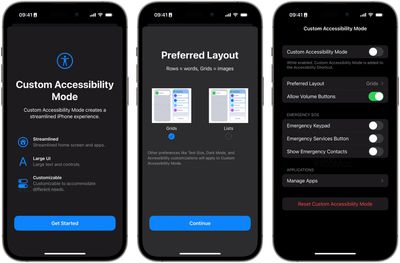
Apple is working on a new "Custom Accessibility Mode" for iPhone and iPad, according to evidence uncovered by 9to5Mac in the second iOS 16.2 developer beta.
Custom Accessibility Mode iOS 16

Image credit: 9to5Mac

Apple released the second betas of iOS 16.2 and iPadOS 16.2 to developers on Tuesday, including camera bug fixes, support for 5G in India, a Medication widget, and references to the new Custom Accessibility Mode, which 9to5Mac found "under the hood."

Within those references, Apple describes the new mode as offering "a customizable, streamlined way to use your ‌iPhone‌ and ‌iPad‌," although how the feature works isn't completely clear, as it is not yet enabled for developers to test.

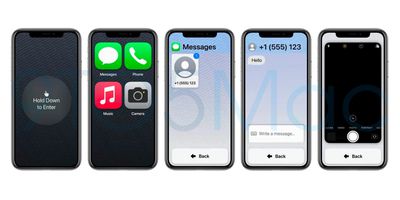
That said, screenshots suggest the new mode will allow users to replace the typical Lock Screen and "Springboard" Home Screen with more accessible UI elements, as well as remove the Dock, set much larger app icons, larger hardware interface elements, allowed contacts, and a simpler interface for Messages.
Custom Accessibility Mode iOS 16

Image credit: 9to5Mac

Given the dearth of references, it's not certain that the Custom Accessibility Mode will go live with the release of iOS 16.2. Apple could be just laying the groundwork, with the feature still in the early stages of development. For everything else in the second beta of iOS 16.2, be sure to check out our roundup of changes.

Popular Stories

Aston Martin CarPlay Ultra Screen

Apple's CarPlay Ultra to Expand to These Vehicle Brands Later This Year

Sunday February 1, 2026 10:08 am PST by
Last year, Apple launched CarPlay Ultra, the long-awaited next-generation version of its CarPlay software system for vehicles. Nearly nine months later, CarPlay Ultra is still limited to Aston Martin's latest luxury vehicles, but that should change fairly soon. In May 2025, Apple said many other vehicle brands planned to offer CarPlay Ultra, including Hyundai, Kia, and Genesis. In his Powe...
Apple Logo Black

Apple's Next Launch is 'Imminent'

Sunday February 1, 2026 12:31 pm PST by
The calendar has turned to February, and a new report indicates that Apple's next product launch is "imminent," in the form of new MacBook Pro models. "All signs point to an imminent launch of next-generation MacBook Pros that retain the current form factor but deliver faster chips," Bloomberg's Mark Gurman said on Sunday. "I'm told the new models — code-named J714 and J716 — are slated...
Apple MacBook Pro M4 hero

New MacBook Pros Reportedly Launching Alongside macOS 26.3

Sunday February 1, 2026 5:42 am PST by
Apple is planning to launch new MacBook Pro models with M5 Pro and M5 Max chips alongside macOS 26.3, according to Bloomberg's Mark Gurman. "Apple's faster MacBook Pros are planned for the macOS 26.3 release cycle," wrote Gurman, in his Power On newsletter today. "I'm told the new models — code-named J714 and J716 — are slated for the macOS 26.3 software cycle, which runs from...
iOS 26

iOS 26.3 and iOS 26.4 Will Add These New Features to Your iPhone

Tuesday February 3, 2026 7:47 am PST by
We are still waiting for the iOS 26.3 Release Candidate to come out, so the first iOS 26.4 beta is likely still at least a week or two away. Following beta testing, iOS 26.4 will likely be released to the general public in March or April. Below, we have recapped known or rumored iOS 26.3 and iOS 26.4 features so far. iOS 26.3 iPhone to Android Transfer Tool iOS 26.3 makes it easier...
14 inch MacBook Pro Keyboard

Apple Changes How You Order a Mac

Saturday January 31, 2026 10:51 am PST by
Apple recently updated its online store with a new ordering process for Macs, including the MacBook Air, MacBook Pro, iMac, Mac mini, Mac Studio, and Mac Pro. There used to be a handful of standard configurations available for each Mac, but now you must configure a Mac entirely from scratch on a feature-by-feature basis. In other words, ordering a new Mac now works much like ordering an...

Top Rated Comments

riverfreak Avatar
42 months ago
If this comes to fruition, it will be immensely helpful for The Olds.

iOS has become so dainty and precious it takes a lot of time and manual dexterity to do many simple and common things.
Score: 22 Votes (Like | Disagree)
B4rbelith Avatar
42 months ago

Steve is turning in his grave right now
This is an accessibility option to help people to use the iPhone who otherwise might be unable to.
I’d say it’s something Jobs would welcome.
Score: 15 Votes (Like | Disagree)
IllinoisCorn Avatar
42 months ago
Apple doesn’t get the credit it clearly deserves for its accessibility efforts. My father had a terrible tremor, so gestures were difficult for him. Thank God Apple made an assistive touch function, or else he wouldn’t have been able to use a phone.
Score: 13 Votes (Like | Disagree)
WiiDSmoker Avatar
42 months ago
Really cool, but would also be nice to replace the camera/flashlight and also add other icons at the bottom as well.
Score: 10 Votes (Like | Disagree)
bulbousnub Avatar
42 months ago
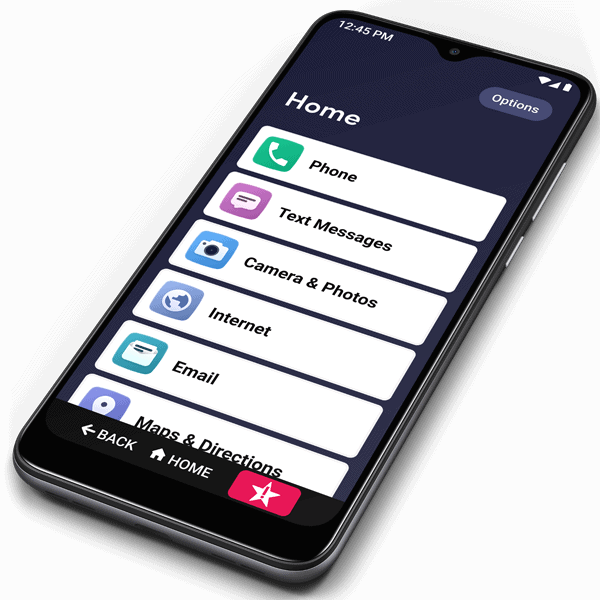
Immediately reminded me of the Jitterbug phones for old people.

Score: 10 Votes (Like | Disagree)
randot Avatar
42 months ago
This is amazing - it looks exactly like what I was mocking up in my head all weekend for my father, and feeling frustrated that it’s something I didn’t think Apple would ever build. iPhones have gotten much harder to use for older people over the last few years. Neither of my parents ever fully adapted after iOS 7 made UI controls much less obvious and clear. And as my Dad’s tremors have gotten worse, the gestures, edge swipes, and long presses essentially make his phone a minefield. Existing accessibility options help a bit, but don’t do enough to fundamentally fix the big-picture UI paradigms that are an issue for older users.

We need options for huge home screen icons and/or a list view with large labels for the homescreen, a way to prevent accidental rearranging, a way to disable control center and the other edge swipe gestures, and a much simpler way for a family member to control your screen from FaceTime (he doesn’t under stand how to share screen from FaceTime, and the button icons are absolutely inscrutable). And frankly, this mode should offer dramatically fewer features. For Photos.app, just let it be a big picture frame with a way to scroll backwards in time through the grid view; hide all the UI about albums, organization, and editing. It’s so overwhelming to people who don’t or can’t keep up with so many new changes every year.

I tried to talk to him about a Jitterbug Smart, which I think is solving a lot of these issues, but we’ve been an Apple family since 1984, and he doesn’t want to give it up (and when I showed it to him he said “but those are for old people”…he’s 82). And I have a sneaking suspicion that once you’re past the Jitterbug’s launcher, the apps themselves will be the typical Android hard-to-use UI, so it’s not complete win.

Apple built its reputation on ease of use, and people used to marvel at how babies could pick up and use an iPad. You don’t hear that anymore. For myself, I want all the gestures, shortcuts, automations, and power user tweaks I can get my hands on. But I don’t want that to come at the expense of a worse experience for others. iPhone needs a way to accommodate our parents. Really hope this pans out.
Score: 10 Votes (Like | Disagree)