

Apple Shares More Details on iOS 16.1 Clean Energy Charging Feature

iOS 16.1 includes a Clean Energy Charging option that is designed to allow iPhone users to cut down on their carbon footprint. Clean Energy Charging selectively charges when lower carbon emission electricity is available for those who want a greener charging method.
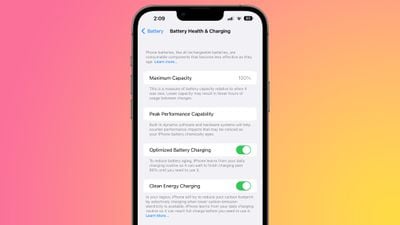
clean energy charging ios 16 1
Apple today published a support document on Clean Energy Charging, providing more specific details on how it works, how to disable it when necessary, and which settings need to be active to get it to work.

Clean Energy Charging is limited to the United States, and it requires Location Services, System Customization, and Significant Locations to all be enabled in the System Services section of the Settings app in order to function.

It is on by default, and those who want to turn it off will need to do so by going to Settings > Battery > Battery Health & Charging.

When enabled, Clean Energy Charging allows the ‌iPhone‌ to get a forecast of carbon emissions in the nearby energy grid, using that to charge the ‌iPhone‌ during times of cleaner energy production.

Apple says that Clean Energy Charging works with Optimized Battery Charging to learn a user's habits, engaging only when the ‌iPhone‌ is charged for long periods of time, such as at home or work. It does not engage if charging habits are variable or when the user is in a new location, such as when traveling.

When Clean Energy Charging turns charging off, a notification on the Lock Screen provides details when the ‌iPhone‌ will be fully charged, similar to Optimized Battery Charging. Touching and holding on the notification brings up a "Charge Now" option to set the ‌iPhone‌ to charge the ‌iPhone‌ to full.

Related Forum: iOS 15

Popular Stories

iOS 26

iOS 26.4 and iOS 27 Features Revealed in New Leak

Friday December 12, 2025 10:56 am PST by
Macworld's Filipe Espósito today revealed a handful of features that Apple is allegedly planning for iOS 26.4, iOS 27, and even iOS 28. The report said the features are referenced within the code for a leaked internal build of iOS 26 that is not meant to be seen by the public. However, it appears that Espósito and/or his sources managed to gain access to it, providing us with a sneak peek...
iOS 26

iOS 26.2 Coming Soon With These 8 New Features on Your iPhone

Thursday December 11, 2025 8:49 am PST by
Apple seeded the second iOS 26.2 Release Candidate to developers earlier this week, meaning the update will be released to the general public very soon. Apple confirmed iOS 26.2 would be released in December, but it did not provide a specific date. We expect the update to be released by early next week. iOS 26.2 includes a handful of new features and changes on the iPhone, such as a new...
iOS 26

Apple Releases iOS 26.2 With Alarms for Reminders, Lock Screen Changes, Enhanced Safety Alerts and More

Friday December 12, 2025 10:10 am PST by
Apple today released iOS 26.2, the second major update to the iOS 26 operating system that came out in September, iOS 26.2 comes a little over a month after iOS 26.1 launched. ‌iOS 26‌.2 is compatible with the ‌iPhone‌ 11 series and later, as well as the second-generation ‌iPhone‌ SE. The new software can be downloaded on eligible iPhones over-the-air by going to Settings >...
AirPods Pro Firmware Feature

Apple Releases New Firmware for AirPods Pro 2 and AirPods Pro 3

Thursday December 11, 2025 11:28 am PST by
Apple today released new firmware designed for the AirPods Pro 3 and the prior-generation AirPods Pro 2. The AirPods Pro 3 firmware is 8B30, up from 8B25, while the AirPods Pro 2 firmware is 8B28, up from 8B21. There's no word on what's include in the updated firmware, but the AirPods Pro 2 and AirPods Pro 3 are getting expanded support for Live Translation in the European Union in iOS...
macOS Tahoe 26 Thumb

Apple Releases macOS Tahoe 26.2 With Edge Light

Friday December 12, 2025 10:08 am PST by
Apple today released macOS Tahoe 26.2, the second major update to the macOS Tahoe operating system that came out in September. macOS Tahoe 26.2 comes five weeks after Apple released macOS Tahoe 26.1. Mac users can download the macOS Tahoe update by using the Software Update section of System Settings. macOS Tahoe 26.2 includes Edge Light, a feature that illuminates your face with soft...
AirTag 2 Mock Feature

Apple AirTag 2: Four New Features Found in iOS 26 Code

Thursday December 11, 2025 10:31 am PST by
The AirTag 2 will include a handful of new features that will improve tracking capabilities, according to a new report from Macworld. The site says that it was able to access an internal build of iOS 26, which includes references to multiple unreleased products. Here's what's supposedly coming: An improved pairing process, though no details were provided. AirTag pairing is already...
Apple Foldable Thumb

Leak Reveals Foldable iPhone Details

Monday December 15, 2025 9:09 am PST by
The first foldable iPhone will feature a series of design and hardware firsts for Apple, according to details shared by the Weibo leaker known as Digital Chat Station. According to a new post, via machine translation, Apple is developing what the leaker describes as a "wide foldable" device, a term used to refer to a horizontally oriented, book-style foldable with a large internal display....
ipados 26 1 slide over

Apple Releases iPadOS 26.2 With Multitasking Improvements

Friday December 12, 2025 10:09 am PST by
Apple today released iPadOS 26.2, the second major update to the iPadOS 26 operating system released in September. iPadOS 26.2 comes a month after iPadOS 26.1. The new software can be downloaded on eligible iPads over-the-air by going to Settings > General > Software Update. iPadOS 26.2 continues with the multitasking improvements that were added with iPadOS 26.1. You can now drag and...

Top Rated Comments

andrewhl Avatar
41 months ago
Requires you to enable signifcant locations feature.... uhhh yeah no thanks
Score: 24 Votes (Like | Disagree)
MallardDuck Avatar
41 months ago
This needs to be disabled by default. I want my phone charged when it needs to be charged. If I got on a plane only to discover that it's half-dead, I'd be pissed.
Score: 23 Votes (Like | Disagree)
Silver78 Avatar
41 months ago
this is the future for all batterypowered devices
Score: 17 Votes (Like | Disagree)
vegetassj4 Avatar
41 months ago
Energy Companies Hate This One Simple Trick


Attachment Image
Score: 17 Votes (Like | Disagree)
1557750 Avatar
41 months ago
I do like this feature being added.

Don’t see any reason to turn it off.

Update: it’s the Devil, I tell ya!!! Turn it off.
Score: 16 Votes (Like | Disagree)
appleguy123 Avatar
41 months ago
I care deeply about the future of the planet, but I’m turning this off. Only 15% of the lifetime emissions for an iPhone (from birth to the used market to the recycling robots) comes from actually using the phone. Even all of the energy ever used in an iPhone for its lifetime is 9kg of carbon (similar burning a single gallon of gasoline in your car). Reusing instead of throwing away a single plastic bottle does more for the planet than being at all inconvenienced by this.

https://www.apple.com/environment/pdf/products/iphone/iPhone_14_Pro_PER_Sept2022.pdf
Score: 15 Votes (Like | Disagree)


















