Luna Display Creators Launch New 'Darkboard' Drawing Surface for iPad

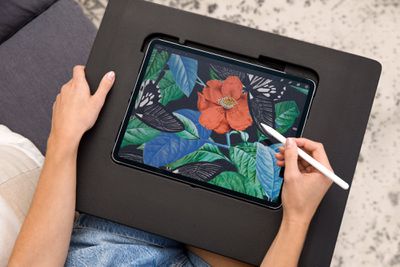
Astropad, known for Astropad Studio software and the Luna Display dongle, today announced the launch of its latest project, called Darkboard. The Darkboard is a lightweight drawing surface designed to be used with the iPad, providing a more ergonomic way to sketch and draw wherever you are.


Weighing in at 1.4 pounds, the Darkboard is made from a rigid foam material that cushions the arm and wrist while still providing comfort and support. Astropad says that the Darkboard is ideal for using on the couch, in bed, and in other situations where you don't have the best ergonomic setup.

There is a polycarbonate frame to hold the ‌iPad‌ in place at any angle, so it can be propped up in a way that's most comfortable to each user. Astropad also added 1mm of space between the ‌iPad‌'s screen and the edge of the foam body to ensure the ‌iPad‌ stays safe should the Darkboard be dropped.

There's a cutout for the camera, charging port access, and a pocket for the Apple Pencil. The Darkboard measures in at 18 inches long, 14 inches wide, and an inch thick, and it is designed to have a textured surface that improves grip, plus there are grooved handles.
darkboard
Darkboard comes in two sizes, one that fits the third-generation 12.9-inch iPad Pro or newer and one that fits the 11-inch ‌iPad Pro‌ and iPad Air models. It will also support future iPads released between now and when it ships out.

Astropad is launching Darkboard on Kickstarter, and early bird backers can pick it up for $79, which is 20 percent off of the retail price. Orders will be delivered in March 2023.


Popular Stories

iOS 26

iOS 26.4 and iOS 27 Features Revealed in New Leak

Friday December 12, 2025 10:56 am PST by
Macworld's Filipe Espósito today revealed a handful of features that Apple is allegedly planning for iOS 26.4, iOS 27, and even iOS 28. The report said the features are referenced within the code for a leaked internal build of iOS 26 that is not meant to be seen by the public. However, it appears that Espósito and/or his sources managed to gain access to it, providing us with a sneak peek...
iOS 26

iOS 26.2 Coming Soon With These 8 New Features on Your iPhone

Thursday December 11, 2025 8:49 am PST by
Apple seeded the second iOS 26.2 Release Candidate to developers earlier this week, meaning the update will be released to the general public very soon. Apple confirmed iOS 26.2 would be released in December, but it did not provide a specific date. We expect the update to be released by early next week. iOS 26.2 includes a handful of new features and changes on the iPhone, such as a new...
iOS 26

Apple Releases iOS 26.2 With Alarms for Reminders, Lock Screen Changes, Enhanced Safety Alerts and More

Friday December 12, 2025 10:10 am PST by
Apple today released iOS 26.2, the second major update to the iOS 26 operating system that came out in September, iOS 26.2 comes a little over a month after iOS 26.1 launched. ‌iOS 26‌.2 is compatible with the ‌iPhone‌ 11 series and later, as well as the second-generation ‌iPhone‌ SE. The new software can be downloaded on eligible iPhones over-the-air by going to Settings >...
AirPods Pro Firmware Feature

Apple Releases New Firmware for AirPods Pro 2 and AirPods Pro 3

Thursday December 11, 2025 11:28 am PST by
Apple today released new firmware designed for the AirPods Pro 3 and the prior-generation AirPods Pro 2. The AirPods Pro 3 firmware is 8B30, up from 8B25, while the AirPods Pro 2 firmware is 8B28, up from 8B21. There's no word on what's include in the updated firmware, but the AirPods Pro 2 and AirPods Pro 3 are getting expanded support for Live Translation in the European Union in iOS...
macOS Tahoe 26 Thumb

Apple Releases macOS Tahoe 26.2 With Edge Light

Friday December 12, 2025 10:08 am PST by
Apple today released macOS Tahoe 26.2, the second major update to the macOS Tahoe operating system that came out in September. macOS Tahoe 26.2 comes five weeks after Apple released macOS Tahoe 26.1. Mac users can download the macOS Tahoe update by using the Software Update section of System Settings. macOS Tahoe 26.2 includes Edge Light, a feature that illuminates your face with soft...
AirTag 2 Mock Feature

Apple AirTag 2: Four New Features Found in iOS 26 Code

Thursday December 11, 2025 10:31 am PST by
The AirTag 2 will include a handful of new features that will improve tracking capabilities, according to a new report from Macworld. The site says that it was able to access an internal build of iOS 26, which includes references to multiple unreleased products. Here's what's supposedly coming: An improved pairing process, though no details were provided. AirTag pairing is already...
Apple Foldable Thumb

Leak Reveals Foldable iPhone Details

Monday December 15, 2025 9:09 am PST by
The first foldable iPhone will feature a series of design and hardware firsts for Apple, according to details shared by the Weibo leaker known as Digital Chat Station. According to a new post, via machine translation, Apple is developing what the leaker describes as a "wide foldable" device, a term used to refer to a horizontally oriented, book-style foldable with a large internal display....
ipados 26 1 slide over

Apple Releases iPadOS 26.2 With Multitasking Improvements

Friday December 12, 2025 10:09 am PST by
Apple today released iPadOS 26.2, the second major update to the iPadOS 26 operating system released in September. iPadOS 26.2 comes a month after iPadOS 26.1. The new software can be downloaded on eligible iPads over-the-air by going to Settings > General > Software Update. iPadOS 26.2 continues with the multitasking improvements that were added with iPadOS 26.1. You can now drag and...

Top Rated Comments

mw360 Avatar
42 months ago
I recently met an artist working on a graphic novel and he had the Sketchboard Pro ('https://sketchboardpro.com'). I was surprised how enthusiastic he was about it. He really, really loved it but I didn't get the point of it. Ever since then I've been hyper aware of having no surface to rest/stabilise on while drawing. I think I want one now.
Score: 5 Votes (Like | Disagree)
ignatius345 Avatar
42 months ago
It does look useful but I'm surprised they didn't put some more work into the aesthetics. Looks like a prototype or something.
Score: 5 Votes (Like | Disagree)
csfossett Avatar
42 months ago
I have a Sketchboard Pro and love it. A hand/arm-resting surface is (I think) essential for drawing on the iPad for long periods of time. Darkboard looks like it solves the same issue . . . except for one major difference. The Sketchboard Pro is two pieces: a hard exterior surface with an inner flexible silicone "cradle." The iPad fits snugly into the cradle, and when Apple inevitably changes the next-gen hardware measurements, the SBP folks will make an updated cradle and you don't have to buy the whole deal a second time.

I hope it doesn't sound like I'm crabbing about this new board. Not at all! Whatever works for you is all that matters when it comes to art. Just figured it was worth pointing out the key difference, since it's what convinced me to try the SBP. Next time Apple change up the iPad's physical specs, I'll definitely get a new cradle.
Score: 3 Votes (Like | Disagree)
macduke Avatar
42 months ago
Huh, this is kinda cool. I think I might make one out of wood in my workshop. A bit smaller, maybe with flip down legs, and the charging port could feed through the back instead. Maybe embed some neodymium magnets to hold it in place. Will need to get some magnetic paper to layout the placement. Or maybe a steel plate would be sufficient? Could maybe make magnetic inserts for my kid’s smaller iPads. I think I found my next project idea!
Score: 3 Votes (Like | Disagree)
Macalicious2011 Avatar
42 months ago

I recently met an artist working on a graphic novel and he had the Sketchboard Pro ('https://sketchboardpro.com'). I was surprised how enthusiastic he was about it. He really, really loved it but I didn't get the point of it. Ever since then I've been hyper aware of having no surface to rest/stabilise on while drawing. I think I want one now.
If you want to draw/paint with your elbow, not wrist, then a support like this one is essential.
Score: 2 Votes (Like | Disagree)
svish Avatar
42 months ago
$100 seems a bit costly for it.
Score: 1 Votes (Like | Disagree)