

Four iOS Safari Extensions to Make the Web Less Annoying - MacRumorsOpen MenuShow RoundupsShow Forums menuVisit ForumsOpen Sidebar
Skip to Content

Four iOS Safari Extensions to Make the Web Less Annoying

Constant pop-ups, annoying forms, and frustrating website behaviors can make browsing and using the web an unpleasant experience. Thankfully on iOS, iPadOS, and macOS, several Safari extensions help turn the experience around.
General iOS 15 Safari Feature
We've listed some Safari extensions that you may not have known about that can help remove annoyances and make a pleasant Safari experience.

No More Cookies
super agent ios safari extension
Perhaps the most universally dreaded web pop-up is: "This website uses cookies. Accept or Reject?" Virtually every website shows users a form to consent to using cookies as they browse that website. While it may be helpful for some to have granular controller over the use of cookies on each website they visit, there is likely to be a better solution for many.

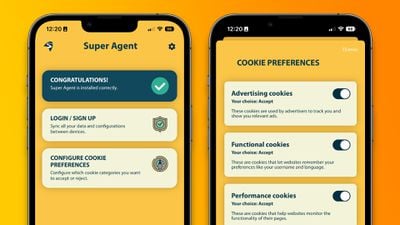
Super Agent for Safari is an extension that automatically fills out the cookies consent form on each website you visit, meaning you'll no longer see those annoying pop-ups. The Super Agent for Safari app lets you customize how you would like websites to use cookies.

Users can choose whether they want to accept or reject advertising, functional, performance, and other cookies. The settings are applied universally to all websites.

Super Agent for Safari is free with no in-app subscription and can be found in the App Store.

'Open in App?' No Thanks.
banish safari app pop ups
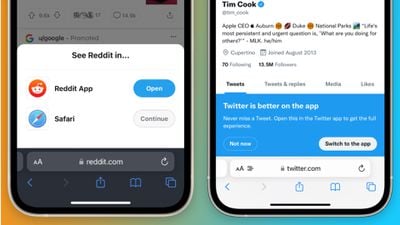
Some websites with accompanying apps on the App Store love to bombard users with pop-ups and banners to push them to use their app rather than the website.

Banish, a relatively new Safari extension on the ‌App Store‌ gets rid of such website notifications. Banish is a one-time purchase of $2 with no in-app subscription and can be found in the App Store.

StopTheMadness, Literally
stopthemadness ios safari extension
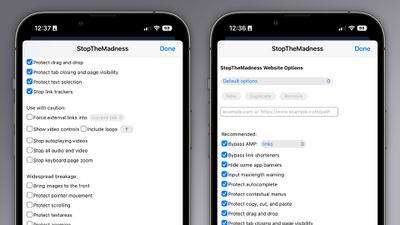
StopTheMadness, as the name suggests, is a general-purpose privacy protection extension with several nifty features. Within the extension's settings page, StopTheMadness includes several toggles that users can enable and disable, including:

  • Bypassing Google's AMP webpages
  • Protects the ability to copy, cut, and paste on websites
  • Gets rid of link trackers and clickjacking in Google search results, and others
  • Stop autoplaying videos
  • Stop all audio and video on websites

StopTheMadness is a one-time purchase of $7.99 with no in-app subscription and can be found in the App Store.

Dark Mode For All
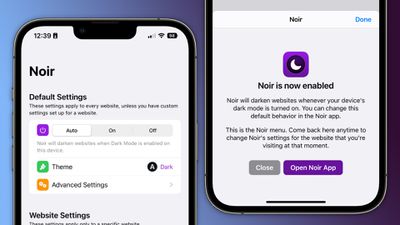
noir ios safari extension
Spearheaded by the introduction of systemwide dark mode in iOS 13, many websites on the web now have the option of light and dark themes. For those websites that don’t have a dark mode option, however, there is a solution.

Noir is a Safari extension that automatically turns a website into dark mode, even if it doesn’t support it. Noir only kicks in if the website doesn’t have a native dark mode theme built-in. This can be especially helpful when your phone is in dark mode, but a website isn’t and you’re suddenly blinded by a bright white webpage.

Noir is a $2.99 purchase with no in-app subscription and can be found in the App Store.

Tag: Safari

Popular Stories

imac video apple feature

Apple Released Yet Another New Product Today

Friday March 20, 2026 2:39 pm PDT by
Apple has unveiled a whopping nine new products so far this March, including an iPhone 17e, iPad Air models with the M4 chip, MacBook Air models with the M5 chip, MacBook Pro models with M5 Pro and M5 Max chips, the all-new MacBook Neo, an updated Studio Display, a higher-end Studio Display XDR, AirPods Max 2, and now the Nike Powerbeats Pro 2. iPhone 17e features the same overall design as...
iPhone 18 Pro Deep Red Feature

iPhone 18 Pro Launching Later This Year With These 12 New Features

Wednesday March 18, 2026 7:39 am PDT by
While the iPhone 18 Pro and iPhone 18 Pro Max are not expected to launch for another six months or so, there are already plenty of rumors about the devices. It was initially reported that the iPhone 18 Pro models would have fully under-screen Face ID, with only a front camera visible in the top-left corner of the screen. However, the latest rumors indicate that only one Face ID component...
ios 26 4 pastel

iOS 26.4: Top 10 New Features Coming to Your iPhone

Friday March 20, 2026 2:44 pm PDT by
iOS 26.4 isn't the major update with new Siri features that we hoped for, but there are some useful quality of life improvements, and a little bit of fun with an AI playlist generator and new emoji characters. Playlist Playground - Apple Music has a Playlist Playground option that lets you generate playlists from text-based descriptions. You can include moods, feelings, activities, or...

Top Rated Comments

ct2k7 Avatar
47 months ago
If you use YouTube on Safari, use the Vinegar.app to make the video element a <video> one. Kills adds, and adds useful options. (Also works on Mac)/
Score: 17 Votes (Like | Disagree)
maktaba Avatar
47 months ago
My biggest concern with Safari extensions is that these can collect your browser data. Content blockers are fine - no data is sent back to the app. But with extensions, everything is sent.
Score: 14 Votes (Like | Disagree)
DMG35 Avatar
47 months ago
Awesome stuff; thank you for this!
Score: 12 Votes (Like | Disagree)
krspkbl Avatar
47 months ago
Only extension i use is Wipr which is an adblocker. Also gets rid of trackers and the cookie/GDPR notices. i'm quite happy with it.

it blocks 89% of trackers on this page:

https://d3ward.github.io/toolz/adblock.html

for comparison, default safari is 12%, Duckduck Go browser is ~40% and Block Bear is ~64%

it is a paid app but worth it, imo. by far the best adblocker i've used on iOS.
Score: 6 Votes (Like | Disagree)
47 months ago
On this article i got this:

"MacRumors Forums would like your permission to enable push notifications."

When i clicked it away, i got this:
"We strongly recommend enabling push notifications on this device so that you can be kept up-to-date with site activity."


I wonder if any of these extensions would prevent this annoyance 😂
Score: 6 Votes (Like | Disagree)
47 months ago

Me too. Hit the “Learn More” link and it gets confusing. It’s as if the developer and 3rd party apps it goes through may collect data.

So just downloading it means you’re safe. But be careful if you start using it, you might not be. 😂

I’m sure someone will come along that knows more.


Every extension that can read or modify a page has the same templated warning put out there by Apple. It’s a notice that the extensions are being given access to view your pages and modify them, which is what many extensions do need to perform their function.

It’s important to trust the app that you’re giving the access to. Many will note no data is sent and in some cases that’s probably verifiable by monitoring network traffic if they truly send no data to their servers. Some apps that do have network components might be harder to monitor but.

I think it’s worth being weary with extensions, but at the same time be mindful that the Apple warning is very nuclear in its wording and that apps that don’t send data off your device at all will still have that notice.
Score: 6 Votes (Like | Disagree)
Related Apple News: Ipad | Technology | Iphone | Buyers Guide | Lifestyle















