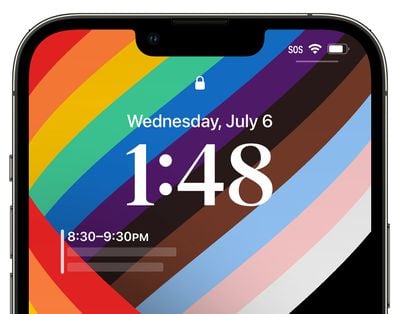
Everything New in iOS 16 Beta 3: AFib History, Clownfish Wallpaper, Lockdown Mode, Lock Screen Updates and More

Apple today seeded the third betas of iOS 16 and iPadOS 16 to developers for testing purposes, and as expected, the betas refine some of the features that Apple has added in iOS 16, and there are also some new additions. Everything new in the third beta of iOS 16 is outlined below.
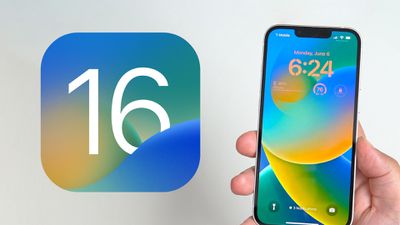
ios 16 lock screen feature

AFib History

Apple in iOS 16 and watchOS 9 is adding an AFib History feature for those who have atrial fibrillation, with the aim of tracking how long a person is in atrial fibrillation and how often. In iOS 16 beta 3, the AFib History section has been added to the Health app, and the AFib feature is activated in watchOS 9 beta 3. For now, AFib History is limited to those in the United States.
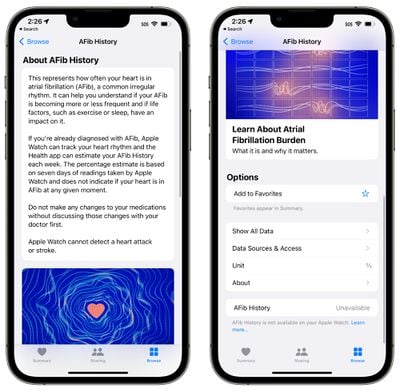
afib history ios 16

iCloud Shared Photo Library

The third beta of iOS 16 introduces support for iCloud Shared Photo Library, which is designed to make it easier for you to share photos with friends and family members. You can invite up to five people to share a photo library with you, and all participants can add, delete, and edit images.
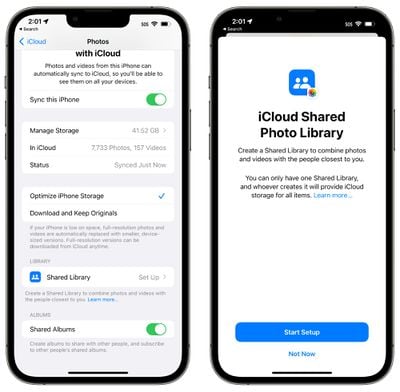
shared photo library splash screen

Lockdown Mode

Added as an extreme security measure, Lockdown Mode is available in iOS 16, iPadOS 16, and macOS Ventura. It is an optional security feature that is aimed at protecting a small number of high-profile users who are at risk of targeted cyberattacks from state-sponsored spyware.
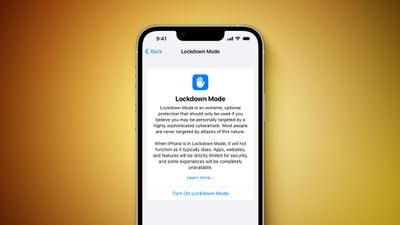
Lockdown Mode Feature
Lockdown Mode is aimed at journalists, activists, government employees, and others who might be targeted by sophisticated cyberattacks. It is not for the everyday user, and it restricts many iPhone features. In Messages, for example, attachments other than images are blocked, and in FaceTime, calls from people you have not previously contacted are blocked.

Complex web technologies and browsing features are blocked in web browsers, shared albums are removed from the Photos app, wired connections are blocked, and configuration profiles cannot be installed. More on Lockdown Mode can be found in our article outlining the feature.

Lock Screen Time Font

There are now 12 fonts to choose from for the time on the customizable iOS 16 Lock Screen, including one option that is thinner than prior fonts, and another that is a thicker version of the previously available serif font.
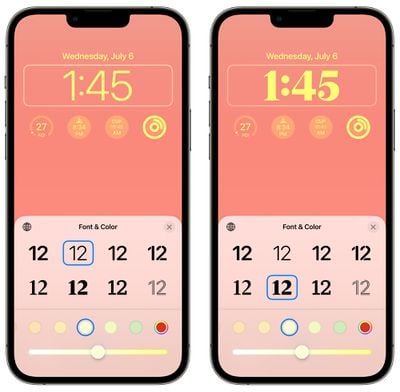
ios 16 beta 3 new fonts

Calendar Lock Screen Widget

For privacy purposes, the Calendar Lock Screen widget no longer provides details on the next upcoming event while the ‌iPhone‌ is locked. It blurs out the information until the ‌iPhone‌ is unlocked by its owner.

ios 16 calendar app hidden lock screen

Reminders

Theres a new "Include Due Today" option in the Settings section of the Reminders app. It is designed to include both overdue and due today items in the badge count, rather than just due today items.
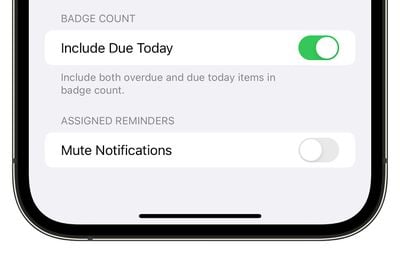
ios 16 reminders include due today

Earth Lock Screen Wallpaper

With the Earth Lock Screen wallpaper, widgets will no longer block the view of the earth. The earth image moves down when widgets are used, and up if there are no widgets placed. In prior versions of the beta, widgets overlapped.
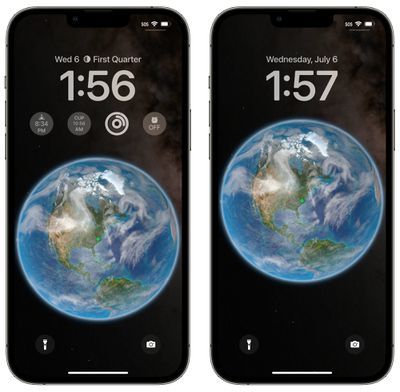
globe wallpaper widget change ios 16

iOS Version Interface Update

In the Settings app under About > iOS Version, if you tap on the version number, the interface has been updated. It's simpler and is no longer a pop-up card, plus it no longer links to Apple's security website.
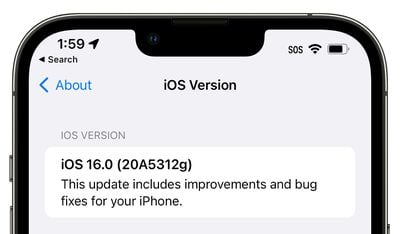
ios 16 version update interface

Clownfish Wallpaper

Some iOS 16 users who installed the third beta are seeing a Clownfish wallpaper option. This wallpaper was on the original ‌iPhone‌ when it was introduced by Steve Jobs in 2007, but it has never officially launched. It is not showing up for everyone, but it could be added as a wallpaper option in a future beta.


Stage Manager

On the iPad, there is a new splash screen for the Stage Manager feature. There are also new tutorials for walking you through how to use it, along with an updated multitasking menu with improved labeling.
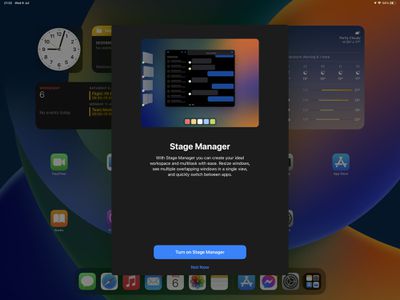
stage manager splash screen

iCloud Splash Screen

When choosing an iCloud+ subscription option, there's a new splash screen that explains the features.

Virtual Card Support

iOS 16 adds support for virtual cards for shopping using Safari. Some banks and card providers allow customers to generate virtual card numbers (similar to how Apple Card works) to use online to avoid having their credit card details stolen. Safari in iOS 16 will support this feature based on code in the beta.

Other New Features

Know of a new feature in iOS 16 beta 3 that we left out? Let us know in the comments below.

Related Forum: iOS 16

Popular Stories

iOS 26

iOS 26.4 and iOS 27 Features Revealed in New Leak

Friday December 12, 2025 10:56 am PST by
Macworld's Filipe Espósito today revealed a handful of features that Apple is allegedly planning for iOS 26.4, iOS 27, and even iOS 28. The report said the features are referenced within the code for a leaked internal build of iOS 26 that is not meant to be seen by the public. However, it appears that Espósito and/or his sources managed to gain access to it, providing us with a sneak peek...
apple beta 26 lineup

Apple Leak Confirms Work on Foldable iPhone, AirTag 2, and Dozens More Devices

Monday December 15, 2025 2:05 pm PST by
Last week, details about unreleased Apple devices and future iOS features were shared by Macworld. This week, we learned where the information came from, plus we have more findings from the leak. As it turns out, an Apple prototype device running an early build of iOS 26 was sold, and the person who bought it shared the software. The OS has a version number of 23A5234w, and the first...
Apple Foldable Thumb

Leak Reveals Foldable iPhone Details

Monday December 15, 2025 9:09 am PST by
The first foldable iPhone will feature a series of design and hardware firsts for Apple, according to details shared by the Weibo leaker known as Digital Chat Station. According to a new post, via machine translation, Apple is developing what the leaker describes as a "wide foldable" device, a term used to refer to a horizontally oriented, book-style foldable with a large internal display....
Apple Logo Top Half

Early iOS 26 Software Leak Uncovers Dozens of Upcoming Apple Features

Monday December 15, 2025 3:05 pm PST by
Software from an iPhone prototype running an early build of iOS 26 leaked last week, giving us a glimpse at future Apple devices and iOS features. We recapped device codenames in our prior article, and now we have a list of some of the most notable feature flags that were found in the software code. In some cases, it's obvious what the feature flags are referring to, while some are more...
iOS 26

Apple Releases iOS 26.2 With Alarms for Reminders, Lock Screen Changes, Enhanced Safety Alerts and More

Friday December 12, 2025 10:10 am PST by
Apple today released iOS 26.2, the second major update to the iOS 26 operating system that came out in September, iOS 26.2 comes a little over a month after iOS 26.1 launched. ‌iOS 26‌.2 is compatible with the ‌iPhone‌ 11 series and later, as well as the second-generation ‌iPhone‌ SE. The new software can be downloaded on eligible iPhones over-the-air by going to Settings >...
iOS 26

iOS 26.2 Coming Soon With These 8 New Features on Your iPhone

Thursday December 11, 2025 8:49 am PST by
Apple seeded the second iOS 26.2 Release Candidate to developers earlier this week, meaning the update will be released to the general public very soon. Apple confirmed iOS 26.2 would be released in December, but it did not provide a specific date. We expect the update to be released by early next week. iOS 26.2 includes a handful of new features and changes on the iPhone, such as a new...
macOS Tahoe 26 Thumb

Apple Releases macOS Tahoe 26.2 With Edge Light

Friday December 12, 2025 10:08 am PST by
Apple today released macOS Tahoe 26.2, the second major update to the macOS Tahoe operating system that came out in September. macOS Tahoe 26.2 comes five weeks after Apple released macOS Tahoe 26.1. Mac users can download the macOS Tahoe update by using the Software Update section of System Settings. macOS Tahoe 26.2 includes Edge Light, a feature that illuminates your face with soft...
AirPods Pro Firmware Feature

Apple Releases New Firmware for AirPods Pro 2 and AirPods Pro 3

Thursday December 11, 2025 11:28 am PST by
Apple today released new firmware designed for the AirPods Pro 3 and the prior-generation AirPods Pro 2. The AirPods Pro 3 firmware is 8B30, up from 8B25, while the AirPods Pro 2 firmware is 8B28, up from 8B21. There's no word on what's include in the updated firmware, but the AirPods Pro 2 and AirPods Pro 3 are getting expanded support for Live Translation in the European Union in iOS...

Top Rated Comments

FreakyT Avatar
45 months ago
Hoping the hide calendar details can be disabled -- the calendar widget seems like it would be pretty useless if you need to unlock the phone to see it.
Score: 9 Votes (Like | Disagree)
Fraserh02 Avatar
45 months ago
Imagine if there’s a bug where the stagemanager splash screen shows up on all iPads ?
Score: 8 Votes (Like | Disagree)
SW3029 Avatar
45 months ago

Hoping the hide calendar details can be disabled -- the calendar widget seems like it would be pretty useless if you need to unlock the phone to see it.
The widget will show the details when the owner of the phone looks at the screen due to Face ID recognizing them. This is how sensitive notifications already work in iOS 15 (their details are hidden until owner looks at iPhone).
Score: 8 Votes (Like | Disagree)
now i see it Avatar
45 months ago

Same and I'm also not seeing the clown fish wallpaper...


Attachment Image
Score: 8 Votes (Like | Disagree)
hxlover904 Avatar
45 months ago
This is shaping up to be a really nice iOS update. The first two betas have been relatively stable with no show stoppers so far. Some of the little features are nice quality of life improvements.
Score: 7 Votes (Like | Disagree)
GregJohn Avatar
45 months ago
Nice to see them expand the lock screen (still wish it was on iPad) but I do hope they remove the green dot on the earth (it’s the one I’ve been using)

not a feature but I’ve been using Apple Music for the last half an hour or so and hasn’t crashed for once fingers are crossed it’s actually fixed.
Score: 6 Votes (Like | Disagree)