iOS 16 Lets Third-Party Apps Using Apple's Video Player Offer a Playback Speed Menu - MacRumorsOpen MenuShow RoundupsShow Forums menuVisit ForumsOpen Sidebar
Skip to Content

iOS 16 Lets Third-Party Apps Using Apple's Video Player Offer a Playback Speed Menu

Starting with iOS 16, iPadOS 16, macOS Ventura, and tvOS 16, apps using Apple's video player are able to offer a native playback speed menu. The feature is optional for developers, however, so the functionality may not be available in some apps.
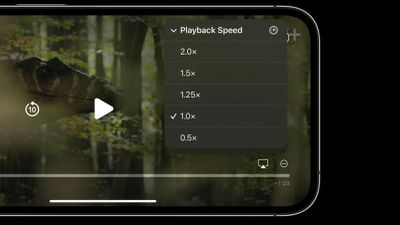
ios 16 playback speed menu
Apple's default playback speed options are 0.5×, 1.0×, 1.25×, 1.5×, and 2.0×, but developers are able to modify the list of speeds.

In supported iPhone and iPad apps, the playback speed menu can be reached by tapping the icon with three dots surrounded by a circle. In supported Mac apps, the menu can be found by clicking on "»" and selecting Playback Speed. In supported Apple TV apps, there is a new timer icon for playback speed to the left of the subtitles icon.
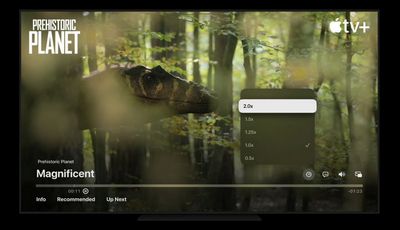
tvos 16 playback speed menu
For developers, Apple says all apps using the new iOS, iPadOS, macOS, and tvOS SDKs will get this playback speed functionality automatically with no additional changes required. Developers wishing to disable the menu entirely can make use of new APIs added to AVPlayer, with more details available in this WWDC 2022 session video.

Some apps using a custom video player on iOS like YouTube already offer playback speed control, as do some Apple apps like the Developer app.


Related Forum: iOS 16

Popular Stories

Apple Event Logo

Apple Just Released a New Accessory

Monday May 4, 2026 8:13 am PDT by
Apple today released a new Pride Edition Sport Loop for the Apple Watch. The band features a rainbow design with 11 colors of woven nylon yarns. The new Pride Edition Sport Loop is available to order now on Apple.com and in the Apple Store app in 40mm, 42mm, and 46mm sizes, and it will be available at Apple Store locations starting later this week. In the U.S., the band costs $49. There...
iOS 27 on iPhone 17 1

iOS 27 Will Add These New Features to Your iPhone

Saturday May 2, 2026 8:43 am PDT by
Apple is expected to unveil iOS 27 during its WWDC 2026 keynote on June 8, and there are already many rumored features and changes for iPhones. The first developer beta of iOS 27 will likely be available immediately following the keynote, and a public beta typically follows in July. Following beta testing, the software update should be released to all users with a compatible iPhone in...
Apple Announces 2026 Pride Band Watch Face and iPhone Wallpaper Article 2

iOS 26.5 Coming Soon With These New Features

Monday May 4, 2026 8:40 am PDT by
iOS 26.5 is expected to be released next week, following more than a month of beta testing. The update is relatively minor, but there are a couple of new features and changes across the operating system that we have recapped below. iOS 26.5 lays the groundwork for end-to-end encryption for RCS in the Messages app and ads in the Apple Maps app, and it will include a new Pride wallpaper and a...

Top Rated Comments

JosephAW Avatar
51 months ago
It would be nice to offer a rotation button even if your device is on locked rotation. :rolleyes:
Score: 11 Votes (Like | Disagree)
51 months ago
Awesome I watch just about everything at 1.25x.
Score: 8 Votes (Like | Disagree)
51 months ago

It would be nice to offer a rotation button even if your device is on locked rotation. :rolleyes:
This! And let’s also add double tap the left or right side of the screen to jump 15s back or ahead.
Score: 6 Votes (Like | Disagree)
TheDailyApple Avatar
51 months ago
I always speed-up any videos that aren’t for entertainment purposes. People just speak too slowly. :D Which is why I typically prefer articles and written text.
Score: 4 Votes (Like | Disagree)
51 months ago
Nice. I hope Netflix gets it on tvOS.
Score: 3 Votes (Like | Disagree)
51 months ago
Interesting addition. Hope to see many apps supporting this later this year.
Score: 2 Votes (Like | Disagree)
Related Apple News: Travel | Motoring | Entertainment | Ipad | Reviews