Handoff Lets You Swap FaceTime Calls Between Devices in iOS 16, iPadOS 16 and macOS Ventura

In iOS 16, iPadOS 16, and macOS Ventura, the FaceTime app finally supports Handoff, which means ‌FaceTime‌ calls can be swapped from one device to another.
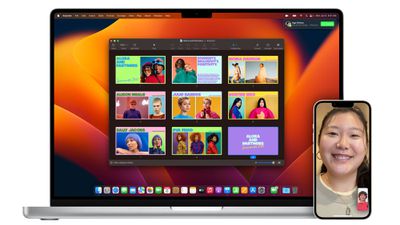
facetime handoff
If you get a ‌FaceTime‌ call on your iPhone while you're out of the house, you can answer it on the go and then swap over to the larger screen of a Mac when you return home. Or you can answer a call on your Mac and transfer over to an ‌iPhone‌ or iPad for a more portable ‌FaceTime‌ experience.

When a ‌FaceTime‌ call is handed off, connected Bluetooth headphones will transition to the new device too, so your call is not interrupted by the transfer.

Apple in ‌FaceTime‌ is also adding support for Live Captions, which let you see automatically transcribed dialogue during ‌FaceTime‌ calls. Live captions are available in English and are limited to the ‌iPhone‌ 11 and later, ‌iPad‌ with A12 Bionic and later, and Macs with Apple silicon.

Along with these new features, Apple is adding a "Collaboration" option that can be activated during a ‌FaceTime‌ call. Collaboration can be started during an active ‌FaceTime‌ call and it can be used with apps that include Files, Keynote, Numbers, Pages, Notes, Reminders, and Safari. Third-party apps will also be able to support Collaboration.

Related Forums: iOS 16, macOS Ventura

Popular Stories

Aston Martin CarPlay Ultra Screen

Apple's CarPlay Ultra to Expand to These Vehicle Brands Later This Year

Sunday February 1, 2026 10:08 am PST by
Last year, Apple launched CarPlay Ultra, the long-awaited next-generation version of its CarPlay software system for vehicles. Nearly nine months later, CarPlay Ultra is still limited to Aston Martin's latest luxury vehicles, but that should change fairly soon. In May 2025, Apple said many other vehicle brands planned to offer CarPlay Ultra, including Hyundai, Kia, and Genesis. In his Powe...
Apple Logo Black

Apple's Next Launch is 'Imminent'

Sunday February 1, 2026 12:31 pm PST by
The calendar has turned to February, and a new report indicates that Apple's next product launch is "imminent," in the form of new MacBook Pro models. "All signs point to an imminent launch of next-generation MacBook Pros that retain the current form factor but deliver faster chips," Bloomberg's Mark Gurman said on Sunday. "I'm told the new models — code-named J714 and J716 — are slated...
Apple MacBook Pro M4 hero

New MacBook Pros Reportedly Launching Alongside macOS 26.3

Sunday February 1, 2026 5:42 am PST by
Apple is planning to launch new MacBook Pro models with M5 Pro and M5 Max chips alongside macOS 26.3, according to Bloomberg's Mark Gurman. "Apple's faster MacBook Pros are planned for the macOS 26.3 release cycle," wrote Gurman, in his Power On newsletter today. "I'm told the new models — code-named J714 and J716 — are slated for the macOS 26.3 software cycle, which runs from...
iOS 26

iOS 26.3 and iOS 26.4 Will Add These New Features to Your iPhone

Tuesday February 3, 2026 7:47 am PST by
We are still waiting for the iOS 26.3 Release Candidate to come out, so the first iOS 26.4 beta is likely still at least a week or two away. Following beta testing, iOS 26.4 will likely be released to the general public in March or April. Below, we have recapped known or rumored iOS 26.3 and iOS 26.4 features so far. iOS 26.3 iPhone to Android Transfer Tool iOS 26.3 makes it easier...
14 inch MacBook Pro Keyboard

Apple Changes How You Order a Mac

Saturday January 31, 2026 10:51 am PST by
Apple recently updated its online store with a new ordering process for Macs, including the MacBook Air, MacBook Pro, iMac, Mac mini, Mac Studio, and Mac Pro. There used to be a handful of standard configurations available for each Mac, but now you must configure a Mac entirely from scratch on a feature-by-feature basis. In other words, ordering a new Mac now works much like ordering an...

Top Rated Comments

seat_hydrant Avatar
48 months ago
Does this work for normal phone calls and FaceTime Audio calls?
Score: 5 Votes (Like | Disagree)
HobeSoundDarryl Avatar
48 months ago

I think the bigger thing if I have this right is that you can use your iPhone camera for a FaceTime call on the Mac for those with a Mac Mini / Studio / Pro who don't have a webcam but want to use their display as their screen.

Am I correct that the phone will be the camera and the connected monitor will be the FaceTime screen interface?
It appeared so. iDevice will be equivalent to a built-in camera, presumably microphone too and you'll see the other person(s) on your Mac screen. This seems like a fantastic feature because it can use a much superior camera than any built-in ones and basically bring easy FaceTime to many monitors without a camera at all.

The big surprise to me is that this wasn't also announced as a tvOS feature. I can't begin to count how many wishes I've read to get FaceTime working with the TV screen. Since the Belkin hook will have to be pretty flexible to work with any screen and TVs are just one big monitor screen, this seems like an obvious feature to work into tvOS too. If so, I'd buy one Belkin hook to just leave on the TV and another for the desktop monitor.

It's wireless, presumably working via airplay or something pretty similar. Why NOT make AppleTV work just like the Mac will work for this?
Score: 4 Votes (Like | Disagree)
steve09090 Avatar
48 months ago
Continuity Camera for the AppleTV is what I want to see. It’s about time we could do FaceTime on the big screen. At the moment I (Grudgingly) use Facebook Portal TV to connect to loved ones who live a long way away and it works great. But I’d much rather do it using FaceTime.
Score: 3 Votes (Like | Disagree)
_Spinn_ Avatar
48 months ago
This sounds like it will be very useful.
Score: 3 Votes (Like | Disagree)
kobberrød Avatar
48 months ago
Need this for WhatsApp and Google Meet!
Score: 1 Votes (Like | Disagree)
roland.g Avatar
48 months ago
I think the bigger thing if I have this right is that you can use your iPhone camera for a FaceTime call on the Mac for those with a Mac Mini / Studio / Pro who don't have a webcam but want to use their display as their screen.

Am I correct that the phone will be the camera and the connected monitor will be the FaceTime screen interface?
Score: 1 Votes (Like | Disagree)