iOS 16 Introduces Safety Check to Help Users in Abusive Relationships
As part of iOS 16, Apple is introducing Safety Check, a new feature meant to help individuals in an abusive relationship quickly and safely end sharing their passwords, location, and more with their partner.
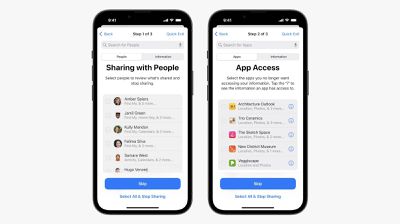
As Apple describes Safety Check:
A new privacy tool called Safety Check can be helpful to users whose personal safety is at risk from domestic or intimate partner violence by quickly removing all access they've granted to others. It includes an emergency reset that helps users easily sign out of iCloud on all their other devices, reset privacy permissions, and limit messaging to just the device in their hand. It also helps users understand and manage which people and apps they've given access to.
Safety Check will be available to users as part of all of Apple's new software updates later this fall. Apple today announced iOS 16, iPadOS 16, macOS Ventura, and watchOS 9.
Popular Stories
In late March, Apple notified the winners of the 2026 Swift Student Challenge, who each received a complimentary one-year Apple Developer Program membership, AirPods Max 2, and a special certificate. A smaller group of Distinguished Winners were also invited to a three-day experience at Apple Park during WWDC 2026 in June.
The annual Swift Student Challenge gives eligible student developers...
Apple's WWDC 2026 graphic provides "a glimpse of the revamped Siri interface coming in iOS 27," according to Bloomberg's Mark Gurman.
In his Power On newsletter today, Gurman said iOS 27 will include a new Siri interface in the Dynamic Island. When you trigger Siri, he said the Dynamic Island will show a "Search or Ask" prompt, and this will apparently be accompanied by a "glowing cursor"...
Apple today highlighted four Distinguished Winners of this year's Swift Student Challenge, ahead of the WWDC 2026 developers conference next month.
The annual Swift Student Challenge gives eligible student developers around the world the opportunity to showcase their coding capabilities by using the Swift Playground or Xcode apps to create an interactive "app playground."
Apple said this...